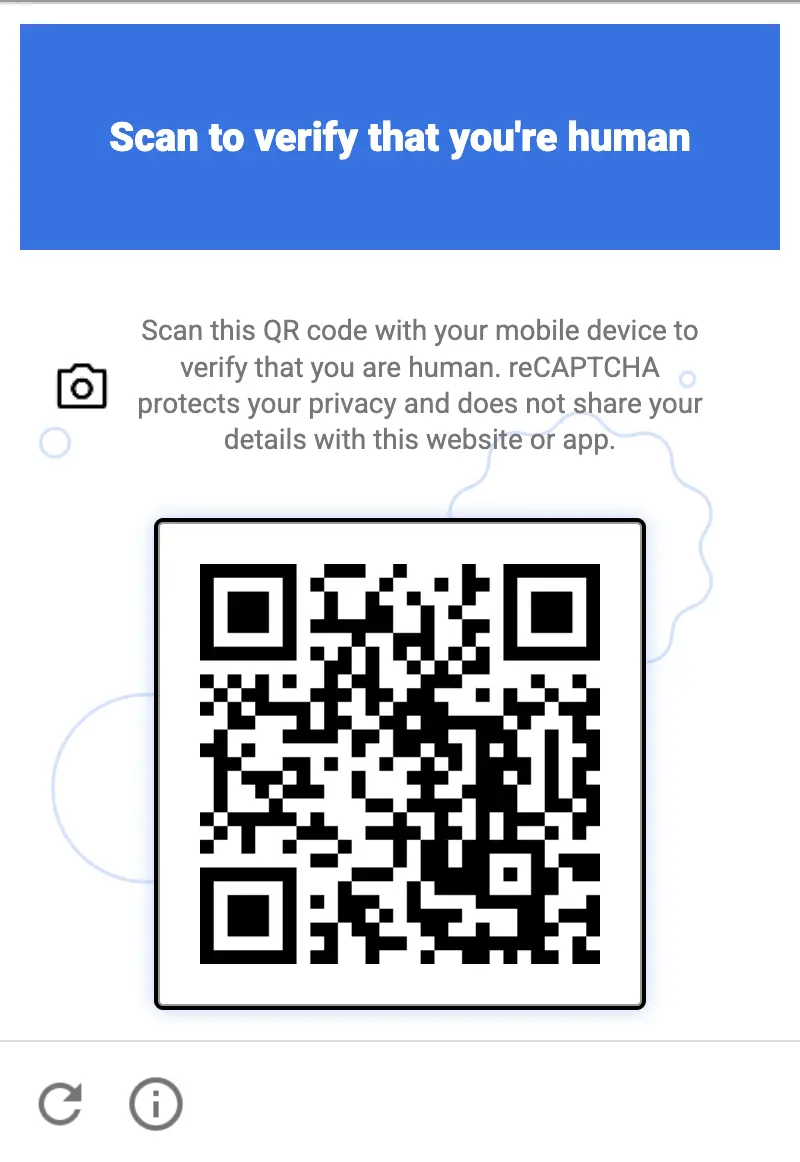
Yeni Recaptcha QR kod doğrulaması Anti-Captcha tarafından yerel olarak destekleniyor
Anti-Captcha ekibi, yeni QR kodlu Recaptcha doğrulaması hizmetimiz tarafından yerel olarak desteklendiğini doğruladı. Entegrasyonunuzda herhangi bir değişiklik yapmanıza gerek yok: Anti-Captcha'daki her captcha gerçek kişiler tarafından çözüldüğü için, çalışanlarımız bu yeni meydan okumayı tıpkı sıradan bir web sitesi ziyaretçisinin yapacağı gibi ele alır.
Recaptcha QR kod meydan okuması nedir
Google yeni doğrulamayı 2026 yazında tanıttı. Şu anda tüm Recaptcha müşterilerine yaygınlaştırılmadan önce sınırlı sayıda web sitesinde kapalı modda test ediliyor. Görselleri seçmek veya bir onay kutusunu işaretlemek yerine kullanıcıya bir QR kodu gösteriliyor ve doğrulamayı mobil telefonu üzerinden tamamlaması isteniyor. QR kod doğrulaması tek bir Recaptcha sürümüne bağlı değildir: hem Recaptcha V2 hem de Recaptcha V3 kullanan web sitelerinde görünür.
Bunun ardındaki fikir basittir: bir botun masaüstü tarayıcısını taklit etmesi nispeten ucuzdur, ancak kameralı, gerçek bir işletim sistemine ve resmi uygulama mağazalarına erişimi olan gerçek fiziksel bir akıllı telefonu taklit etmesi çok daha zordur.
Teknik özellikler
Mobil odaklı. Meydan okuma, görüntülendiği tarayıcının içinde tamamlanamaz. Doğrulama ayrı bir cihaza — kullanıcının akıllı telefonuna — taşınır ve tarayıcı yalnızca onayı bekler.
Telefon kamerasıyla taranır. QR kod, telefonun normal kamera uygulamasıyla taranır. Üçüncü taraf bir QR tarayıcısına gerek yoktur: kamera kodu tanır ve doğrulamayı açmayı önerir.
Google Play ve App Store'daki mini uygulamalar tarafından çözülür. Kodun taranması, Google Play (Google Play Services 25.41.30 ile Android) veya App Store (iOS 15/16+) üzerinden dağıtılan hafif bir mini uygulamayı başlatır. Mini uygulama tam bir kurulum olmadan anında açılır ve doğrulamayı cihazda gerçekleştirir.
Cihaza bağlı doğrulama. Sonuç gerçek fiziksel bir cihaza bağlıdır, bu da meydan okumanın başsız tarayıcılar, emülatörler veya yapay zeka tabanlı çözücülerle otomatikleştirilmesini çok zorlaştırır.
Anti-Captcha çalışanları bunu nasıl ele alıyor
Anti-Captcha çalışanları arasında bir iç test yaptık: yaklaşık %50'si yeni meydan okumayı hemen çözebildi herhangi ek talimat veya hazırlık olmadan kendi telefonlarını kullanarak. Geri kalanların çoğunun işletim sistemini güncellemesi veya desteklenen bir cihaza geçmesi gerekiyor ki bu gerçek bir engelden çok zaman meselesidir.
İnsan gücüne dayalı bir hizmetin otomatik çözücülere göre avantajı tam da burada devreye giriyor. Sıradan bir akıllı telefona sahip bir kişi meydan okumayı saniyeler içinde tamamlar, oysa bir botun aynısını yapabilmesi için gerçek cihazlardan oluşan bir çiftlik işletmesi gerekir.
Müşterilerimiz için ne anlama geliyor
Recaptcha V2 veya V3 görevlerini şu anda yaptığınız şekilde göndermeye devam edersiniz. Bir web sitesi QR kod doğrulamasını gösterdiğinde, bu doğrulama çalışanlarımız tarafından telefonlarında çözülür ve görev sonucunda normal bir g-recaptcha-response token'ı alırsınız.
Bir web sitesinin hangi Recaptcha sürümünü kullandığı nasıl öğrenilir
Captcha'nın bulunduğu sayfayı Chrome'da açın, geliştirici konsolunu açın (F12, ardından Console sekmesi), aşağıdaki betiği yapıştırın ve Enter'a basın. Betiği captcha sayfada göründükten sonra, örneğin formun gönder düğmesine tıkladıktan sonra çalıştırın.
(() => {
  const out = { scripts: [], iframes: [], clients: [], verdict: [] };

  // 1. Loaded Recaptcha scripts
  document.querySelectorAll('script[src*="recaptcha"]').forEach(s => {
    const u = new URL(s.src, location.href);
    out.scripts.push({
      src: u.pathname,
      enterprise: u.pathname.includes('enterprise'),
      render: u.searchParams.get('render'),
    });
  });

  // 2. Anchor-iframe
  document.querySelectorAll('iframe[src*="/anchor"]').forEach(f => {
    const u = new URL(f.src);
    out.iframes.push({
      enterprise: u.pathname.includes('/enterprise/'),
      sitekey: u.searchParams.get('k'),
      size: u.searchParams.get('size'),
      action: u.searchParams.get('sa'),
      s: u.searchParams.has('s'),
    });
  });

  // 3. Internal config: look for objects with a sitekey
  const seen = new WeakSet();
  const walk = (o, depth = 0) => {
    if (!o || typeof o !== 'object' || seen.has(o) || depth > 6) return;
    seen.add(o);
    if (typeof o.sitekey === 'string') {
      out.clients.push({
        sitekey: o.sitekey,
        size: o.size,
        action: o.action,
        callback: typeof o.callback === 'function' ? o.callback.name || 'fn'
                 : o.callback || null,
        badge: o.badge,
      });
    }
    for (const k in o) { try { walk(o[k], depth + 1); } catch {} }
  };
  try { walk(window.___grecaptcha_cfg?.clients); } catch {}

  // 4. Verdict
  const renderKey = out.scripts.find(s => s.render && s.render !== 'explicit' && s.render !== 'onload');
  const ent = out.scripts.some(s => s.enterprise) || !!window.grecaptcha?.enterprise;
  if (renderKey) out.verdict.push(`v3/score (render=${renderKey.render})`);
  out.iframes.forEach(i => {
    if (i.size === 'normal' || i.size === 'compact') out.verdict.push(`v2 checkbox (${i.sitekey})`);
    else if (i.size === 'invisible' && (!renderKey || renderKey.render !== i.sitekey))
      out.verdict.push(`v2 invisible (${i.sitekey})`);
  });
  if (ent) out.verdict.push('Enterprise');

  console.table(out.scripts);
  console.table(out.iframes);
  console.table(out.clients);
  console.log('VERDICT:', out.verdict.length ? out.verdict.join(' | ') : 'not found (the captcha may not be loaded yet)');
  return out;
})();
Betik, Recaptcha betiklerini, widget'larını ve ayarlarını (sitekey, size, action) tablolar halinde yazdırır, ardından bir VERDICT satırı gelir:
Enterprise — web sitesi Recaptcha Enterprise kullanıyor (enterprise.js betiği).
Aşağıdaki kod örneklerinde çıktıdaki sitekey'i web sitesi anahtarı olarak, varsa action değerini de sayfa eylemi olarak kullanın.
Kod örnekleri
Web sitesinde bulunan Recaptcha sürümünü seçin:
Python
Node.js
Go
PHP
Java
Kotlin
C#
C++
Rust
Ruby
bash
Python dilinde Recaptcha QR nasıl çözülür
#pip3 install anticaptchaofficial

from anticaptchaofficial.recaptchav2enterpriseproxyless import *

solver = recaptchaV2EnterpriseProxyless()
solver.set_verbose(1)
solver.set_key("YOUR_API_KEY_HERE")
solver.set_website_url("https://website.com")
solver.set_website_key("YOUR_API_KEY_HERE")
# set to "true" if there's "size":"invisible" option in "grecaptcha.enterprise.render" function
solver.set_is_invisible(True)
# Set page action value:
solver.set_enterprise_payload({"action": "form_submit"})

g_response = solver.solve_and_return_solution()
if g_response != 0:
    print("g-response: "+g_response)
    # user-agent in case you need it:
    print("user-agent: "+solver.get_user_agent())
else:
    print("task finished with error "+solver.error_code)
Node.js dilinde Recaptcha QR nasıl çözülür
//npm install @antiadmin/anticaptchaofficial
//https://github.com/anti-captcha/anticaptcha-npm

const ac = require("@antiadmin/anticaptchaofficial");

ac.setAPIKey('YOUR_API_KEY_HERE');

ac.solveRecaptchaV2EnterpriseProxyless(
    'http://DOMAIN.COM',
    'WEBSITE_KEY',
    {
        "action": "form_submit" // set page action value here
    },
    true)  // set to "true" if there's "size":"invisible" option in "grecaptcha.enterprise.render" function
    .then(gresponse => {
        console.log('g-response: '+gresponse);
    })
    .catch(error => console.log('test received error '+error));

// in case you need it
console.log("worker's user-agent:");
console.log(ac.getUserAgent());
Go dilinde Recaptcha QR nasıl çözülür
// Install with:
// go get github.com/anti-captcha/anticaptcha-go
package main

import (
    "fmt"
    "github.com/anti-captcha/anticaptcha-go"
    "log"
)

func main() {
    // Create API client and set the API Key
    ac := anticaptcha.NewClient("API_KEY_HERE")

    // set to 'false' to turn off debug output
    ac.IsVerbose = true

    // Make sure the API key funds balance is positive
    balance, err := ac.GetBalance()
    if err != nil {
        log.Fatal(err)
        // Exit program to make sure you don't DDoS API with requests, while having empty balance
        return
    }
    fmt.Println("Balance:", balance)

    // Solve Recaptcha V2 Enterprise without proxy
    solution, err := ac.SolveRecaptchaV2Enterprise(anticaptcha.RecaptchaV2{
        WebsiteURL:  "https://huev.com/",
        WebsiteKey:  "6Lcyu8UZAAAAACwSh6Xf58WrNXTu0LLu4F85xf20",
        IsInvisible: true, // set to "true" if there's "size":"invisible" option in "grecaptcha.enterprise.render" function
        EnterprisePayload:  map[string]interface{}{
            "action": "form_submit", // set page action here
        },
    })
    if err != nil {
        log.Fatal(err)
    }
    fmt.Println("Recaptcha Enterprise g-response token:", solution)
}
PHP dilinde Recaptcha QR nasıl çözülür
//git clone https://github.com/anti-captcha/anticaptcha-php.git

include("anticaptcha.php");
include("recaptchaV2Enterpriseproxyless.php");

$api = new Recaptchav2enterpriseProxyless();
$api->setVerboseMode(true);

//your anti-captcha.com account key
$api->setKey("YOUR_API_KEY_HERE");

//target website address
$api->setWebsiteURL("http://enteprisedomain.com/recaptcha/test.php");

//recaptcha key from target website
$api->setWebsiteKey("ENTERPRISE_SITEKEY_HERE");

//set page action here
$api->setEnterprisePayload(["action" => "form_submit"]);

//set to "true" if there's "size":"invisible" option in "grecaptcha.enterprise.render" function
$api->setIsInvisible();

//create task in API
if (!$api->createTask()) {
    $api->debout("API v2 send failed - ".$api->getErrorMessage(), "red");
    return false;
}

$taskId = $api->getTaskId();

//wait in a loop for max 300 seconds till task is solved
if (!$api->waitForResult(300)) {
    echo "could not solve captcha\n";
    echo $api->getErrorMessage()."\n";
} else {

    $gResponse    =   $api->getTaskSolution();
    echo "\your recaptcha token: $gResponse\n\n";
    echo "worker's user-agent in case you need it:\n";
    echo $api->getWorkersUserAgent()."\n";

}
Java dilinde Recaptcha QR nasıl çözülür
// GitHub: https://github.com/anti-captcha/anticaptcha-java
//
// Maven, add to pom.xml:
//   <dependency>
//     <groupId>com.anti-captcha</groupId>
//     <artifactId>anticaptcha</artifactId>
//     <version>1.0.0</version>
//   </dependency>
//
// Gradle, add to build.gradle:
//   implementation "com.anti-captcha:anticaptcha:1.0.0"

import com.anti_captcha.Api.RecaptchaV2EnterpriseProxyless;
import com.anti_captcha.Helper.DebugHelper;
import org.json.JSONObject;

public class Main {

    public static void main(String[] args) throws InterruptedException {
        // Set to false to turn the debug output off
        DebugHelper.setVerboseMode(true);

        RecaptchaV2EnterpriseProxyless api = new RecaptchaV2EnterpriseProxyless();
        api.setClientKey("YOUR_API_KEY_HERE");

        api.setWebsiteUrl("http://makeawebsitehub.com/recaptcha/test.php");
        api.setWebsiteKey("6LfI9IsUAAAAAKuvopU0hfY8pWADfR_mogXokIIZ");

        // Set page action here:
        api.setEnterprisePayload(new JSONObject()
                .put("action", "form_submit"));

        // set to "true" if there's "size":"invisible" option in "grecaptcha.enterprise.render" function
        api.setIsInvisible(true);

        // Make sure the API key funds balance is positive
        Double balance = api.getBalance();
        if (balance == null || balance <= 0) {
            // Stop here to make sure you don't DDoS the API while having empty balance
            DebugHelper.out("Balance error: " + api.getErrorMessage(), DebugHelper.Type.ERROR);
            return;
        }
        DebugHelper.out("Balance: " + balance, DebugHelper.Type.SUCCESS);

        if (!api.createTask()) {
            DebugHelper.out("API v2 send failed. " + api.getErrorMessage(), DebugHelper.Type.ERROR);
        } else if (!api.waitForResult()) {
            DebugHelper.out("Could not solve the captcha.", DebugHelper.Type.ERROR);
        } else {
            DebugHelper.out("Recaptcha g-response token: " + api.getTaskSolution().getGRecaptchaResponse(), DebugHelper.Type.SUCCESS);
            DebugHelper.out("Worker's user-agent in case you need it: " + api.getTaskSolution().getUserAgent(), DebugHelper.Type.SUCCESS);
        }
    }
}
Kotlin dilinde Recaptcha QR nasıl çözülür
// GitHub: https://github.com/anti-captcha/anticaptcha-kotlin
//
// Gradle, add to build.gradle.kts:
//   implementation("com.anti-captcha:anticaptcha-kotlin:1.0.0")

import com.anticaptcha.AnticaptchaClient
import com.anticaptcha.AnticaptchaException
import com.anticaptcha.ApiException
import com.anticaptcha.RecaptchaV2
import kotlinx.coroutines.runBlocking

fun main(): Unit = runBlocking {
    // Create the API client and set the API key
    val ac = AnticaptchaClient(
        apiKey = "YOUR_API_KEY_HERE",
        // Specify softId to earn 10% commission with your app.
        // Get your softId here: https://anti-captcha.com/clients/tools/devcenter
        softId = 0,
        // Set to false to turn the debug output off
        verbose = true,
    )

    try {
        // Make sure the API key funds balance is positive
        val balance = ac.getBalance()
        if (balance <= 0) {
            // Stop here to make sure you don't DDoS the API while having empty balance
            System.err.println("Empty balance")
            return@runBlocking
        }
        println("Balance: $balance")

        val solution = ac.solveRecaptchaV2(
            RecaptchaV2(
                websiteUrl = "http://makeawebsitehub.com/recaptcha/test.php",
                websiteKey = "6LfI9IsUAAAAAKuvopU0hfY8pWADfR_mogXokIIZ",
                isEnterprise = true,
                // set to "true" if there's "size":"invisible" option in "grecaptcha.enterprise.render" function
                isInvisible = true,
                // Set page action here
                enterprisePayload = mapOf(
                    "action" to "form_submit",
                ),
            ),
        )

        println("Recaptcha g-response token: ${solution.gRecaptchaResponse}")
        println("Worker's user-agent in case you need it: ${solution.userAgent}")
    } catch (error: ApiException) {
        // https://anti-captcha.com/apidoc/errors
        System.err.println("API error: ${error.errorCode} ${error.description}")
    } catch (error: AnticaptchaException) {
        System.err.println("Failed: ${error.message}")
    }
}
C# dilinde Recaptcha QR nasıl çözülür
// GitHub: https://github.com/anti-captcha/anticaptcha-csharp.git
// install:  dotnet add package AntiCaptchaOfficial
// or, in the Package Manager Console:
// Install-Package AntiCaptchaOfficial

using System;
using AntiCaptcha.Api;
using AntiCaptcha.Helper;


class Program
{
    static void Main()
    {
        // Set to 'false' to turn off debug output
        DebugHelper.VerboseMode = true;

        var api = new RecaptchaV2EnterpriseProxyless
        {
            ClientKey = "YOUR_API_KEY_HERE",
            WebsiteUrl = new Uri("http://makeawebsitehub.com/recaptcha/test.php"),
            WebsiteKey = "6LfI9IsUAAAAAKuvopU0hfY8pWADfR_mogXokIIZ",
            IsInvisible = true  // set to "true" if there's "size":"invisible" option in "grecaptcha.enterprise.render" function
        };

        // set page action here
        api.EnterprisePayload.Add("action", "form_submit");

        // Make sure the API key funds balance is positive
        var balance = api.GetBalance();
        if (balance == null || balance <= 0)
        {
            // Exit the program to make sure you don't DDoS the API with requests while having empty balance
            Console.WriteLine("Balance error: " + api.ErrorMessage);
            return;
        }
        Console.WriteLine("Balance: " + balance);

        var solution = api.Solve();
        Console.WriteLine("Recaptcha g-response token: " + solution?.GRecaptchaResponse);
        Console.WriteLine("Worker's user-agent in case you need it: " + solution?.UserAgent);
    }
}
C++ dilinde Recaptcha QR nasıl çözülür
// GitHub: https://github.com/anti-captcha/anticaptcha-cplus.git
// Add it to your CMake project:
//   include(FetchContent)
//   FetchContent_Declare(anticaptcha
//           GIT_REPOSITORY https://github.com/anti-captcha/anticaptcha-cplus.git
//           GIT_TAG v1.1.0)
//   FetchContent_MakeAvailable(anticaptcha)
//   target_link_libraries(your_app PRIVATE anticaptcha::anticaptcha)

#include <iostream>
#include <anticaptcha/anticaptcha.hpp>

int main() {
    // Create the API client and set the API key
    anticaptcha::Client ac("YOUR_API_KEY_HERE");

    // Debug output is on by default, turn it off with:
    // ac.shut_up();

    // Specify softId to earn 10% commission with your app.
    // Get your softId here: https://anti-captcha.com/clients/tools/devcenter
    ac.set_soft_id(0);

    try {
        // Make sure the API key funds balance is positive
        const double balance = ac.get_balance();
        if (balance <= 0) {
            // Stop here to make sure you don't DDoS the API while having empty balance
            std::cerr << "Empty balance" << std::endl;
            return 1;
        }
        std::cout << "Balance: " << balance << std::endl;

        anticaptcha::RecaptchaV2 params;
        params.website_url = "http://makeawebsitehub.com/recaptcha/test.php";
        params.website_key = "6LfI9IsUAAAAAKuvopU0hfY8pWADfR_mogXokIIZ";
        params.is_enterprise = true;
        // set to "true" if there's "size":"invisible" option in "grecaptcha.enterprise.render" function
        params.is_invisible = true;
        // Set page action here
        params.enterprise_payload = { {"action", "form_submit"} };
        // params.api_domain = "recaptcha.net"; // only for a non-google.com script domain

        const anticaptcha::Solution solution = ac.solve_recaptcha_v2(params);
        std::cout << "Recaptcha g-response token: " << solution.g_recaptcha_response() << std::endl;
        std::cout << "Worker's user-agent in case you need it: " << solution.user_agent() << std::endl;
    } catch (const anticaptcha::ApiError& error) {
        // https://anti-captcha.com/apidoc/errors
        std::cerr << "API error: " << error.error_code() << " " << error.description() << std::endl;
        return 1;
    } catch (const anticaptcha::Error& error) {
        std::cerr << "Failed: " << error.what() << std::endl;
        return 1;
    }

    return 0;
}
Rust dilinde Recaptcha QR nasıl çözülür
// GitHub: https://github.com/anti-captcha/anticaptcha-rust
// Install with:
//   cargo add anticaptchaofficial
// or add it to Cargo.toml:
//   [dependencies]
//   anticaptchaofficial = "1"

use std::collections::BTreeMap;
use anticaptcha::{Client, RecaptchaV2};

#[tokio::main]
async fn main() -> anticaptcha::Result<()> {
    // Create the API client and set the API key
    let ac = Client::new("YOUR_API_KEY_HERE")
        // Specify softId to earn 10% commission with your app.
        // Get your softId here: https://anti-captcha.com/clients/tools/devcenter
        .with_soft_id(0);
    // .quiet() turns the debug output off

    // Make sure the API key funds balance is positive
    let balance = ac.get_balance().await?;
    if balance <= 0.0 {
        // Stop here to make sure you don't DDoS the API while having empty balance
        eprintln!("Empty balance");
        return Ok(());
    }
    println!("Balance: {balance}");

    // set page action here
    let mut enterprise_payload = BTreeMap::new();
    enterprise_payload.insert("action".to_owned(), "form_submit".to_owned());

    let solution = ac
        .solve_recaptcha_v2(&RecaptchaV2 {
            website_url: "http://makeawebsitehub.com/recaptcha/test.php".into(),
            website_key: "6LfI9IsUAAAAAKuvopU0hfY8pWADfR_mogXokIIZ".into(),
            is_enterprise: true,
            is_invisible: true, // set to "true" if there's "size":"invisible" option in "grecaptcha.enterprise.render" function
            // Additional parameters passed to the grecaptcha.enterprise.render call
            enterprise_payload,
            // api_domain: "recaptcha.net".into(), // only for a non-google.com script domain
            ..Default::default()
        })
        .await?;

    println!("Recaptcha g-response token: {}", solution.g_recaptcha_response());
    println!("Worker's user-agent in case you need it: {}", solution.user_agent());

    Ok(())
}
Ruby dilinde Recaptcha QR nasıl çözülür
# GitHub: https://github.com/anti-captcha/anticaptcha-ruby
# Install with:
#   gem install anticaptchaofficial
# or add it to your Gemfile:
#   gem "anticaptchaofficial"

require "anticaptcha"

# Create the API client and set the API key
ac = Anticaptcha.new("YOUR_API_KEY_HERE")

# Specify softId to earn 10% commission with your app.
# Get your softId here: https://anti-captcha.com/clients/tools/devcenter
ac.soft_id = 0

# Set to false to turn the debug output off
ac.verbose = true

begin
  # Make sure the API key funds balance is positive
  balance = ac.balance
  # Stop here to make sure you don't DDoS the API while having empty balance
  abort "Empty balance" if balance <= 0
  puts "Balance: #{balance}"

  solution = ac.solve_recaptcha_v2(
    website_url: "http://makeawebsitehub.com/recaptcha/test.php",
    website_key: "6LfI9IsUAAAAAKuvopU0hfY8pWADfR_mogXokIIZ",
    is_enterprise: true,
    # set to "true" if there's "size":"invisible" option in "grecaptcha.enterprise.render" function
    # is_invisible: true,
    # Set page action here
    enterprise_payload: { "action" => "form_submit" }
    # api_domain: "recaptcha.net", # only for a non-google.com script domain
  )

  puts "Recaptcha g-response token: #{solution.g_recaptcha_response}"
  puts "Worker's user-agent in case you need it: #{solution.user_agent}"
rescue Anticaptcha::ApiError => e
  # https://anti-captcha.com/apidoc/errors
  warn "API error: #{e.error_code} #{e.description}"
rescue Anticaptcha::Error => e
  warn "Failed: #{e.message}"
end
#pip3 install anticaptchaofficial

from anticaptchaofficial.recaptchav3enterpriseproxyless import *

solver = recaptchaV3EnterpriseProxyless()
solver.set_verbose(1)
solver.set_key("YOUR_API_KEY_HERE")
solver.set_website_url("https://website.com")
solver.set_website_key("SITE_KEY")
solver.set_page_action("home_page")
solver.set_min_score(0.9)

# Specify softId to earn 10% commission with your app.
# Get your softId here: https://anti-captcha.com/clients/tools/devcenter
solver.set_soft_id(0)

g_response = solver.solve_and_return_solution()
if g_response != 0:
    print("g-response: "+g_response)
    # user-agent in case you need it:
    print("user-agent: "+solver.get_user_agent())
else:
    print("task finished with error "+solver.error_code)
Node.js dilinde Recaptcha QR nasıl çözülür
//npm install @antiadmin/anticaptchaofficial
//https://github.com/anti-captcha/anticaptcha-npm

const ac = require("@antiadmin/anticaptchaofficial");

ac.setAPIKey('YOUR_API_KEY_HERE');

//Specify softId to earn 10% commission with your app.
//Get your softId here: https://anti-captcha.com/clients/tools/devcenter
ac.setSoftId(0);

ac.solveRecaptchaV3Enterprise('http://DOMAIN.COM',
    'WEBSITE_KEY',
    0.3, //minimum score required: 0.3, 0.7 or 0.9
    'PAGE_ACTION_CAN_BE_EMPTY')
    .then(gresponse => {
        console.log('g-response: '+gresponse);
    })
    .catch(error => console.log('test received error '+error));

// in case you need it
console.log("worker's user-agent:");
console.log(ac.getUserAgent());
Go dilinde Recaptcha QR nasıl çözülür
// Install with:
// go get github.com/anti-captcha/anticaptcha-go
package main

import (
    "fmt"
    "github.com/anti-captcha/anticaptcha-go"
    "log"
)

func main() {
    // Create API client and set the API Key
    ac := anticaptcha.NewClient("API_KEY_HERE")

    // set to 'false' to turn off debug output
    ac.IsVerbose = true

    // Specify softId to earn 10% commission with your app.
    // Get your softId here: https://anti-captcha.com/clients/tools/devcenter
    //ac.SoftId = 1187

    // Make sure the API key funds balance is positive
    balance, err := ac.GetBalance()
    if err != nil {
        log.Fatal(err)
        // Exit program to make sure you don't DDoS API with requests, while having empty balance
        return
    }
    fmt.Println("Balance:", balance)

    // Solve Recaptcha V3 Enterprise
    solution, err := ac.SolveRecaptchaV3(anticaptcha.RecaptchaV3{
        WebsiteURL: "https://onlyfans.com/",
        WebsiteKey: "6LcvNcwdAAAAAMWAuNRXH74u3QePsEzTm6GEjx0J",
        PageAction: "somefun",
        MinScore:   0.9,
        IsEnterprise: true, // Set to 'true' if you are solving a Recaptcha V3 Enterprise
    })
    if err != nil {
        log.Fatal(err)
    }
    fmt.Println("Recaptcha g-response token:", solution)
    // In case you need the worker's user-agent
    fmt.Println("User-Agent:", ac.WorkersUserAgent)
}
PHP dilinde Recaptcha QR nasıl çözülür
//git clone https://github.com/anti-captcha/anticaptcha-php.git

include("anticaptcha.php");
include("recaptchav3enterprise.php");

$api = new RecaptchaV3Enterprise();
$api->setVerboseMode(true);

//your anti-captcha.com account key
$api->setKey("YOUR_API_KEY_HERE");

//target website address
$api->setWebsiteURL("http://makeawebsitehub.com/recaptcha/test.php");

//recaptcha key from target website
$api->setWebsiteKey("6LfI9IsUAAAAAKuvopU0hfY8pWADfR_mogXokIIZ");

//parameters for V3
//score you would like to have
$api->setMinScore(0.9);
//optional page action
$api->setPageAction("some_action");

//Specify softId to earn 10% commission with your app.
//Get your softId here: https://anti-captcha.com/clients/tools/devcenter
$api->setSoftId(0);

//create task in API
if (!$api->createTask()) {
    $api->debout("API v2 send failed - ".$api->getErrorMessage(), "red");
    return false;
}

$taskId = $api->getTaskId();

//wait in a loop for max 300 seconds till task is solved
if (!$api->waitForResult(300)) {
    echo "could not solve captcha\n";
    echo $api->getErrorMessage()."\n";
} else {

    $gResponse    =   $api->getTaskSolution();
    echo "your recaptcha token: $gResponse\n\n";
    echo "worker's user-agent in case you need it:\n";
    echo $api->getWorkersUserAgent()."\n";

}
Java dilinde Recaptcha QR nasıl çözülür
// GitHub: https://github.com/anti-captcha/anticaptcha-java
//
// Maven, add to pom.xml:
//   <dependency>
//     <groupId>com.anti-captcha</groupId>
//     <artifactId>anticaptcha</artifactId>
//     <version>1.0.0</version>
//   </dependency>
//
// Gradle, add to build.gradle:
//   implementation "com.anti-captcha:anticaptcha:1.0.0"

import com.anti_captcha.Api.RecaptchaV3EnterpriseProxyless;
import com.anti_captcha.Helper.DebugHelper;

public class Main {

    public static void main(String[] args) throws InterruptedException {
        // Set to false to turn the debug output off
        DebugHelper.setVerboseMode(true);

        RecaptchaV3EnterpriseProxyless api = new RecaptchaV3EnterpriseProxyless();
        api.setClientKey("YOUR_API_KEY_HERE");

        // Specify softId to earn 10% commission with your app.
        // Get your softId here: https://anti-captcha.com/clients/tools/devcenter
        api.setSoftId(0);

        api.setWebsiteUrl("http://makeawebsitehub.com/recaptcha/test.php");
        api.setWebsiteKey("6LfI9IsUAAAAAKuvopU0hfY8pWADfR_mogXokIIZ");
        api.setPageAction("login_or_register");

        // Score you need, one of 0.3, 0.7 or 0.9
        api.setMinScore(0.3);

        // Make sure the API key funds balance is positive
        Double balance = api.getBalance();
        if (balance == null || balance <= 0) {
            // Stop here to make sure you don't DDoS the API while having empty balance
            DebugHelper.out("Balance error: " + api.getErrorMessage(), DebugHelper.Type.ERROR);
            return;
        }
        DebugHelper.out("Balance: " + balance, DebugHelper.Type.SUCCESS);

        if (!api.createTask()) {
            DebugHelper.out("API v2 send failed. " + api.getErrorMessage(), DebugHelper.Type.ERROR);
        } else if (!api.waitForResult()) {
            DebugHelper.out("Could not solve the captcha.", DebugHelper.Type.ERROR);
        } else {
            DebugHelper.out("Recaptcha g-response token: " + api.getTaskSolution().getGRecaptchaResponse(), DebugHelper.Type.SUCCESS);
            DebugHelper.out("Worker's user-agent in case you need it: " + api.getTaskSolution().getUserAgent(), DebugHelper.Type.SUCCESS);
        }
    }
}
Kotlin dilinde Recaptcha QR nasıl çözülür
// GitHub: https://github.com/anti-captcha/anticaptcha-kotlin
//
// Gradle, add to build.gradle.kts:
//   implementation("com.anti-captcha:anticaptcha-kotlin:1.0.0")

import com.anticaptcha.AnticaptchaClient
import com.anticaptcha.AnticaptchaException
import com.anticaptcha.ApiException
import com.anticaptcha.RecaptchaV3
import kotlinx.coroutines.runBlocking

fun main(): Unit = runBlocking {
    // Create the API client and set the API key
    val ac = AnticaptchaClient(
        apiKey = "YOUR_API_KEY_HERE",
        // Specify softId to earn 10% commission with your app.
        // Get your softId here: https://anti-captcha.com/clients/tools/devcenter
        softId = 0,
        // Set to false to turn the debug output off
        verbose = true,
    )

    try {
        // Make sure the API key funds balance is positive
        val balance = ac.getBalance()
        if (balance <= 0) {
            // Stop here to make sure you don't DDoS the API while having empty balance
            System.err.println("Empty balance")
            return@runBlocking
        }
        println("Balance: $balance")

        val solution = ac.solveRecaptchaV3(
            RecaptchaV3(
                websiteUrl = "http://makeawebsitehub.com/recaptcha/test.php",
                websiteKey = "6LfI9IsUAAAAAKuvopU0hfY8pWADfR_mogXokIIZ",
                pageAction = "login_or_register",
                isEnterprise = true,

                // Score you need, one of 0.3, 0.7 or 0.9
                minScore = 0.3,
            ),
        )

        println("Recaptcha g-response token: ${solution.gRecaptchaResponse}")
        println("Worker's user-agent in case you need it: ${solution.userAgent}")
    } catch (error: ApiException) {
        // https://anti-captcha.com/apidoc/errors
        System.err.println("API error: ${error.errorCode} ${error.description}")
    } catch (error: AnticaptchaException) {
        System.err.println("Failed: ${error.message}")
    }
}
C# dilinde Recaptcha QR nasıl çözülür
// GitHub: https://github.com/anti-captcha/anticaptcha-csharp.git
// install:  dotnet add package AntiCaptchaOfficial
// or, in the Package Manager Console:
// Install-Package AntiCaptchaOfficial

using System;
using AntiCaptcha.Api;
using AntiCaptcha.Helper;


class Program
{
    static void Main()
    {
        // Set to 'false' to turn off debug output
        DebugHelper.VerboseMode = true;

        var api = new RecaptchaV3Proxyless
        {
            ClientKey = "YOUR_API_KEY_HERE",
            WebsiteUrl = new Uri("http://makeawebsitehub.com/recaptcha/test.php"),
            WebsiteKey = "6LfI9IsUAAAAAKuvopU0hfY8pWADfR_mogXokIIZ",
            PageAction = "login_or_register",
            IsEnterprise = true,
            // Score you need, one of 0.3, 0.7 or 0.9
            MinScore = 0.3,
            // Specify softId to earn 10% commission with your app.
            // Get your softId here:
            // https://anti-captcha.com/clients/tools/devcenter
            SoftId = 0
        };

        // Make sure the API key funds balance is positive
        var balance = api.GetBalance();
        if (balance == null || balance <= 0)
        {
            // Exit the program to make sure you don't DDoS the API with requests while having empty balance
            Console.WriteLine("Balance error: " + api.ErrorMessage);
            return;
        }
        Console.WriteLine("Balance: " + balance);

        var solution = api.Solve();
        Console.WriteLine("Recaptcha g-response token: " + solution?.GRecaptchaResponse);
        Console.WriteLine("Worker's user-agent in case you need it: " + solution?.UserAgent);
    }
}
C++ dilinde Recaptcha QR nasıl çözülür
// GitHub: https://github.com/anti-captcha/anticaptcha-cplus.git
// Add it to your CMake project:
//   include(FetchContent)
//   FetchContent_Declare(anticaptcha
//           GIT_REPOSITORY https://github.com/anti-captcha/anticaptcha-cplus.git
//           GIT_TAG v1.0.0)
//   FetchContent_MakeAvailable(anticaptcha)
//   target_link_libraries(your_app PRIVATE anticaptcha::anticaptcha)

#include <iostream>
#include <anticaptcha/anticaptcha.hpp>

int main() {
    // Create the API client and set the API key
    anticaptcha::Client ac("YOUR_API_KEY_HERE");

    // Debug output is on by default, turn it off with:
    // ac.shut_up();

    // Specify softId to earn 10% commission with your app.
    // Get your softId here: https://anti-captcha.com/clients/tools/devcenter
    ac.set_soft_id(0);

    try {
        // Make sure the API key funds balance is positive
        const double balance = ac.get_balance();
        if (balance <= 0) {
            // Stop here to make sure you don't DDoS the API while having empty balance
            std::cerr << "Empty balance" << std::endl;
            return 1;
        }
        std::cout << "Balance: " << balance << std::endl;

        anticaptcha::RecaptchaV3 params;
        params.website_url = "http://makeawebsitehub.com/recaptcha/test.php";
        params.website_key = "6LfI9IsUAAAAAKuvopU0hfY8pWADfR_mogXokIIZ";
        params.page_action = "login_or_register";
        params.is_enterprise = true;
        // Score you need, one of 0.3, 0.7 or 0.9
        params.min_score = 0.3;

        const anticaptcha::Solution solution = ac.solve_recaptcha_v3(params);
        std::cout << "Recaptcha g-response token: " << solution.g_recaptcha_response() << std::endl;
        std::cout << "Worker's user-agent in case you need it: " << solution.user_agent() << std::endl;
    } catch (const anticaptcha::ApiError& error) {
        // https://anti-captcha.com/apidoc/errors
        std::cerr << "API error: " << error.error_code() << " " << error.description() << std::endl;
        return 1;
    } catch (const anticaptcha::Error& error) {
        std::cerr << "Failed: " << error.what() << std::endl;
        return 1;
    }

    return 0;
}
Rust dilinde Recaptcha QR nasıl çözülür
// GitHub: https://github.com/anti-captcha/anticaptcha-rust
// Install with:
//   cargo add anticaptchaofficial
// or add it to Cargo.toml:
//   [dependencies]
//   anticaptchaofficial = "1"

use anticaptcha::{Client, RecaptchaV3};

#[tokio::main]
async fn main() -> anticaptcha::Result<()> {
    // Create the API client and set the API key
    let ac = Client::new("YOUR_API_KEY_HERE")
        // Specify softId to earn 10% commission with your app.
        // Get your softId here: https://anti-captcha.com/clients/tools/devcenter
        .with_soft_id(0);
    // .quiet() turns the debug output off

    // Make sure the API key funds balance is positive
    let balance = ac.get_balance().await?;
    if balance <= 0.0 {
        // Stop here to make sure you don't DDoS the API while having empty balance
        eprintln!("Empty balance");
        return Ok(());
    }
    println!("Balance: {balance}");

    let solution = ac
        .solve_recaptcha_v3(&RecaptchaV3 {
            website_url: "http://makeawebsitehub.com/recaptcha/test.php".into(),
            website_key: "6LfI9IsUAAAAAKuvopU0hfY8pWADfR_mogXokIIZ".into(),
            page_action: "login_or_register".into(),
            is_enterprise: true,
            // Score you need, one of 0.3, 0.7 or 0.9
            min_score: 0.3,
            ..Default::default()
        })
        .await?;

    println!("Recaptcha g-response token: {}", solution.g_recaptcha_response());
    println!("Worker's user-agent in case you need it: {}", solution.user_agent());

    Ok(())
}
Ruby dilinde Recaptcha QR nasıl çözülür
# GitHub: https://github.com/anti-captcha/anticaptcha-ruby
# Install with:
#   gem install anticaptchaofficial
# or add it to your Gemfile:
#   gem "anticaptchaofficial"

require "anticaptcha"

# Create the API client and set the API key
ac = Anticaptcha.new("YOUR_API_KEY_HERE")

# Specify softId to earn 10% commission with your app.
# Get your softId here: https://anti-captcha.com/clients/tools/devcenter
ac.soft_id = 0

# Set to false to turn the debug output off
ac.verbose = true

begin
  # Make sure the API key funds balance is positive
  balance = ac.balance
  # Stop here to make sure you don't DDoS the API while having empty balance
  abort "Empty balance" if balance <= 0
  puts "Balance: #{balance}"

  solution = ac.solve_recaptcha_v3(
    website_url: "http://makeawebsitehub.com/recaptcha/test.php",
    website_key: "6LfI9IsUAAAAAKuvopU0hfY8pWADfR_mogXokIIZ",
    page_action: "login_or_register",
    is_enterprise: true,
    # Score you need, one of 0.3, 0.7 or 0.9
    min_score: 0.3
  )

  puts "Recaptcha g-response token: #{solution.g_recaptcha_response}"
  puts "Worker's user-agent in case you need it: #{solution.user_agent}"
rescue Anticaptcha::ApiError => e
  # https://anti-captcha.com/apidoc/errors
  warn "API error: #{e.error_code} #{e.description}"
rescue Anticaptcha::Error => e
  warn "Failed: #{e.message}"
end