Menu

نیا Recaptcha QR کوڈ چیلنج Anti-Captcha کی طرف سے مقامی طور پر معاون ہے

Anti-Captcha ٹیم نے تصدیق کی ہے کہ نیا QR کوڈ کے ساتھ Recaptcha چیلنج ہماری سروس کی جانب سے مقامی طور پر معاون ہے۔ آپ کے انضمام میں کسی تبدیلی کی ضرورت نہیں ہے: چونکہ Anti-Captcha پر ہر کیپچا حقیقی لوگوں کے ذریعے حل کیا جاتا ہے، اس لیے ہمارے کارکن اس نئے چیلنج کو اسی طرح سنبھالتے ہیں جیسے ایک عام ویب سائٹ کا وزیٹر کرتا ہے۔
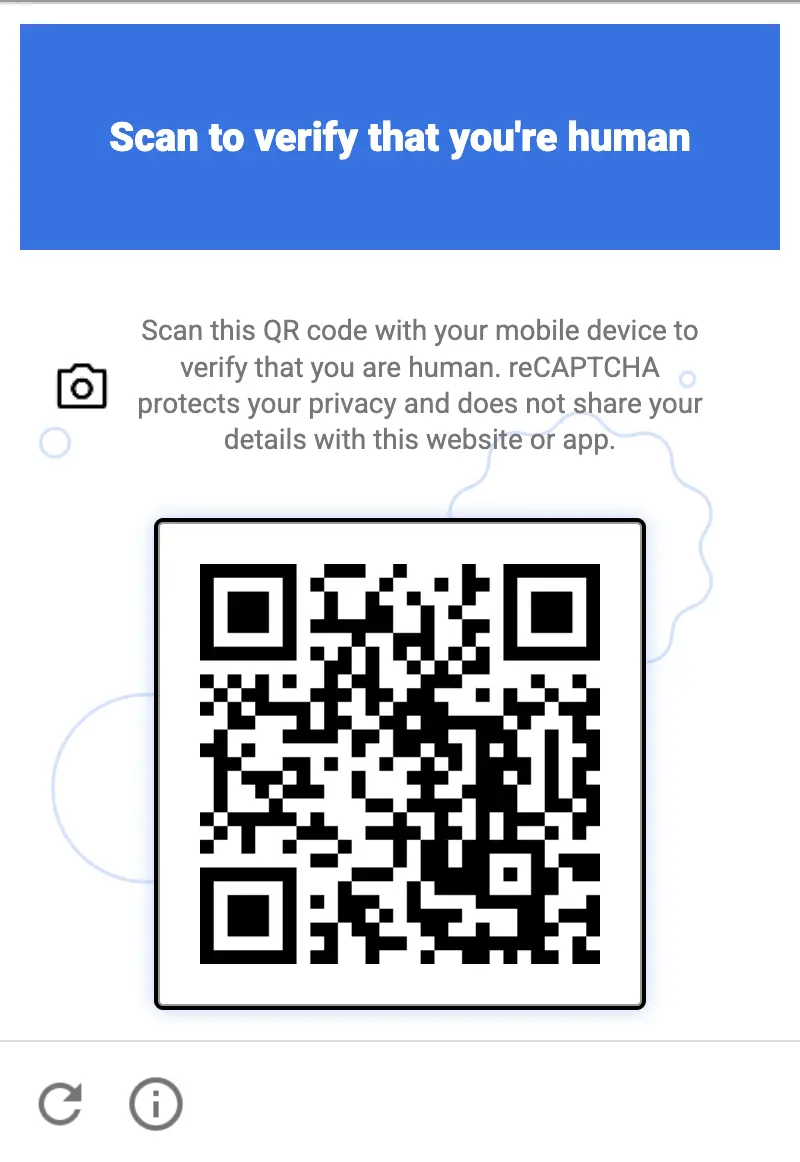
نیا Recaptcha QR کوڈ چیلنج Anti-Captcha کی طرف سے مقامی طور پر معاون ہے

Recaptcha QR کوڈ چیلنج کیا ہے

گوگل نے 2026 کی گرمیوں میں نیا چیلنج پیش کیا۔ اس وقت اسے تمام Recaptcha صارفین تک پہنچانے سے پہلے ویب سائٹس کے ایک محدود سیٹ پر بند موڈ میں آزمایا جا رہا ہے۔ تصاویر منتخب کرنے یا چیک باکس پر نشان لگانے کے بجائے، صارف کو ایک QR کوڈ دکھایا جاتا ہے اور اس سے اپنے موبائل فون پر تصدیق مکمل کرنے کو کہا جاتا ہے۔ QR کوڈ چیلنج کسی ایک Recaptcha ورژن سے منسلک نہیں ہے: یہ Recaptcha V2 اور Recaptcha V3 دونوں استعمال کرنے والی ویب سائٹس پر ظاہر ہوتا ہے۔

اس کے پیچھے کا خیال سادہ ہے: ایک بوٹ کے لیے ڈیسک ٹاپ براؤزر کی نقل کرنا نسبتاً سستا ہے، لیکن کیمرے، حقیقی آپریٹنگ سسٹم اور سرکاری ایپ اسٹورز تک رسائی کے ساتھ ایک حقیقی جسمانی اسمارٹ فون کی نقل کرنا کہیں زیادہ مشکل ہے۔

تکنیکی خصوصیات

  • موبائل پر مرکوز۔ یہ چیلنج اسی براؤزر میں مکمل نہیں کیا جا سکتا جہاں یہ ظاہر ہوتا ہے۔ تصدیق کو ایک الگ ڈیوائس — یعنی صارف کے اسمارٹ فون — پر منتقل کر دیا جاتا ہے، اور براؤزر صرف تصدیق کا انتظار کرتا ہے۔
  • فون کے کیمرے سے اسکین کیا جاتا ہے۔ QR کوڈ کو فون کی عام کیمرہ ایپ سے اسکین کیا جاتا ہے۔ کسی فریق ثالث کے QR اسکینر کی ضرورت نہیں ہوتی: کیمرہ کوڈ کو پہچانتا ہے اور تصدیق کھولنے کی پیشکش کرتا ہے۔
  • Google Play اور App Store کی منی ایپس کے ذریعے حل کیا جاتا ہے۔ کوڈ اسکین کرنے سے ایک ہلکی پھلکی منی ایپ لانچ ہوتی ہے جو Google Play (Android بمع Google Play Services 25.41.30) یا App Store (iOS 15/16+) کے ذریعے تقسیم کی جاتی ہے۔ منی ایپ مکمل انسٹالیشن کے بغیر فوری طور پر کھلتی ہے اور ڈیوائس پر تصدیق انجام دیتی ہے۔
  • ڈیوائس سے منسلک تصدیق۔ نتیجہ ایک حقیقی جسمانی ڈیوائس سے منسلک ہوتا ہے، جو اس چیلنج کو ہیڈ لیس براؤزرز، ایمولیٹرز یا AI پر مبنی حل کاروں کے ساتھ خودکار بنانا بہت مشکل بنا دیتا ہے۔

Anti-Captcha کے کارکن اسے کیسے سنبھالتے ہیں

ہم نے Anti-Captcha کارکنوں کے درمیان ایک اندرونی ٹیسٹ کیا: ان میں سے تقریباً 50% فوری طور پر نیا چیلنج حل کرنے میں کامیاب رہے اپنے فون استعمال کرتے ہوئے، کسی اضافی ہدایات یا تیاری کے بغیر۔ باقی کو زیادہ تر اپنے آپریٹنگ سسٹم کو اپ ڈیٹ کرنے یا کسی معاون ڈیوائس پر منتقل ہونے کی ضرورت ہوتی ہے، جو کسی حقیقی رکاوٹ کے بجائے وقت کی بات ہے۔

یہی وہ جگہ ہے جہاں انسانی طاقت پر مبنی سروس کو خودکار حل کاروں پر برتری حاصل ہوتی ہے۔ ایک عام اسمارٹ فون والا شخص چند سیکنڈوں میں چیلنج مکمل کر لیتا ہے، جبکہ ایک بوٹ کو ایسا کرنے کے لیے حقیقی ڈیوائسز کا ایک فارم چلانا پڑے گا۔

ہمارے صارفین کے لیے اس کا کیا مطلب ہے

آپ Recaptcha V2 یا V3 ٹاسکس کو اسی طرح بھیجتے رہیں جیسے آپ اب کرتے ہیں۔ جب کوئی ویب سائٹ QR کوڈ چیلنج دکھاتی ہے، تو اسے ہمارے ورکرز اپنے فون پر حل کرتے ہیں اور آپ کو ٹاسک کے نتیجے میں ایک معمول کا g-recaptcha-response ٹوکن موصول ہوتا ہے۔

کیسے معلوم کریں کہ کوئی ویب سائٹ کون سا Recaptcha ورژن استعمال کرتی ہے

Chrome میں captcha والا صفحہ کھولیں، ڈیولپر کنسول کھولیں (F12، پھر Console ٹیب)، ذیل میں دیا گیا اسکرپٹ پیسٹ کریں اور Enter دبائیں۔ captcha کے صفحے پر ظاہر ہونے کے بعد اسے چلائیں، مثلاً فارم کے submit بٹن پر کلک کرنے کے بعد۔

(() => {
  const out = { scripts: [], iframes: [], clients: [], verdict: [] };

  // 1. Loaded Recaptcha scripts
  document.querySelectorAll('script[src*="recaptcha"]').forEach(s => {
    const u = new URL(s.src, location.href);
    out.scripts.push({
      src: u.pathname,
      enterprise: u.pathname.includes('enterprise'),
      render: u.searchParams.get('render'),
    });
  });

  // 2. Anchor-iframe
  document.querySelectorAll('iframe[src*="/anchor"]').forEach(f => {
    const u = new URL(f.src);
    out.iframes.push({
      enterprise: u.pathname.includes('/enterprise/'),
      sitekey: u.searchParams.get('k'),
      size: u.searchParams.get('size'),
      action: u.searchParams.get('sa'),
      s: u.searchParams.has('s'),
    });
  });

  // 3. Internal config: look for objects with a sitekey
  const seen = new WeakSet();
  const walk = (o, depth = 0) => {
    if (!o || typeof o !== 'object' || seen.has(o) || depth > 6) return;
    seen.add(o);
    if (typeof o.sitekey === 'string') {
      out.clients.push({
        sitekey: o.sitekey,
        size: o.size,
        action: o.action,
        callback: typeof o.callback === 'function' ? o.callback.name || 'fn'
                 : o.callback || null,
        badge: o.badge,
      });
    }
    for (const k in o) { try { walk(o[k], depth + 1); } catch {} }
  };
  try { walk(window.___grecaptcha_cfg?.clients); } catch {}

  // 4. Verdict
  const renderKey = out.scripts.find(s => s.render && s.render !== 'explicit' && s.render !== 'onload');
  const ent = out.scripts.some(s => s.enterprise) || !!window.grecaptcha?.enterprise;
  if (renderKey) out.verdict.push(`v3/score (render=${renderKey.render})`);
  out.iframes.forEach(i => {
    if (i.size === 'normal' || i.size === 'compact') out.verdict.push(`v2 checkbox (${i.sitekey})`);
    else if (i.size === 'invisible' && (!renderKey || renderKey.render !== i.sitekey))
      out.verdict.push(`v2 invisible (${i.sitekey})`);
  });
  if (ent) out.verdict.push('Enterprise');

  console.table(out.scripts);
  console.table(out.iframes);
  console.table(out.clients);
  console.log('VERDICT:', out.verdict.length ? out.verdict.join(' | ') : 'not found (the captcha may not be loaded yet)');
  return out;
})();

اسکرپٹ Recaptcha اسکرپٹس، ویجٹس اور ان کی ترتیبات (sitekey, size, action) کو ٹیبلز کی صورت میں پرنٹ کرتا ہے، جس کے بعد ایک VERDICT لائن آتی ہے:

  • v3/score — Recaptcha V3: sitekey کو Recaptcha اسکرپٹ کے render پیرامیٹر میں پاس کیا جاتا ہے۔
  • v2 checkbox / v2 invisible — Recaptcha V2 چیک باکس یا ایک غیر مرئی ویجٹ کے ساتھ۔
  • Enterprise — ویب سائٹ Recaptcha Enterprise استعمال کرتی ہے (enterprise.js اسکرپٹ)۔

آؤٹ پٹ سے sitekey کو ویب سائٹ کلید کے طور پر، اور action ویلیو کو، اگر کوئی ہو، ذیل کی کوڈ مثالوں میں صفحے کے ایکشن کے طور پر استعمال کریں۔

کوڈ کی مثالیں

ویب سائٹ پر پایا جانے والا Recaptcha ورژن منتخب کریں:

Python
Node.js
Go
PHP
Java
Kotlin
C#
C++
Rust
Ruby
bash

Python میں Recaptcha QR کو کیسے حل کریں

#pip3 install anticaptchaofficial

from anticaptchaofficial.recaptchav2enterpriseproxyless import *

solver = recaptchaV2EnterpriseProxyless()
solver.set_verbose(1)
solver.set_key("YOUR_API_KEY_HERE")
solver.set_website_url("https://website.com")
solver.set_website_key("YOUR_API_KEY_HERE")
# set to "true" if there's "size":"invisible" option in "grecaptcha.enterprise.render" function
solver.set_is_invisible(True)
# Set page action value:
solver.set_enterprise_payload({"action": "form_submit"})

g_response = solver.solve_and_return_solution()
if g_response != 0:
    print("g-response: "+g_response)
    # user-agent in case you need it:
    print("user-agent: "+solver.get_user_agent())
else:
    print("task finished with error "+solver.error_code)

Node.js میں Recaptcha QR کو کیسے حل کریں

//npm install @antiadmin/anticaptchaofficial
//https://github.com/anti-captcha/anticaptcha-npm

const ac = require("@antiadmin/anticaptchaofficial");

ac.setAPIKey('YOUR_API_KEY_HERE');

ac.solveRecaptchaV2EnterpriseProxyless(
    'http://DOMAIN.COM',
    'WEBSITE_KEY',
    {
        "action": "form_submit" // set page action value here
    },
    true)  // set to "true" if there's "size":"invisible" option in "grecaptcha.enterprise.render" function
    .then(gresponse => {
        console.log('g-response: '+gresponse);
    })
    .catch(error => console.log('test received error '+error));

// in case you need it
console.log("worker's user-agent:");
console.log(ac.getUserAgent());

Go میں Recaptcha QR کو کیسے حل کریں

// Install with:
// go get github.com/anti-captcha/anticaptcha-go
package main

import (
    "fmt"
    "github.com/anti-captcha/anticaptcha-go"
    "log"
)

func main() {
    // Create API client and set the API Key
    ac := anticaptcha.NewClient("API_KEY_HERE")

    // set to 'false' to turn off debug output
    ac.IsVerbose = true

    // Make sure the API key funds balance is positive
    balance, err := ac.GetBalance()
    if err != nil {
        log.Fatal(err)
        // Exit program to make sure you don't DDoS API with requests, while having empty balance
        return
    }
    fmt.Println("Balance:", balance)

    // Solve Recaptcha V2 Enterprise without proxy
    solution, err := ac.SolveRecaptchaV2Enterprise(anticaptcha.RecaptchaV2{
        WebsiteURL:  "https://huev.com/",
        WebsiteKey:  "6Lcyu8UZAAAAACwSh6Xf58WrNXTu0LLu4F85xf20",
        IsInvisible: true, // set to "true" if there's "size":"invisible" option in "grecaptcha.enterprise.render" function
        EnterprisePayload:  map[string]interface{}{
            "action": "form_submit", // set page action here
        },
    })
    if err != nil {
        log.Fatal(err)
    }
    fmt.Println("Recaptcha Enterprise g-response token:", solution)
}

PHP میں Recaptcha QR کو کیسے حل کریں

//git clone https://github.com/anti-captcha/anticaptcha-php.git

include("anticaptcha.php");
include("recaptchaV2Enterpriseproxyless.php");

$api = new Recaptchav2enterpriseProxyless();
$api->setVerboseMode(true);

//your anti-captcha.com account key
$api->setKey("YOUR_API_KEY_HERE");

//target website address
$api->setWebsiteURL("http://enteprisedomain.com/recaptcha/test.php");

//recaptcha key from target website
$api->setWebsiteKey("ENTERPRISE_SITEKEY_HERE");

//set page action here
$api->setEnterprisePayload(["action" => "form_submit"]);

//set to "true" if there's "size":"invisible" option in "grecaptcha.enterprise.render" function
$api->setIsInvisible();

//create task in API
if (!$api->createTask()) {
    $api->debout("API v2 send failed - ".$api->getErrorMessage(), "red");
    return false;
}

$taskId = $api->getTaskId();

//wait in a loop for max 300 seconds till task is solved
if (!$api->waitForResult(300)) {
    echo "could not solve captcha\n";
    echo $api->getErrorMessage()."\n";
} else {

    $gResponse    =   $api->getTaskSolution();
    echo "\your recaptcha token: $gResponse\n\n";
    echo "worker's user-agent in case you need it:\n";
    echo $api->getWorkersUserAgent()."\n";

}

Java میں Recaptcha QR کو کیسے حل کریں

// GitHub: https://github.com/anti-captcha/anticaptcha-java
//
// Maven, add to pom.xml:
//   <dependency>
//     <groupId>com.anti-captcha</groupId>
//     <artifactId>anticaptcha</artifactId>
//     <version>1.0.0</version>
//   </dependency>
//
// Gradle, add to build.gradle:
//   implementation "com.anti-captcha:anticaptcha:1.0.0"

import com.anti_captcha.Api.RecaptchaV2EnterpriseProxyless;
import com.anti_captcha.Helper.DebugHelper;
import org.json.JSONObject;

public class Main {

    public static void main(String[] args) throws InterruptedException {
        // Set to false to turn the debug output off
        DebugHelper.setVerboseMode(true);

        RecaptchaV2EnterpriseProxyless api = new RecaptchaV2EnterpriseProxyless();
        api.setClientKey("YOUR_API_KEY_HERE");

        api.setWebsiteUrl("http://makeawebsitehub.com/recaptcha/test.php");
        api.setWebsiteKey("6LfI9IsUAAAAAKuvopU0hfY8pWADfR_mogXokIIZ");

        // Set page action here:
        api.setEnterprisePayload(new JSONObject()
                .put("action", "form_submit"));

        // set to "true" if there's "size":"invisible" option in "grecaptcha.enterprise.render" function
        api.setIsInvisible(true);

        // Make sure the API key funds balance is positive
        Double balance = api.getBalance();
        if (balance == null || balance <= 0) {
            // Stop here to make sure you don't DDoS the API while having empty balance
            DebugHelper.out("Balance error: " + api.getErrorMessage(), DebugHelper.Type.ERROR);
            return;
        }
        DebugHelper.out("Balance: " + balance, DebugHelper.Type.SUCCESS);

        if (!api.createTask()) {
            DebugHelper.out("API v2 send failed. " + api.getErrorMessage(), DebugHelper.Type.ERROR);
        } else if (!api.waitForResult()) {
            DebugHelper.out("Could not solve the captcha.", DebugHelper.Type.ERROR);
        } else {
            DebugHelper.out("Recaptcha g-response token: " + api.getTaskSolution().getGRecaptchaResponse(), DebugHelper.Type.SUCCESS);
            DebugHelper.out("Worker's user-agent in case you need it: " + api.getTaskSolution().getUserAgent(), DebugHelper.Type.SUCCESS);
        }
    }
}

Kotlin میں Recaptcha QR کو کیسے حل کریں

// GitHub: https://github.com/anti-captcha/anticaptcha-kotlin
//
// Gradle, add to build.gradle.kts:
//   implementation("com.anti-captcha:anticaptcha-kotlin:1.0.0")

import com.anticaptcha.AnticaptchaClient
import com.anticaptcha.AnticaptchaException
import com.anticaptcha.ApiException
import com.anticaptcha.RecaptchaV2
import kotlinx.coroutines.runBlocking

fun main(): Unit = runBlocking {
    // Create the API client and set the API key
    val ac = AnticaptchaClient(
        apiKey = "YOUR_API_KEY_HERE",
        // Specify softId to earn 10% commission with your app.
        // Get your softId here: https://anti-captcha.com/clients/tools/devcenter
        softId = 0,
        // Set to false to turn the debug output off
        verbose = true,
    )

    try {
        // Make sure the API key funds balance is positive
        val balance = ac.getBalance()
        if (balance <= 0) {
            // Stop here to make sure you don't DDoS the API while having empty balance
            System.err.println("Empty balance")
            return@runBlocking
        }
        println("Balance: $balance")

        val solution = ac.solveRecaptchaV2(
            RecaptchaV2(
                websiteUrl = "http://makeawebsitehub.com/recaptcha/test.php",
                websiteKey = "6LfI9IsUAAAAAKuvopU0hfY8pWADfR_mogXokIIZ",
                isEnterprise = true,
                // set to "true" if there's "size":"invisible" option in "grecaptcha.enterprise.render" function
                isInvisible = true,
                // Set page action here
                enterprisePayload = mapOf(
                    "action" to "form_submit",
                ),
            ),
        )

        println("Recaptcha g-response token: ${solution.gRecaptchaResponse}")
        println("Worker's user-agent in case you need it: ${solution.userAgent}")
    } catch (error: ApiException) {
        // https://anti-captcha.com/apidoc/errors
        System.err.println("API error: ${error.errorCode} ${error.description}")
    } catch (error: AnticaptchaException) {
        System.err.println("Failed: ${error.message}")
    }
}

C# میں Recaptcha QR کو کیسے حل کریں

// GitHub: https://github.com/anti-captcha/anticaptcha-csharp.git
// install:  dotnet add package AntiCaptchaOfficial
// or, in the Package Manager Console:
// Install-Package AntiCaptchaOfficial

using System;
using AntiCaptcha.Api;
using AntiCaptcha.Helper;


class Program
{
    static void Main()
    {
        // Set to 'false' to turn off debug output
        DebugHelper.VerboseMode = true;

        var api = new RecaptchaV2EnterpriseProxyless
        {
            ClientKey = "YOUR_API_KEY_HERE",
            WebsiteUrl = new Uri("http://makeawebsitehub.com/recaptcha/test.php"),
            WebsiteKey = "6LfI9IsUAAAAAKuvopU0hfY8pWADfR_mogXokIIZ",
            IsInvisible = true  // set to "true" if there's "size":"invisible" option in "grecaptcha.enterprise.render" function
        };

        // set page action here
        api.EnterprisePayload.Add("action", "form_submit");

        // Make sure the API key funds balance is positive
        var balance = api.GetBalance();
        if (balance == null || balance <= 0)
        {
            // Exit the program to make sure you don't DDoS the API with requests while having empty balance
            Console.WriteLine("Balance error: " + api.ErrorMessage);
            return;
        }
        Console.WriteLine("Balance: " + balance);

        var solution = api.Solve();
        Console.WriteLine("Recaptcha g-response token: " + solution?.GRecaptchaResponse);
        Console.WriteLine("Worker's user-agent in case you need it: " + solution?.UserAgent);
    }
}

C++ میں Recaptcha QR کو کیسے حل کریں

// GitHub: https://github.com/anti-captcha/anticaptcha-cplus.git
// Add it to your CMake project:
//   include(FetchContent)
//   FetchContent_Declare(anticaptcha
//           GIT_REPOSITORY https://github.com/anti-captcha/anticaptcha-cplus.git
//           GIT_TAG v1.1.0)
//   FetchContent_MakeAvailable(anticaptcha)
//   target_link_libraries(your_app PRIVATE anticaptcha::anticaptcha)

#include <iostream>
#include <anticaptcha/anticaptcha.hpp>

int main() {
    // Create the API client and set the API key
    anticaptcha::Client ac("YOUR_API_KEY_HERE");

    // Debug output is on by default, turn it off with:
    // ac.shut_up();

    // Specify softId to earn 10% commission with your app.
    // Get your softId here: https://anti-captcha.com/clients/tools/devcenter
    ac.set_soft_id(0);

    try {
        // Make sure the API key funds balance is positive
        const double balance = ac.get_balance();
        if (balance <= 0) {
            // Stop here to make sure you don't DDoS the API while having empty balance
            std::cerr << "Empty balance" << std::endl;
            return 1;
        }
        std::cout << "Balance: " << balance << std::endl;

        anticaptcha::RecaptchaV2 params;
        params.website_url = "http://makeawebsitehub.com/recaptcha/test.php";
        params.website_key = "6LfI9IsUAAAAAKuvopU0hfY8pWADfR_mogXokIIZ";
        params.is_enterprise = true;
        // set to "true" if there's "size":"invisible" option in "grecaptcha.enterprise.render" function
        params.is_invisible = true;
        // Set page action here
        params.enterprise_payload = { {"action", "form_submit"} };
        // params.api_domain = "recaptcha.net"; // only for a non-google.com script domain

        const anticaptcha::Solution solution = ac.solve_recaptcha_v2(params);
        std::cout << "Recaptcha g-response token: " << solution.g_recaptcha_response() << std::endl;
        std::cout << "Worker's user-agent in case you need it: " << solution.user_agent() << std::endl;
    } catch (const anticaptcha::ApiError& error) {
        // https://anti-captcha.com/apidoc/errors
        std::cerr << "API error: " << error.error_code() << " " << error.description() << std::endl;
        return 1;
    } catch (const anticaptcha::Error& error) {
        std::cerr << "Failed: " << error.what() << std::endl;
        return 1;
    }

    return 0;
}

Rust میں Recaptcha QR کو کیسے حل کریں

// GitHub: https://github.com/anti-captcha/anticaptcha-rust
// Install with:
//   cargo add anticaptchaofficial
// or add it to Cargo.toml:
//   [dependencies]
//   anticaptchaofficial = "1"

use std::collections::BTreeMap;
use anticaptcha::{Client, RecaptchaV2};

#[tokio::main]
async fn main() -> anticaptcha::Result<()> {
    // Create the API client and set the API key
    let ac = Client::new("YOUR_API_KEY_HERE")
        // Specify softId to earn 10% commission with your app.
        // Get your softId here: https://anti-captcha.com/clients/tools/devcenter
        .with_soft_id(0);
    // .quiet() turns the debug output off

    // Make sure the API key funds balance is positive
    let balance = ac.get_balance().await?;
    if balance <= 0.0 {
        // Stop here to make sure you don't DDoS the API while having empty balance
        eprintln!("Empty balance");
        return Ok(());
    }
    println!("Balance: {balance}");

    // set page action here
    let mut enterprise_payload = BTreeMap::new();
    enterprise_payload.insert("action".to_owned(), "form_submit".to_owned());

    let solution = ac
        .solve_recaptcha_v2(&RecaptchaV2 {
            website_url: "http://makeawebsitehub.com/recaptcha/test.php".into(),
            website_key: "6LfI9IsUAAAAAKuvopU0hfY8pWADfR_mogXokIIZ".into(),
            is_enterprise: true,
            is_invisible: true, // set to "true" if there's "size":"invisible" option in "grecaptcha.enterprise.render" function
            // Additional parameters passed to the grecaptcha.enterprise.render call
            enterprise_payload,
            // api_domain: "recaptcha.net".into(), // only for a non-google.com script domain
            ..Default::default()
        })
        .await?;

    println!("Recaptcha g-response token: {}", solution.g_recaptcha_response());
    println!("Worker's user-agent in case you need it: {}", solution.user_agent());

    Ok(())
}

Ruby میں Recaptcha QR کو کیسے حل کریں

# GitHub: https://github.com/anti-captcha/anticaptcha-ruby
# Install with:
#   gem install anticaptchaofficial
# or add it to your Gemfile:
#   gem "anticaptchaofficial"

require "anticaptcha"

# Create the API client and set the API key
ac = Anticaptcha.new("YOUR_API_KEY_HERE")

# Specify softId to earn 10% commission with your app.
# Get your softId here: https://anti-captcha.com/clients/tools/devcenter
ac.soft_id = 0

# Set to false to turn the debug output off
ac.verbose = true

begin
  # Make sure the API key funds balance is positive
  balance = ac.balance
  # Stop here to make sure you don't DDoS the API while having empty balance
  abort "Empty balance" if balance <= 0
  puts "Balance: #{balance}"

  solution = ac.solve_recaptcha_v2(
    website_url: "http://makeawebsitehub.com/recaptcha/test.php",
    website_key: "6LfI9IsUAAAAAKuvopU0hfY8pWADfR_mogXokIIZ",
    is_enterprise: true,
    # set to "true" if there's "size":"invisible" option in "grecaptcha.enterprise.render" function
    # is_invisible: true,
    # Set page action here
    enterprise_payload: { "action" => "form_submit" }
    # api_domain: "recaptcha.net", # only for a non-google.com script domain
  )

  puts "Recaptcha g-response token: #{solution.g_recaptcha_response}"
  puts "Worker's user-agent in case you need it: #{solution.user_agent}"
rescue Anticaptcha::ApiError => e
  # https://anti-captcha.com/apidoc/errors
  warn "API error: #{e.error_code} #{e.description}"
rescue Anticaptcha::Error => e
  warn "Failed: #{e.message}"
end

bash میں Recaptcha QR کو کیسے حل کریں

curl -i -H "Accept: application/json" \
     -H "Content-Type: application/json" \
     -X POST -d '{
    "clientKey":"YOUR_API_KEY_HERE",
    "task":
        {
            "type":"RecaptchaV2EnterpriseTaskProxyless",
            "websiteURL":"http://mywebsite.com/recaptcha/test.php",
            "websiteKey":"6Lc_aCMTAAAAABx7u2N0D1XnVbI_v6ZdbM6rYf16",
            "enterprisePayload": {
                "action": "form_submit"
            },
            "isInvisible": true
        },
    "softId": 0
}' https://api.anti-captcha.com/createTask