

 GitHub

Menu
Koordinaten von Objekten in einem Bild abrufen
Geben Sie ein Bild und einen Kommentar in englischer Sprache ein und erhalten Sie bis zu 6 Koordinatensätze von bestimmten Objekten. Sie können sowohl Punktkoordinaten als auch Rechteckkoordinaten anfordern. Die maximale Bildgröße an einer Seite beträgt 500 Pixel. Bilder, die größer sind, werden an der Arbeiter-Schnittstelle herunterskaliert.
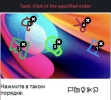
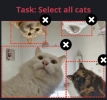
Ein Beispiel für "Punkt"- und "Rechteck"-Aufgaben
Python
Node.js
Go
PHP
C#
Java
Kotlin
C++
Rust
Ruby
bash
So lösen Sie Bild zu Koordinaten in Python
#pip3 install anticaptchaofficial

from anticaptchaofficial.imagetocoordinates import *

solver = imagetocoordinates()
solver.set_verbose(1)
solver.set_key("YOUR_KEY")
solver.set_mode("points")
solver.set_comment("Select objects in specified order")

coordinates = solver.solve_and_return_solution("coordinates.png")
if coordinates != 0:
    print("coordinates: ", coordinates)
else:
    print("task finished with error "+solver.error_code)
So lösen Sie Bild zu Koordinaten in Node.js
//npm install @antiadmin/anticaptchaofficial
//https://github.com/anti-captcha/anticaptcha-npm

const ac = require("@antiadmin/anticaptchaofficial");
const fs = require('fs');

const captcha = fs.readFileSync('captcha.png', { encoding: 'base64' });

ac.setAPIKey('YOUR_API_KEY_HERE');

//Specify softId to earn 10% commission with your app.
//Get your softId here: https://anti-captcha.com/clients/tools/devcenter
ac.setSoftId(0);

ac.solveImageToCoordinates(captcha, "Select all objects in specified order", "points")
    .then(coordinates => console.log('image coordinates:', coordinates))
    .catch(error => console.log('test received error '+error));
So lösen Sie Bild zu Koordinaten in Go
// Install with:
// go get github.com/anti-captcha/anticaptcha-go

package main

import (
    "encoding/base64"
    "fmt"
    "github.com/anti-captcha/anticaptcha-go"
    "log"
)

func main() {
    // Create API client and set the API Key
    ac := anticaptcha.NewClient("API_KEY_HERE")

    // set to 'false' to turn off debug output
    ac.IsVerbose = true

    // Specify softId to earn 10% commission with your app.
    // Get your softId here: https://anti-captcha.com/clients/tools/devcenter
    //ac.SoftId = 1187

    // Make sure the API key funds balance is positive
    balance, err := ac.GetBalance()
    if err != nil {
        log.Fatal(err)
        // Exit program to make sure you don't DDoS API with requests, while having empty balance
        return
    }
    fmt.Println("Balance:", balance)

    // Solve image-to-coordinates captcha
    imageData, err := ac.ReadImageFile("coordinates.jpg")
    if err != nil {
        log.Fatal(err)
    }
    solution, err := ac.SolveImageToCoordinates(base64.StdEncoding.EncodeToString(imageData), anticaptcha.ImageToCoordinates{
        Comment: "Select object in the specified order",
        Mode:    "points",
    })
    if err != nil {
        log.Fatal(err)
    }
    fmt.Println("Objects X,Y coordinates:", solution)
}
So lösen Sie Bild zu Koordinaten in PHP
//git clone https://github.com/anti-captcha/anticaptcha-php.git

include("../anticaptcha.php");
include("../imagetocoordinates.php");

$api = new ImageToCoordinates();
$api->setVerboseMode(true);

//your anti-captcha.com account key
$api->setKey(readline("You API key: "));

//setting file
$api->setFile("captcha.jpg");
$api->setComment("Select all elephants");
$api->setMode("rectangles");

//Specify softId to earn 10% commission with your app.
//Get your softId here: https://anti-captcha.com/clients/tools/devcenter
$api->setSoftId(0);

if (!$api->createTask()) {
    $api->debout("API v2 send failed - ".$api->getErrorMessage(), "red");
    return false;
}

$taskId = $api->getTaskId();


if (!$api->waitForResult()) {
    $api->debout("could not solve captcha", "red");
    $api->debout($api->getErrorMessage());
} else {
    $coordinates    =   $api->getTaskSolution();
    echo "\nresult:\n";
    print_r($coordinates);
    //check result, then if results is wrong:
    $api->reportIncorrectImageCaptcha();
}
So lösen Sie Bild zu Koordinaten in C#
// GitHub: https://github.com/anti-captcha/anticaptcha-csharp.git
// install:  dotnet add package AntiCaptchaOfficial
// or, in the Package Manager Console:
// Install-Package AntiCaptchaOfficial

using System;
using AntiCaptcha.Api;
using AntiCaptcha.Helper;


class Program
{
    static void Main()
    {
        // Set to 'false' to turn off debug output
        DebugHelper.VerboseMode = true;

        var api = new ImageToCoordinates
        {
            ClientKey = "YOUR_API_KEY_HERE",
            FilePath = "captcha.jpg",
            // OR
            // BodyBase64 = "image-encoded-in-base64",

            // "points" to get single click coordinates, "rectangles" to get selection boxes
            Mode = "rectangles",
            Comment = "Select all elephants",

            // Specify softId to earn 10% commission with your app.
            // Get your softId here:
            // https://anti-captcha.com/clients/tools/devcenter
            SoftId = 0
        };

        // Make sure the API key funds balance is positive
        var balance = api.GetBalance();
        if (balance == null || balance <= 0)
        {
            // Exit the program to make sure you don't DDoS the API with requests while having empty balance
            Console.WriteLine("Balance error: " + api.ErrorMessage);
            return;
        }
        Console.WriteLine("Balance: " + balance);

        var solution = api.Solve();
        Console.WriteLine("Objects X,Y coordinates: " + solution?.Coordinates);
    }
}
So lösen Sie Bild zu Koordinaten in Java
// GitHub: https://github.com/anti-captcha/anticaptcha-java
//
// Maven, add to pom.xml:
//   <dependency>
//     <groupId>com.anti-captcha</groupId>
//     <artifactId>anticaptcha</artifactId>
//     <version>1.0.0</version>
//   </dependency>
//
// Gradle, add to build.gradle:
//   implementation "com.anti-captcha:anticaptcha:1.0.0"

import com.anti_captcha.Api.ImageToCoordinates;
import com.anti_captcha.Helper.DebugHelper;

public class Main {

    public static void main(String[] args) throws InterruptedException {
        // Set to false to turn the debug output off
        DebugHelper.setVerboseMode(true);

        ImageToCoordinates api = new ImageToCoordinates();
        api.setClientKey("YOUR_API_KEY_HERE");

        // Specify softId to earn 10% commission with your app.
        // Get your softId here: https://anti-captcha.com/clients/tools/devcenter
        api.setSoftId(0);

        api.setFilePath("captcha.jpg");
        // OR api.setBodyBase64("image-encoded-in-base64");

        // "points" to get single click coordinates, "rectangles" to get selection boxes
        api.setMode("rectangles");
        api.setComment("Select all elephants");


        // Make sure the API key funds balance is positive
        Double balance = api.getBalance();
        if (balance == null || balance <= 0) {
            // Stop here to make sure you don't DDoS the API while having empty balance
            DebugHelper.out("Balance error: " + api.getErrorMessage(), DebugHelper.Type.ERROR);
            return;
        }
        DebugHelper.out("Balance: " + balance, DebugHelper.Type.SUCCESS);

        if (!api.createTask()) {
            DebugHelper.out("API v2 send failed. " + api.getErrorMessage(), DebugHelper.Type.ERROR);
        } else if (!api.waitForResult()) {
            DebugHelper.out("Could not solve the captcha.", DebugHelper.Type.ERROR);
        } else {
            DebugHelper.out("Objects X,Y coordinates: " + api.getTaskSolution().getCoordinates(), DebugHelper.Type.SUCCESS);
        }
    }
}
So lösen Sie Bild zu Koordinaten in Kotlin
// GitHub: https://github.com/anti-captcha/anticaptcha-kotlin
//
// Gradle, add to build.gradle.kts:
//   implementation("com.anti-captcha:anticaptcha-kotlin:1.0.0")

import com.anticaptcha.AnticaptchaClient
import com.anticaptcha.AnticaptchaException
import com.anticaptcha.ApiException
import com.anticaptcha.ImageToCoordinates
import kotlinx.coroutines.runBlocking

fun main(): Unit = runBlocking {
    // Create the API client and set the API key
    val ac = AnticaptchaClient(
        apiKey = "YOUR_API_KEY_HERE",
        // Specify softId to earn 10% commission with your app.
        // Get your softId here: https://anti-captcha.com/clients/tools/devcenter
        softId = 0,
        // Set to false to turn the debug output off
        verbose = true,
    )

    try {
        // Make sure the API key funds balance is positive
        val balance = ac.getBalance()
        if (balance <= 0) {
            // Stop here to make sure you don't DDoS the API while having empty balance
            System.err.println("Empty balance")
            return@runBlocking
        }
        println("Balance: $balance")

        val solution = ac.solveImageToCoordinatesFile(
            "captcha.jpg",
            ImageToCoordinates(
                // "points" to get single click coordinates, "rectangles" to get selection boxes
                mode = "rectangles",
                comment = "Select all elephants",
            ),
        )

        println("Objects X,Y coordinates: ${solution.coordinates}")
    } catch (error: ApiException) {
        // https://anti-captcha.com/apidoc/errors
        System.err.println("API error: ${error.errorCode} ${error.description}")
    } catch (error: AnticaptchaException) {
        System.err.println("Failed: ${error.message}")
    }
}
So lösen Sie Bild zu Koordinaten in C++
// GitHub: https://github.com/anti-captcha/anticaptcha-cplus.git
// Add it to your CMake project:
//   include(FetchContent)
//   FetchContent_Declare(anticaptcha
//           GIT_REPOSITORY https://github.com/anti-captcha/anticaptcha-cplus.git
//           GIT_TAG v1.0.0)
//   FetchContent_MakeAvailable(anticaptcha)
//   target_link_libraries(your_app PRIVATE anticaptcha::anticaptcha)

#include <iostream>
#include <anticaptcha/anticaptcha.hpp>

int main() {
    // Create the API client and set the API key
    anticaptcha::Client ac("YOUR_API_KEY_HERE");

    // Debug output is on by default, turn it off with:
    // ac.shut_up();

    // Specify softId to earn 10% commission with your app.
    // Get your softId here: https://anti-captcha.com/clients/tools/devcenter
    ac.set_soft_id(0);

    try {
        // Make sure the API key funds balance is positive
        const double balance = ac.get_balance();
        if (balance <= 0) {
            // Stop here to make sure you don't DDoS the API while having empty balance
            std::cerr << "Empty balance" << std::endl;
            return 1;
        }
        std::cout << "Balance: " << balance << std::endl;

        anticaptcha::ImageToCoordinates params;
        // "points" to get single click coordinates, "rectangles" to get selection boxes
        params.mode = "rectangles";
        params.comment = "Select all elephants";

        const anticaptcha::Solution solution = ac.solve_image_to_coordinates_file("captcha.jpg", params);
        std::cout << "Objects X,Y coordinates: " << solution.coordinates().dump() << std::endl;
    } catch (const anticaptcha::ApiError& error) {
        // https://anti-captcha.com/apidoc/errors
        std::cerr << "API error: " << error.error_code() << " " << error.description() << std::endl;
        return 1;
    } catch (const anticaptcha::Error& error) {
        std::cerr << "Failed: " << error.what() << std::endl;
        return 1;
    }

    return 0;
}
So lösen Sie Bild zu Koordinaten in Rust
// GitHub: https://github.com/anti-captcha/anticaptcha-rust
// Install with:
//   cargo add anticaptchaofficial
// or add it to Cargo.toml:
//   [dependencies]
//   anticaptchaofficial = "1"

use anticaptcha::{Client, ImageToCoordinates};

#[tokio::main]
async fn main() -> anticaptcha::Result<()> {
    // Create the API client and set the API key
    let ac = Client::new("YOUR_API_KEY_HERE")
        // Specify softId to earn 10% commission with your app.
        // Get your softId here: https://anti-captcha.com/clients/tools/devcenter
        .with_soft_id(0);
    // .quiet() turns the debug output off

    // Make sure the API key funds balance is positive
    let balance = ac.get_balance().await?;
    if balance <= 0.0 {
        // Stop here to make sure you don't DDoS the API while having empty balance
        eprintln!("Empty balance");
        return Ok(());
    }
    println!("Balance: {balance}");

    let solution = ac
        .solve_image_to_coordinates_file(
            "captcha.jpg",
            &ImageToCoordinates {
                // "points" to get single click coordinates, "rectangles" to get selection boxes
                mode: "rectangles".into(),
                comment: "Select all elephants".into(),
                ..Default::default()
            },
        )
        .await?;

    println!("Objects X,Y coordinates: {}", solution.coordinates().unwrap());

    Ok(())
}
So lösen Sie Bild zu Koordinaten in Ruby
# GitHub: https://github.com/anti-captcha/anticaptcha-ruby
# Install with:
#   gem install anticaptchaofficial
# or add it to your Gemfile:
#   gem "anticaptchaofficial"

require "anticaptcha"

# Create the API client and set the API key
ac = Anticaptcha.new("YOUR_API_KEY_HERE")

# Specify softId to earn 10% commission with your app.
# Get your softId here: https://anti-captcha.com/clients/tools/devcenter
ac.soft_id = 0

# Set to false to turn the debug output off
ac.verbose = true

begin
  # Make sure the API key funds balance is positive
  balance = ac.balance
  # Stop here to make sure you don't DDoS the API while having empty balance
  abort "Empty balance" if balance <= 0
  puts "Balance: #{balance}"

  solution = ac.solve_image_to_coordinates_file(
    "captcha.jpg",
    # "points" to get single click coordinates, "rectangles" to get selection boxes
    mode: "rectangles",
    comment: "Select all elephants"
  )

  puts "Objects X,Y coordinates: #{solution.coordinates.inspect}"
rescue Anticaptcha::ApiError => e
  # https://anti-captcha.com/apidoc/errors
  warn "API error: #{e.error_code} #{e.description}"
rescue Anticaptcha::Error => e
  warn "Failed: #{e.message}"
end
So lösen Sie Bild zu Koordinaten in bash
curl -i -H "Accept: application/json" \
-H "Content-Type: application/json" \
-X POST -d '{
    "clientKey":"YOUR_API_KEY_HERE",
    "task":
        {
            "type":"ImageToCoordinatesTask",
            "body":"BASE64_BODY_HERE__NO_NEWLINES__NO_EXTRA_TAGS__ONLY_CLEAN_BASE64",
            "comment":"Select all elephants",
            "mode":"rectangles"
        },
    "softId": 0
}' https://api.anti-captcha.com/createTask
Aufgabenobjekt
| Wert | Art | Erforderlich | Zweck |
|---|---|---|---|
| type | String | Ja | ImageToCoordinatesTask Definiert den Aufgabentyp. |
| body | String | Ja | Dateikörper in base64 kodiert. Achten Sie darauf, dass Sie ihn ohne Zeilenumbrüche senden. Fügen Sie keine 'data:image/png,' oder ähnliche Tags ein, nur sauberes base64! |
| comment | String | Nein | Kommentare zur Aufgabe nur in englischen Zeichen. Beispiel: "Select objects in specified order" oder "select all cars". |
| mode | String | Nein | Aufgabenmodus, kann "Punkte" oder "Rechtecke" sein. Die Standardeinstellung ist "Punkte". |
| websiteURL | String | Nein | Optionaler Parameter zur Unterscheidung der Bild-Captcha-Quelle in der Ausgabenstatistik. |
Aufgabenlösungsobjekt
| Wert | Art | Zweck |
|---|---|---|
| coordinates | String | Array mit einer Reihe von Koordinaten. Für "Punkt"-Modus wird (x,y) gesetzt. Für "Rechtecke" ist es (x1,y1,x2,y2), beginnend von oben-links nach unten-rechts. Die Koordinaten beginnen in der linken oberen Ecke. |
Antwort-Beispiel
{
    "errorId":0,
    "status":"ready",
    "solution":
    {
      "coordinates":[
        [17,48,54,83],
        [76,93,140,164]
      ]
    },
    "cost":"0.000700",
    "ip":"46.98.54.221",
    "createTime":1472205564,
    "endTime":1472205570,
    "solveCount":"0"
}