

 GitHub

Menu
Obtenir les coordonnées d'objets dans une image
Postez un corps d'image, un commentaire en anglais et recevez jusqu'à 6 jeux de coordonnées d'objets donnés. Vous pouvez demander des coordonnées de points, ainsi que des coordonnées de rectangles. La taille maximale d'un côté de l'image est de 500 pixels. Les images plus grandes seront réduites à l'interface du travailleur.
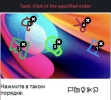
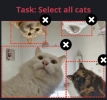
Exemple de tâches "points" et "rectangles".
Python
Node.js
Go
PHP
C#
Java
Kotlin
C++
Rust
Ruby
bash
Comment résoudre Image aux coordonnées en Python
#pip3 install anticaptchaofficial

from anticaptchaofficial.imagetocoordinates import *

solver = imagetocoordinates()
solver.set_verbose(1)
solver.set_key("YOUR_KEY")
solver.set_mode("points")
solver.set_comment("Select objects in specified order")

coordinates = solver.solve_and_return_solution("coordinates.png")
if coordinates != 0:
    print("coordinates: ", coordinates)
else:
    print("task finished with error "+solver.error_code)
Comment résoudre Image aux coordonnées en Node.js
//npm install @antiadmin/anticaptchaofficial
//https://github.com/anti-captcha/anticaptcha-npm

const ac = require("@antiadmin/anticaptchaofficial");
const fs = require('fs');

const captcha = fs.readFileSync('captcha.png', { encoding: 'base64' });

ac.setAPIKey('YOUR_API_KEY_HERE');

//Specify softId to earn 10% commission with your app.
//Get your softId here: https://anti-captcha.com/clients/tools/devcenter
ac.setSoftId(0);

ac.solveImageToCoordinates(captcha, "Select all objects in specified order", "points")
    .then(coordinates => console.log('image coordinates:', coordinates))
    .catch(error => console.log('test received error '+error));
Comment résoudre Image aux coordonnées en Go
// Install with:
// go get github.com/anti-captcha/anticaptcha-go

package main

import (
    "encoding/base64"
    "fmt"
    "github.com/anti-captcha/anticaptcha-go"
    "log"
)

func main() {
    // Create API client and set the API Key
    ac := anticaptcha.NewClient("API_KEY_HERE")

    // set to 'false' to turn off debug output
    ac.IsVerbose = true

    // Specify softId to earn 10% commission with your app.
    // Get your softId here: https://anti-captcha.com/clients/tools/devcenter
    //ac.SoftId = 1187

    // Make sure the API key funds balance is positive
    balance, err := ac.GetBalance()
    if err != nil {
        log.Fatal(err)
        // Exit program to make sure you don't DDoS API with requests, while having empty balance
        return
    }
    fmt.Println("Balance:", balance)

    // Solve image-to-coordinates captcha
    imageData, err := ac.ReadImageFile("coordinates.jpg")
    if err != nil {
        log.Fatal(err)
    }
    solution, err := ac.SolveImageToCoordinates(base64.StdEncoding.EncodeToString(imageData), anticaptcha.ImageToCoordinates{
        Comment: "Select object in the specified order",
        Mode:    "points",
    })
    if err != nil {
        log.Fatal(err)
    }
    fmt.Println("Objects X,Y coordinates:", solution)
}
Comment résoudre Image aux coordonnées en PHP
//git clone https://github.com/anti-captcha/anticaptcha-php.git

include("../anticaptcha.php");
include("../imagetocoordinates.php");

$api = new ImageToCoordinates();
$api->setVerboseMode(true);

//your anti-captcha.com account key
$api->setKey(readline("You API key: "));

//setting file
$api->setFile("captcha.jpg");
$api->setComment("Select all elephants");
$api->setMode("rectangles");

//Specify softId to earn 10% commission with your app.
//Get your softId here: https://anti-captcha.com/clients/tools/devcenter
$api->setSoftId(0);

if (!$api->createTask()) {
    $api->debout("API v2 send failed - ".$api->getErrorMessage(), "red");
    return false;
}

$taskId = $api->getTaskId();


if (!$api->waitForResult()) {
    $api->debout("could not solve captcha", "red");
    $api->debout($api->getErrorMessage());
} else {
    $coordinates    =   $api->getTaskSolution();
    echo "\nresult:\n";
    print_r($coordinates);
    //check result, then if results is wrong:
    $api->reportIncorrectImageCaptcha();
}
Comment résoudre Image aux coordonnées en C#
// GitHub: https://github.com/anti-captcha/anticaptcha-csharp.git
// install:  dotnet add package AntiCaptchaOfficial
// or, in the Package Manager Console:
// Install-Package AntiCaptchaOfficial

using System;
using AntiCaptcha.Api;
using AntiCaptcha.Helper;


class Program
{
    static void Main()
    {
        // Set to 'false' to turn off debug output
        DebugHelper.VerboseMode = true;

        var api = new ImageToCoordinates
        {
            ClientKey = "YOUR_API_KEY_HERE",
            FilePath = "captcha.jpg",
            // OR
            // BodyBase64 = "image-encoded-in-base64",

            // "points" to get single click coordinates, "rectangles" to get selection boxes
            Mode = "rectangles",
            Comment = "Select all elephants",

            // Specify softId to earn 10% commission with your app.
            // Get your softId here:
            // https://anti-captcha.com/clients/tools/devcenter
            SoftId = 0
        };

        // Make sure the API key funds balance is positive
        var balance = api.GetBalance();
        if (balance == null || balance <= 0)
        {
            // Exit the program to make sure you don't DDoS the API with requests while having empty balance
            Console.WriteLine("Balance error: " + api.ErrorMessage);
            return;
        }
        Console.WriteLine("Balance: " + balance);

        var solution = api.Solve();
        Console.WriteLine("Objects X,Y coordinates: " + solution?.Coordinates);
    }
}
Comment résoudre Image aux coordonnées en Java
// GitHub: https://github.com/anti-captcha/anticaptcha-java
//
// Maven, add to pom.xml:
//   <dependency>
//     <groupId>com.anti-captcha</groupId>
//     <artifactId>anticaptcha</artifactId>
//     <version>1.0.0</version>
//   </dependency>
//
// Gradle, add to build.gradle:
//   implementation "com.anti-captcha:anticaptcha:1.0.0"

import com.anti_captcha.Api.ImageToCoordinates;
import com.anti_captcha.Helper.DebugHelper;

public class Main {

    public static void main(String[] args) throws InterruptedException {
        // Set to false to turn the debug output off
        DebugHelper.setVerboseMode(true);

        ImageToCoordinates api = new ImageToCoordinates();
        api.setClientKey("YOUR_API_KEY_HERE");

        // Specify softId to earn 10% commission with your app.
        // Get your softId here: https://anti-captcha.com/clients/tools/devcenter
        api.setSoftId(0);

        api.setFilePath("captcha.jpg");
        // OR api.setBodyBase64("image-encoded-in-base64");

        // "points" to get single click coordinates, "rectangles" to get selection boxes
        api.setMode("rectangles");
        api.setComment("Select all elephants");


        // Make sure the API key funds balance is positive
        Double balance = api.getBalance();
        if (balance == null || balance <= 0) {
            // Stop here to make sure you don't DDoS the API while having empty balance
            DebugHelper.out("Balance error: " + api.getErrorMessage(), DebugHelper.Type.ERROR);
            return;
        }
        DebugHelper.out("Balance: " + balance, DebugHelper.Type.SUCCESS);

        if (!api.createTask()) {
            DebugHelper.out("API v2 send failed. " + api.getErrorMessage(), DebugHelper.Type.ERROR);
        } else if (!api.waitForResult()) {
            DebugHelper.out("Could not solve the captcha.", DebugHelper.Type.ERROR);
        } else {
            DebugHelper.out("Objects X,Y coordinates: " + api.getTaskSolution().getCoordinates(), DebugHelper.Type.SUCCESS);
        }
    }
}
Comment résoudre Image aux coordonnées en Kotlin
// GitHub: https://github.com/anti-captcha/anticaptcha-kotlin
//
// Gradle, add to build.gradle.kts:
//   implementation("com.anti-captcha:anticaptcha-kotlin:1.0.0")

import com.anticaptcha.AnticaptchaClient
import com.anticaptcha.AnticaptchaException
import com.anticaptcha.ApiException
import com.anticaptcha.ImageToCoordinates
import kotlinx.coroutines.runBlocking

fun main(): Unit = runBlocking {
    // Create the API client and set the API key
    val ac = AnticaptchaClient(
        apiKey = "YOUR_API_KEY_HERE",
        // Specify softId to earn 10% commission with your app.
        // Get your softId here: https://anti-captcha.com/clients/tools/devcenter
        softId = 0,
        // Set to false to turn the debug output off
        verbose = true,
    )

    try {
        // Make sure the API key funds balance is positive
        val balance = ac.getBalance()
        if (balance <= 0) {
            // Stop here to make sure you don't DDoS the API while having empty balance
            System.err.println("Empty balance")
            return@runBlocking
        }
        println("Balance: $balance")

        val solution = ac.solveImageToCoordinatesFile(
            "captcha.jpg",
            ImageToCoordinates(
                // "points" to get single click coordinates, "rectangles" to get selection boxes
                mode = "rectangles",
                comment = "Select all elephants",
            ),
        )

        println("Objects X,Y coordinates: ${solution.coordinates}")
    } catch (error: ApiException) {
        // https://anti-captcha.com/apidoc/errors
        System.err.println("API error: ${error.errorCode} ${error.description}")
    } catch (error: AnticaptchaException) {
        System.err.println("Failed: ${error.message}")
    }
}
Comment résoudre Image aux coordonnées en C++
// GitHub: https://github.com/anti-captcha/anticaptcha-cplus.git
// Add it to your CMake project:
//   include(FetchContent)
//   FetchContent_Declare(anticaptcha
//           GIT_REPOSITORY https://github.com/anti-captcha/anticaptcha-cplus.git
//           GIT_TAG v1.0.0)
//   FetchContent_MakeAvailable(anticaptcha)
//   target_link_libraries(your_app PRIVATE anticaptcha::anticaptcha)

#include <iostream>
#include <anticaptcha/anticaptcha.hpp>

int main() {
    // Create the API client and set the API key
    anticaptcha::Client ac("YOUR_API_KEY_HERE");

    // Debug output is on by default, turn it off with:
    // ac.shut_up();

    // Specify softId to earn 10% commission with your app.
    // Get your softId here: https://anti-captcha.com/clients/tools/devcenter
    ac.set_soft_id(0);

    try {
        // Make sure the API key funds balance is positive
        const double balance = ac.get_balance();
        if (balance <= 0) {
            // Stop here to make sure you don't DDoS the API while having empty balance
            std::cerr << "Empty balance" << std::endl;
            return 1;
        }
        std::cout << "Balance: " << balance << std::endl;

        anticaptcha::ImageToCoordinates params;
        // "points" to get single click coordinates, "rectangles" to get selection boxes
        params.mode = "rectangles";
        params.comment = "Select all elephants";

        const anticaptcha::Solution solution = ac.solve_image_to_coordinates_file("captcha.jpg", params);
        std::cout << "Objects X,Y coordinates: " << solution.coordinates().dump() << std::endl;
    } catch (const anticaptcha::ApiError& error) {
        // https://anti-captcha.com/apidoc/errors
        std::cerr << "API error: " << error.error_code() << " " << error.description() << std::endl;
        return 1;
    } catch (const anticaptcha::Error& error) {
        std::cerr << "Failed: " << error.what() << std::endl;
        return 1;
    }

    return 0;
}
Comment résoudre Image aux coordonnées en Rust
// GitHub: https://github.com/anti-captcha/anticaptcha-rust
// Install with:
//   cargo add anticaptchaofficial
// or add it to Cargo.toml:
//   [dependencies]
//   anticaptchaofficial = "1"

use anticaptcha::{Client, ImageToCoordinates};

#[tokio::main]
async fn main() -> anticaptcha::Result<()> {
    // Create the API client and set the API key
    let ac = Client::new("YOUR_API_KEY_HERE")
        // Specify softId to earn 10% commission with your app.
        // Get your softId here: https://anti-captcha.com/clients/tools/devcenter
        .with_soft_id(0);
    // .quiet() turns the debug output off

    // Make sure the API key funds balance is positive
    let balance = ac.get_balance().await?;
    if balance <= 0.0 {
        // Stop here to make sure you don't DDoS the API while having empty balance
        eprintln!("Empty balance");
        return Ok(());
    }
    println!("Balance: {balance}");

    let solution = ac
        .solve_image_to_coordinates_file(
            "captcha.jpg",
            &ImageToCoordinates {
                // "points" to get single click coordinates, "rectangles" to get selection boxes
                mode: "rectangles".into(),
                comment: "Select all elephants".into(),
                ..Default::default()
            },
        )
        .await?;

    println!("Objects X,Y coordinates: {}", solution.coordinates().unwrap());

    Ok(())
}
Comment résoudre Image aux coordonnées en Ruby
# GitHub: https://github.com/anti-captcha/anticaptcha-ruby
# Install with:
#   gem install anticaptchaofficial
# or add it to your Gemfile:
#   gem "anticaptchaofficial"

require "anticaptcha"

# Create the API client and set the API key
ac = Anticaptcha.new("YOUR_API_KEY_HERE")

# Specify softId to earn 10% commission with your app.
# Get your softId here: https://anti-captcha.com/clients/tools/devcenter
ac.soft_id = 0

# Set to false to turn the debug output off
ac.verbose = true

begin
  # Make sure the API key funds balance is positive
  balance = ac.balance
  # Stop here to make sure you don't DDoS the API while having empty balance
  abort "Empty balance" if balance <= 0
  puts "Balance: #{balance}"

  solution = ac.solve_image_to_coordinates_file(
    "captcha.jpg",
    # "points" to get single click coordinates, "rectangles" to get selection boxes
    mode: "rectangles",
    comment: "Select all elephants"
  )

  puts "Objects X,Y coordinates: #{solution.coordinates.inspect}"
rescue Anticaptcha::ApiError => e
  # https://anti-captcha.com/apidoc/errors
  warn "API error: #{e.error_code} #{e.description}"
rescue Anticaptcha::Error => e
  warn "Failed: #{e.message}"
end
Comment résoudre Image aux coordonnées en bash
curl -i -H "Accept: application/json" \
-H "Content-Type: application/json" \
-X POST -d '{
    "clientKey":"YOUR_API_KEY_HERE",
    "task":
        {
            "type":"ImageToCoordinatesTask",
            "body":"BASE64_BODY_HERE__NO_NEWLINES__NO_EXTRA_TAGS__ONLY_CLEAN_BASE64",
            "comment":"Select all elephants",
            "mode":"rectangles"
        },
    "softId": 0
}' https://api.anti-captcha.com/createTask
Objet de tâche
| Propriété | Type | Obligatoire | Objectif |
|---|---|---|---|
| type | String | Oui | ImageToCoordinatesTask Définit un type de tâche. |
| body | String | Oui | Corps du fichier encodé en base64. Assurez-vous de l'envoyer sans saut de ligne. N'incluez pas 'data:image/png,' ou des balises similaires, uniquement base64 propre! |
| comment | String | Non | Commentaires pour la tâche en caractères anglais uniquement. Exemple : "Select objects in specified order" ou "select all cars". |
| mode | String | Non | Mode de travail, peut être "points" ou "rectangles". La valeur par défaut est "points". |
| websiteURL | String | Non | Paramètre facultatif pour distinguer la source des captchas d'image dans les statistiques de dépenses. |
Objet de solution de tâche
| Propriété | Type | Objectif |
|---|---|---|
| coordinates | String | Tableau de coordonnées. Pour le mode "points", il s'agit de l'ensemble (x,y). Pour les "rectangles", il s'agit de (x1,y1,x2,y2), en partant du haut à gauche vers le bas à droite. Les coordonnées commencent au coin supérieur gauche. |
Exemple de réponse
{
    "errorId":0,
    "status":"ready",
    "solution":
    {
      "coordinates":[
        [17,48,54,83],
        [76,93,140,164]
      ]
    },
    "cost":"0.000700",
    "ip":"46.98.54.221",
    "createTime":1472205564,
    "endTime":1472205570,
    "solveCount":"0"
}