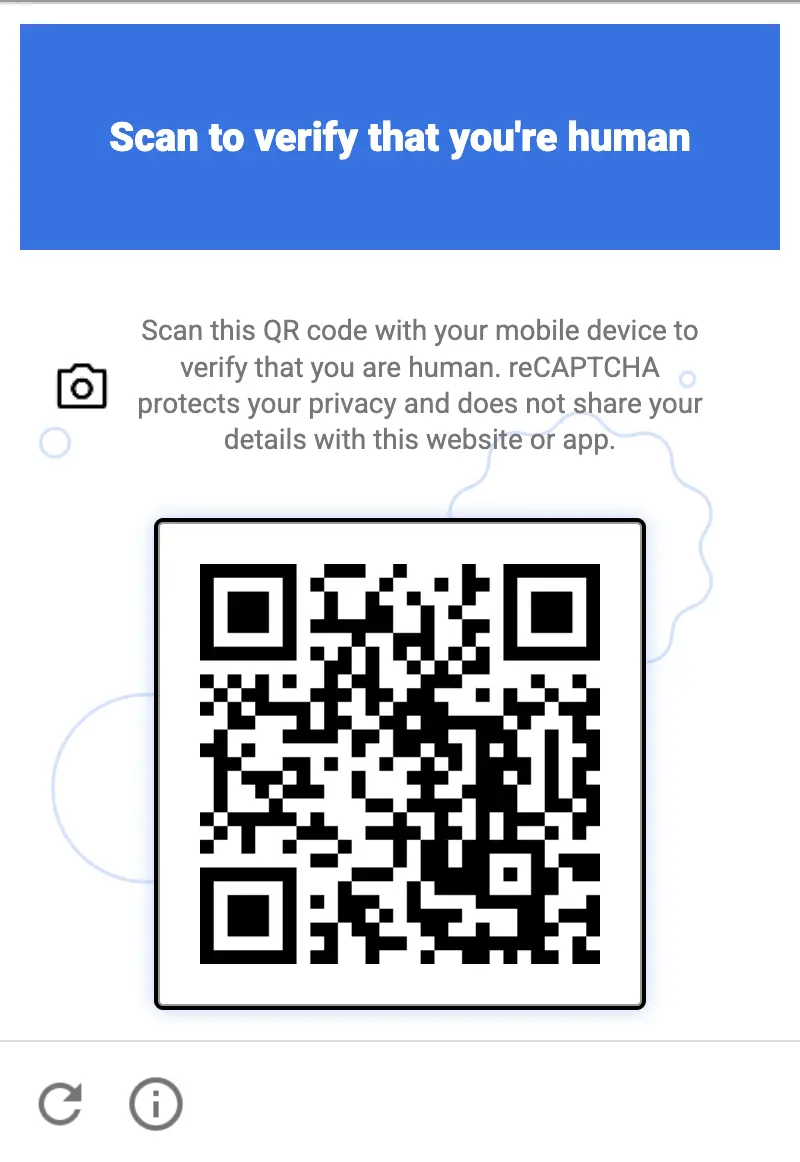
Nieuwe Recaptcha QR-code-uitdaging wordt standaard ondersteund door Anti-Captcha
Het Anti-Captcha-team heeft bevestigd dat de nieuwe Recaptcha-uitdaging met een QR-code native door onze dienst wordt ondersteund. Er zijn geen wijzigingen in je integratie nodig: aangezien elke captcha op Anti-Captcha door echte mensen wordt opgelost, verwerken onze medewerkers deze nieuwe uitdaging op dezelfde manier als een gewone websitebezoeker dat zou doen.
Wat is de Recaptcha QR-code-uitdaging
Google presenteerde de nieuwe uitdaging in de zomer van 2026. Op dit moment wordt deze in een besloten modus getest op een beperkt aantal websites, voordat deze wordt uitgerold naar alle Recaptcha-klanten. In plaats van het selecteren van afbeeldingen of het aanvinken van een selectievakje, krijgt de gebruiker een QR-code te zien en wordt gevraagd de verificatie op hun mobiele telefoon te voltooien. De QR-code-uitdaging is niet gebonden aan één specifieke Recaptcha-versie: hij verschijnt op websites die zowel Recaptcha V2 als Recaptcha V3 gebruiken.
Het idee erachter is eenvoudig: het is relatief goedkoop voor een bot om een desktopbrowser te emuleren, maar het is veel moeilijker om een echte fysieke smartphone met een camera, een echt besturingssysteem en toegang tot de officiële appstores te emuleren.
Technische kenmerken
Mobiel gericht. De uitdaging kan niet worden voltooid in de browser waarin deze wordt weergegeven. De verificatie wordt verplaatst naar een apart apparaat — de smartphone van de gebruiker — en de browser wacht alleen op de bevestiging.
Gescand met de telefooncamera. De QR-code wordt gescand met de gewone camera-app van de telefoon. Er is geen externe QR-scanner nodig: de camera herkent de code en biedt aan om de verificatie te openen.
Opgelost door mini-apps uit Google Play en de App Store. Door de code te scannen wordt een lichtgewicht mini-app gestart die wordt verspreid via Google Play (Android met Google Play Services 25.41.30) of de App Store (iOS 15/16+). De mini-app opent direct zonder volledige installatie en voert de verificatie op het apparaat uit.
Verificatie gebonden aan het apparaat. Het resultaat is gekoppeld aan een echt fysiek apparaat, waardoor de uitdaging zeer moeilijk te automatiseren is met headless browsers, emulators of op AI gebaseerde oplossers.
Hoe Anti-Captcha-medewerkers ermee omgaan
We hebben een interne test uitgevoerd onder Anti-Captcha-medewerkers: ongeveer 50% van hen kon de nieuwe uitdaging meteen oplossen met hun eigen telefoon, zonder aanvullende instructies of voorbereiding. De rest moet meestal hun besturingssysteem bijwerken of overschakelen naar een ondersteund apparaat, wat een kwestie van tijd is in plaats van een echt obstakel.
Dit is precies waar een door mensen aangedreven dienst een voordeel heeft ten opzichte van geautomatiseerde oplossers. Een persoon met een gewone smartphone voltooit de uitdaging binnen enkele seconden, terwijl een bot een farm van echte apparaten zou moeten bedienen om hetzelfde te doen.
Wat het betekent voor onze klanten
U blijft Recaptcha V2- of V3-taken op dezelfde manier verzenden als nu. Wanneer een website de QR-code-uitdaging toont, wordt deze opgelost door onze werkers op hun telefoon en ontvangt u een gewoon g-recaptcha-response-token in het taakresultaat.
Hoe u kunt achterhalen welke Recaptcha-versie een website gebruikt
Open de pagina met de captcha in Chrome, open de ontwikkelaarsconsole (F12, dan het tabblad Console), plak het onderstaande script en druk op Enter. Voer het uit nadat de captcha op de pagina is verschenen, bijvoorbeeld na het klikken op de verzendknop van het formulier.
(() => {
  const out = { scripts: [], iframes: [], clients: [], verdict: [] };

  // 1. Loaded Recaptcha scripts
  document.querySelectorAll('script[src*="recaptcha"]').forEach(s => {
    const u = new URL(s.src, location.href);
    out.scripts.push({
      src: u.pathname,
      enterprise: u.pathname.includes('enterprise'),
      render: u.searchParams.get('render'),
    });
  });

  // 2. Anchor-iframe
  document.querySelectorAll('iframe[src*="/anchor"]').forEach(f => {
    const u = new URL(f.src);
    out.iframes.push({
      enterprise: u.pathname.includes('/enterprise/'),
      sitekey: u.searchParams.get('k'),
      size: u.searchParams.get('size'),
      action: u.searchParams.get('sa'),
      s: u.searchParams.has('s'),
    });
  });

  // 3. Internal config: look for objects with a sitekey
  const seen = new WeakSet();
  const walk = (o, depth = 0) => {
    if (!o || typeof o !== 'object' || seen.has(o) || depth > 6) return;
    seen.add(o);
    if (typeof o.sitekey === 'string') {
      out.clients.push({
        sitekey: o.sitekey,
        size: o.size,
        action: o.action,
        callback: typeof o.callback === 'function' ? o.callback.name || 'fn'
                 : o.callback || null,
        badge: o.badge,
      });
    }
    for (const k in o) { try { walk(o[k], depth + 1); } catch {} }
  };
  try { walk(window.___grecaptcha_cfg?.clients); } catch {}

  // 4. Verdict
  const renderKey = out.scripts.find(s => s.render && s.render !== 'explicit' && s.render !== 'onload');
  const ent = out.scripts.some(s => s.enterprise) || !!window.grecaptcha?.enterprise;
  if (renderKey) out.verdict.push(`v3/score (render=${renderKey.render})`);
  out.iframes.forEach(i => {
    if (i.size === 'normal' || i.size === 'compact') out.verdict.push(`v2 checkbox (${i.sitekey})`);
    else if (i.size === 'invisible' && (!renderKey || renderKey.render !== i.sitekey))
      out.verdict.push(`v2 invisible (${i.sitekey})`);
  });
  if (ent) out.verdict.push('Enterprise');

  console.table(out.scripts);
  console.table(out.iframes);
  console.table(out.clients);
  console.log('VERDICT:', out.verdict.length ? out.verdict.join(' | ') : 'not found (the captcha may not be loaded yet)');
  return out;
})();
Het script drukt de Recaptcha-scripts, widgets en hun instellingen (sitekey, size, action) af als tabellen, gevolgd door een VERDICT-regel:
v3/score — Recaptcha V3: de sitekey wordt doorgegeven in de render-parameter van het Recaptcha-script.
v2 checkbox / v2 invisible — Recaptcha V2 met een selectievakje of een onzichtbare widget.
Enterprise — de website gebruikt Recaptcha Enterprise (het enterprise.js-script).
Gebruik de sitekey uit de uitvoer als de websitesleutel, en de action-waarde, indien aanwezig, als de pagina-actie in de onderstaande codevoorbeelden.
Codevoorbeelden
Kies de Recaptcha-versie die op de website is gevonden:
Python
Node.js
Go
PHP
Java
Kotlin
C#
C++
Rust
Ruby
bash
Hoe je Recaptcha QR oplost in Python
#pip3 install anticaptchaofficial

from anticaptchaofficial.recaptchav2enterpriseproxyless import *

solver = recaptchaV2EnterpriseProxyless()
solver.set_verbose(1)
solver.set_key("YOUR_API_KEY_HERE")
solver.set_website_url("https://website.com")
solver.set_website_key("YOUR_API_KEY_HERE")
# set to "true" if there's "size":"invisible" option in "grecaptcha.enterprise.render" function
solver.set_is_invisible(True)
# Set page action value:
solver.set_enterprise_payload({"action": "form_submit"})

g_response = solver.solve_and_return_solution()
if g_response != 0:
    print("g-response: "+g_response)
    # user-agent in case you need it:
    print("user-agent: "+solver.get_user_agent())
else:
    print("task finished with error "+solver.error_code)
Hoe je Recaptcha QR oplost in Node.js
//npm install @antiadmin/anticaptchaofficial
//https://github.com/anti-captcha/anticaptcha-npm

const ac = require("@antiadmin/anticaptchaofficial");

ac.setAPIKey('YOUR_API_KEY_HERE');

ac.solveRecaptchaV2EnterpriseProxyless(
    'http://DOMAIN.COM',
    'WEBSITE_KEY',
    {
        "action": "form_submit" // set page action value here
    },
    true)  // set to "true" if there's "size":"invisible" option in "grecaptcha.enterprise.render" function
    .then(gresponse => {
        console.log('g-response: '+gresponse);
    })
    .catch(error => console.log('test received error '+error));

// in case you need it
console.log("worker's user-agent:");
console.log(ac.getUserAgent());
Hoe je Recaptcha QR oplost in Go
// Install with:
// go get github.com/anti-captcha/anticaptcha-go
package main

import (
    "fmt"
    "github.com/anti-captcha/anticaptcha-go"
    "log"
)

func main() {
    // Create API client and set the API Key
    ac := anticaptcha.NewClient("API_KEY_HERE")

    // set to 'false' to turn off debug output
    ac.IsVerbose = true

    // Make sure the API key funds balance is positive
    balance, err := ac.GetBalance()
    if err != nil {
        log.Fatal(err)
        // Exit program to make sure you don't DDoS API with requests, while having empty balance
        return
    }
    fmt.Println("Balance:", balance)

    // Solve Recaptcha V2 Enterprise without proxy
    solution, err := ac.SolveRecaptchaV2Enterprise(anticaptcha.RecaptchaV2{
        WebsiteURL:  "https://huev.com/",
        WebsiteKey:  "6Lcyu8UZAAAAACwSh6Xf58WrNXTu0LLu4F85xf20",
        IsInvisible: true, // set to "true" if there's "size":"invisible" option in "grecaptcha.enterprise.render" function
        EnterprisePayload:  map[string]interface{}{
            "action": "form_submit", // set page action here
        },
    })
    if err != nil {
        log.Fatal(err)
    }
    fmt.Println("Recaptcha Enterprise g-response token:", solution)
}
Hoe je Recaptcha QR oplost in PHP
//git clone https://github.com/anti-captcha/anticaptcha-php.git

include("anticaptcha.php");
include("recaptchaV2Enterpriseproxyless.php");

$api = new Recaptchav2enterpriseProxyless();
$api->setVerboseMode(true);

//your anti-captcha.com account key
$api->setKey("YOUR_API_KEY_HERE");

//target website address
$api->setWebsiteURL("http://enteprisedomain.com/recaptcha/test.php");

//recaptcha key from target website
$api->setWebsiteKey("ENTERPRISE_SITEKEY_HERE");

//set page action here
$api->setEnterprisePayload(["action" => "form_submit"]);

//set to "true" if there's "size":"invisible" option in "grecaptcha.enterprise.render" function
$api->setIsInvisible();

//create task in API
if (!$api->createTask()) {
    $api->debout("API v2 send failed - ".$api->getErrorMessage(), "red");
    return false;
}

$taskId = $api->getTaskId();

//wait in a loop for max 300 seconds till task is solved
if (!$api->waitForResult(300)) {
    echo "could not solve captcha\n";
    echo $api->getErrorMessage()."\n";
} else {

    $gResponse    =   $api->getTaskSolution();
    echo "\your recaptcha token: $gResponse\n\n";
    echo "worker's user-agent in case you need it:\n";
    echo $api->getWorkersUserAgent()."\n";

}
Hoe je Recaptcha QR oplost in Java
// GitHub: https://github.com/anti-captcha/anticaptcha-java
//
// Maven, add to pom.xml:
//   <dependency>
//     <groupId>com.anti-captcha</groupId>
//     <artifactId>anticaptcha</artifactId>
//     <version>1.0.0</version>
//   </dependency>
//
// Gradle, add to build.gradle:
//   implementation "com.anti-captcha:anticaptcha:1.0.0"

import com.anti_captcha.Api.RecaptchaV2EnterpriseProxyless;
import com.anti_captcha.Helper.DebugHelper;
import org.json.JSONObject;

public class Main {

    public static void main(String[] args) throws InterruptedException {
        // Set to false to turn the debug output off
        DebugHelper.setVerboseMode(true);

        RecaptchaV2EnterpriseProxyless api = new RecaptchaV2EnterpriseProxyless();
        api.setClientKey("YOUR_API_KEY_HERE");

        api.setWebsiteUrl("http://makeawebsitehub.com/recaptcha/test.php");
        api.setWebsiteKey("6LfI9IsUAAAAAKuvopU0hfY8pWADfR_mogXokIIZ");

        // Set page action here:
        api.setEnterprisePayload(new JSONObject()
                .put("action", "form_submit"));

        // set to "true" if there's "size":"invisible" option in "grecaptcha.enterprise.render" function
        api.setIsInvisible(true);

        // Make sure the API key funds balance is positive
        Double balance = api.getBalance();
        if (balance == null || balance <= 0) {
            // Stop here to make sure you don't DDoS the API while having empty balance
            DebugHelper.out("Balance error: " + api.getErrorMessage(), DebugHelper.Type.ERROR);
            return;
        }
        DebugHelper.out("Balance: " + balance, DebugHelper.Type.SUCCESS);

        if (!api.createTask()) {
            DebugHelper.out("API v2 send failed. " + api.getErrorMessage(), DebugHelper.Type.ERROR);
        } else if (!api.waitForResult()) {
            DebugHelper.out("Could not solve the captcha.", DebugHelper.Type.ERROR);
        } else {
            DebugHelper.out("Recaptcha g-response token: " + api.getTaskSolution().getGRecaptchaResponse(), DebugHelper.Type.SUCCESS);
            DebugHelper.out("Worker's user-agent in case you need it: " + api.getTaskSolution().getUserAgent(), DebugHelper.Type.SUCCESS);
        }
    }
}
Hoe je Recaptcha QR oplost in Kotlin
// GitHub: https://github.com/anti-captcha/anticaptcha-kotlin
//
// Gradle, add to build.gradle.kts:
//   implementation("com.anti-captcha:anticaptcha-kotlin:1.0.0")

import com.anticaptcha.AnticaptchaClient
import com.anticaptcha.AnticaptchaException
import com.anticaptcha.ApiException
import com.anticaptcha.RecaptchaV2
import kotlinx.coroutines.runBlocking

fun main(): Unit = runBlocking {
    // Create the API client and set the API key
    val ac = AnticaptchaClient(
        apiKey = "YOUR_API_KEY_HERE",
        // Specify softId to earn 10% commission with your app.
        // Get your softId here: https://anti-captcha.com/clients/tools/devcenter
        softId = 0,
        // Set to false to turn the debug output off
        verbose = true,
    )

    try {
        // Make sure the API key funds balance is positive
        val balance = ac.getBalance()
        if (balance <= 0) {
            // Stop here to make sure you don't DDoS the API while having empty balance
            System.err.println("Empty balance")
            return@runBlocking
        }
        println("Balance: $balance")

        val solution = ac.solveRecaptchaV2(
            RecaptchaV2(
                websiteUrl = "http://makeawebsitehub.com/recaptcha/test.php",
                websiteKey = "6LfI9IsUAAAAAKuvopU0hfY8pWADfR_mogXokIIZ",
                isEnterprise = true,
                // set to "true" if there's "size":"invisible" option in "grecaptcha.enterprise.render" function
                isInvisible = true,
                // Set page action here
                enterprisePayload = mapOf(
                    "action" to "form_submit",
                ),
            ),
        )

        println("Recaptcha g-response token: ${solution.gRecaptchaResponse}")
        println("Worker's user-agent in case you need it: ${solution.userAgent}")
    } catch (error: ApiException) {
        // https://anti-captcha.com/apidoc/errors
        System.err.println("API error: ${error.errorCode} ${error.description}")
    } catch (error: AnticaptchaException) {
        System.err.println("Failed: ${error.message}")
    }
}
Hoe je Recaptcha QR oplost in C#
// GitHub: https://github.com/anti-captcha/anticaptcha-csharp.git
// install:  dotnet add package AntiCaptchaOfficial
// or, in the Package Manager Console:
// Install-Package AntiCaptchaOfficial

using System;
using AntiCaptcha.Api;
using AntiCaptcha.Helper;


class Program
{
    static void Main()
    {
        // Set to 'false' to turn off debug output
        DebugHelper.VerboseMode = true;

        var api = new RecaptchaV2EnterpriseProxyless
        {
            ClientKey = "YOUR_API_KEY_HERE",
            WebsiteUrl = new Uri("http://makeawebsitehub.com/recaptcha/test.php"),
            WebsiteKey = "6LfI9IsUAAAAAKuvopU0hfY8pWADfR_mogXokIIZ",
            IsInvisible = true  // set to "true" if there's "size":"invisible" option in "grecaptcha.enterprise.render" function
        };

        // set page action here
        api.EnterprisePayload.Add("action", "form_submit");

        // Make sure the API key funds balance is positive
        var balance = api.GetBalance();
        if (balance == null || balance <= 0)
        {
            // Exit the program to make sure you don't DDoS the API with requests while having empty balance
            Console.WriteLine("Balance error: " + api.ErrorMessage);
            return;
        }
        Console.WriteLine("Balance: " + balance);

        var solution = api.Solve();
        Console.WriteLine("Recaptcha g-response token: " + solution?.GRecaptchaResponse);
        Console.WriteLine("Worker's user-agent in case you need it: " + solution?.UserAgent);
    }
}
Hoe je Recaptcha QR oplost in C++
// GitHub: https://github.com/anti-captcha/anticaptcha-cplus.git
// Add it to your CMake project:
//   include(FetchContent)
//   FetchContent_Declare(anticaptcha
//           GIT_REPOSITORY https://github.com/anti-captcha/anticaptcha-cplus.git
//           GIT_TAG v1.1.0)
//   FetchContent_MakeAvailable(anticaptcha)
//   target_link_libraries(your_app PRIVATE anticaptcha::anticaptcha)

#include <iostream>
#include <anticaptcha/anticaptcha.hpp>

int main() {
    // Create the API client and set the API key
    anticaptcha::Client ac("YOUR_API_KEY_HERE");

    // Debug output is on by default, turn it off with:
    // ac.shut_up();

    // Specify softId to earn 10% commission with your app.
    // Get your softId here: https://anti-captcha.com/clients/tools/devcenter
    ac.set_soft_id(0);

    try {
        // Make sure the API key funds balance is positive
        const double balance = ac.get_balance();
        if (balance <= 0) {
            // Stop here to make sure you don't DDoS the API while having empty balance
            std::cerr << "Empty balance" << std::endl;
            return 1;
        }
        std::cout << "Balance: " << balance << std::endl;

        anticaptcha::RecaptchaV2 params;
        params.website_url = "http://makeawebsitehub.com/recaptcha/test.php";
        params.website_key = "6LfI9IsUAAAAAKuvopU0hfY8pWADfR_mogXokIIZ";
        params.is_enterprise = true;
        // set to "true" if there's "size":"invisible" option in "grecaptcha.enterprise.render" function
        params.is_invisible = true;
        // Set page action here
        params.enterprise_payload = { {"action", "form_submit"} };
        // params.api_domain = "recaptcha.net"; // only for a non-google.com script domain

        const anticaptcha::Solution solution = ac.solve_recaptcha_v2(params);
        std::cout << "Recaptcha g-response token: " << solution.g_recaptcha_response() << std::endl;
        std::cout << "Worker's user-agent in case you need it: " << solution.user_agent() << std::endl;
    } catch (const anticaptcha::ApiError& error) {
        // https://anti-captcha.com/apidoc/errors
        std::cerr << "API error: " << error.error_code() << " " << error.description() << std::endl;
        return 1;
    } catch (const anticaptcha::Error& error) {
        std::cerr << "Failed: " << error.what() << std::endl;
        return 1;
    }

    return 0;
}
Hoe je Recaptcha QR oplost in Rust
// GitHub: https://github.com/anti-captcha/anticaptcha-rust
// Install with:
//   cargo add anticaptchaofficial
// or add it to Cargo.toml:
//   [dependencies]
//   anticaptchaofficial = "1"

use std::collections::BTreeMap;
use anticaptcha::{Client, RecaptchaV2};

#[tokio::main]
async fn main() -> anticaptcha::Result<()> {
    // Create the API client and set the API key
    let ac = Client::new("YOUR_API_KEY_HERE")
        // Specify softId to earn 10% commission with your app.
        // Get your softId here: https://anti-captcha.com/clients/tools/devcenter
        .with_soft_id(0);
    // .quiet() turns the debug output off

    // Make sure the API key funds balance is positive
    let balance = ac.get_balance().await?;
    if balance <= 0.0 {
        // Stop here to make sure you don't DDoS the API while having empty balance
        eprintln!("Empty balance");
        return Ok(());
    }
    println!("Balance: {balance}");

    // set page action here
    let mut enterprise_payload = BTreeMap::new();
    enterprise_payload.insert("action".to_owned(), "form_submit".to_owned());

    let solution = ac
        .solve_recaptcha_v2(&RecaptchaV2 {
            website_url: "http://makeawebsitehub.com/recaptcha/test.php".into(),
            website_key: "6LfI9IsUAAAAAKuvopU0hfY8pWADfR_mogXokIIZ".into(),
            is_enterprise: true,
            is_invisible: true, // set to "true" if there's "size":"invisible" option in "grecaptcha.enterprise.render" function
            // Additional parameters passed to the grecaptcha.enterprise.render call
            enterprise_payload,
            // api_domain: "recaptcha.net".into(), // only for a non-google.com script domain
            ..Default::default()
        })
        .await?;

    println!("Recaptcha g-response token: {}", solution.g_recaptcha_response());
    println!("Worker's user-agent in case you need it: {}", solution.user_agent());

    Ok(())
}
Hoe je Recaptcha QR oplost in Ruby
# GitHub: https://github.com/anti-captcha/anticaptcha-ruby
# Install with:
#   gem install anticaptchaofficial
# or add it to your Gemfile:
#   gem "anticaptchaofficial"

require "anticaptcha"

# Create the API client and set the API key
ac = Anticaptcha.new("YOUR_API_KEY_HERE")

# Specify softId to earn 10% commission with your app.
# Get your softId here: https://anti-captcha.com/clients/tools/devcenter
ac.soft_id = 0

# Set to false to turn the debug output off
ac.verbose = true

begin
  # Make sure the API key funds balance is positive
  balance = ac.balance
  # Stop here to make sure you don't DDoS the API while having empty balance
  abort "Empty balance" if balance <= 0
  puts "Balance: #{balance}"

  solution = ac.solve_recaptcha_v2(
    website_url: "http://makeawebsitehub.com/recaptcha/test.php",
    website_key: "6LfI9IsUAAAAAKuvopU0hfY8pWADfR_mogXokIIZ",
    is_enterprise: true,
    # set to "true" if there's "size":"invisible" option in "grecaptcha.enterprise.render" function
    # is_invisible: true,
    # Set page action here
    enterprise_payload: { "action" => "form_submit" }
    # api_domain: "recaptcha.net", # only for a non-google.com script domain
  )

  puts "Recaptcha g-response token: #{solution.g_recaptcha_response}"
  puts "Worker's user-agent in case you need it: #{solution.user_agent}"
rescue Anticaptcha::ApiError => e
  # https://anti-captcha.com/apidoc/errors
  warn "API error: #{e.error_code} #{e.description}"
rescue Anticaptcha::Error => e
  warn "Failed: #{e.message}"
end
#pip3 install anticaptchaofficial

from anticaptchaofficial.recaptchav3enterpriseproxyless import *

solver = recaptchaV3EnterpriseProxyless()
solver.set_verbose(1)
solver.set_key("YOUR_API_KEY_HERE")
solver.set_website_url("https://website.com")
solver.set_website_key("SITE_KEY")
solver.set_page_action("home_page")
solver.set_min_score(0.9)

# Specify softId to earn 10% commission with your app.
# Get your softId here: https://anti-captcha.com/clients/tools/devcenter
solver.set_soft_id(0)

g_response = solver.solve_and_return_solution()
if g_response != 0:
    print("g-response: "+g_response)
    # user-agent in case you need it:
    print("user-agent: "+solver.get_user_agent())
else:
    print("task finished with error "+solver.error_code)
Hoe je Recaptcha QR oplost in Node.js
//npm install @antiadmin/anticaptchaofficial
//https://github.com/anti-captcha/anticaptcha-npm

const ac = require("@antiadmin/anticaptchaofficial");

ac.setAPIKey('YOUR_API_KEY_HERE');

//Specify softId to earn 10% commission with your app.
//Get your softId here: https://anti-captcha.com/clients/tools/devcenter
ac.setSoftId(0);

ac.solveRecaptchaV3Enterprise('http://DOMAIN.COM',
    'WEBSITE_KEY',
    0.3, //minimum score required: 0.3, 0.7 or 0.9
    'PAGE_ACTION_CAN_BE_EMPTY')
    .then(gresponse => {
        console.log('g-response: '+gresponse);
    })
    .catch(error => console.log('test received error '+error));

// in case you need it
console.log("worker's user-agent:");
console.log(ac.getUserAgent());
Hoe je Recaptcha QR oplost in Go
// Install with:
// go get github.com/anti-captcha/anticaptcha-go
package main

import (
    "fmt"
    "github.com/anti-captcha/anticaptcha-go"
    "log"
)

func main() {
    // Create API client and set the API Key
    ac := anticaptcha.NewClient("API_KEY_HERE")

    // set to 'false' to turn off debug output
    ac.IsVerbose = true

    // Specify softId to earn 10% commission with your app.
    // Get your softId here: https://anti-captcha.com/clients/tools/devcenter
    //ac.SoftId = 1187

    // Make sure the API key funds balance is positive
    balance, err := ac.GetBalance()
    if err != nil {
        log.Fatal(err)
        // Exit program to make sure you don't DDoS API with requests, while having empty balance
        return
    }
    fmt.Println("Balance:", balance)

    // Solve Recaptcha V3 Enterprise
    solution, err := ac.SolveRecaptchaV3(anticaptcha.RecaptchaV3{
        WebsiteURL: "https://onlyfans.com/",
        WebsiteKey: "6LcvNcwdAAAAAMWAuNRXH74u3QePsEzTm6GEjx0J",
        PageAction: "somefun",
        MinScore:   0.9,
        IsEnterprise: true, // Set to 'true' if you are solving a Recaptcha V3 Enterprise
    })
    if err != nil {
        log.Fatal(err)
    }
    fmt.Println("Recaptcha g-response token:", solution)
    // In case you need the worker's user-agent
    fmt.Println("User-Agent:", ac.WorkersUserAgent)
}
Hoe je Recaptcha QR oplost in PHP
//git clone https://github.com/anti-captcha/anticaptcha-php.git

include("anticaptcha.php");
include("recaptchav3enterprise.php");

$api = new RecaptchaV3Enterprise();
$api->setVerboseMode(true);

//your anti-captcha.com account key
$api->setKey("YOUR_API_KEY_HERE");

//target website address
$api->setWebsiteURL("http://makeawebsitehub.com/recaptcha/test.php");

//recaptcha key from target website
$api->setWebsiteKey("6LfI9IsUAAAAAKuvopU0hfY8pWADfR_mogXokIIZ");

//parameters for V3
//score you would like to have
$api->setMinScore(0.9);
//optional page action
$api->setPageAction("some_action");

//Specify softId to earn 10% commission with your app.
//Get your softId here: https://anti-captcha.com/clients/tools/devcenter
$api->setSoftId(0);

//create task in API
if (!$api->createTask()) {
    $api->debout("API v2 send failed - ".$api->getErrorMessage(), "red");
    return false;
}

$taskId = $api->getTaskId();

//wait in a loop for max 300 seconds till task is solved
if (!$api->waitForResult(300)) {
    echo "could not solve captcha\n";
    echo $api->getErrorMessage()."\n";
} else {

    $gResponse    =   $api->getTaskSolution();
    echo "your recaptcha token: $gResponse\n\n";
    echo "worker's user-agent in case you need it:\n";
    echo $api->getWorkersUserAgent()."\n";

}
Hoe je Recaptcha QR oplost in Java
// GitHub: https://github.com/anti-captcha/anticaptcha-java
//
// Maven, add to pom.xml:
//   <dependency>
//     <groupId>com.anti-captcha</groupId>
//     <artifactId>anticaptcha</artifactId>
//     <version>1.0.0</version>
//   </dependency>
//
// Gradle, add to build.gradle:
//   implementation "com.anti-captcha:anticaptcha:1.0.0"

import com.anti_captcha.Api.RecaptchaV3EnterpriseProxyless;
import com.anti_captcha.Helper.DebugHelper;

public class Main {

    public static void main(String[] args) throws InterruptedException {
        // Set to false to turn the debug output off
        DebugHelper.setVerboseMode(true);

        RecaptchaV3EnterpriseProxyless api = new RecaptchaV3EnterpriseProxyless();
        api.setClientKey("YOUR_API_KEY_HERE");

        // Specify softId to earn 10% commission with your app.
        // Get your softId here: https://anti-captcha.com/clients/tools/devcenter
        api.setSoftId(0);

        api.setWebsiteUrl("http://makeawebsitehub.com/recaptcha/test.php");
        api.setWebsiteKey("6LfI9IsUAAAAAKuvopU0hfY8pWADfR_mogXokIIZ");
        api.setPageAction("login_or_register");

        // Score you need, one of 0.3, 0.7 or 0.9
        api.setMinScore(0.3);

        // Make sure the API key funds balance is positive
        Double balance = api.getBalance();
        if (balance == null || balance <= 0) {
            // Stop here to make sure you don't DDoS the API while having empty balance
            DebugHelper.out("Balance error: " + api.getErrorMessage(), DebugHelper.Type.ERROR);
            return;
        }
        DebugHelper.out("Balance: " + balance, DebugHelper.Type.SUCCESS);

        if (!api.createTask()) {
            DebugHelper.out("API v2 send failed. " + api.getErrorMessage(), DebugHelper.Type.ERROR);
        } else if (!api.waitForResult()) {
            DebugHelper.out("Could not solve the captcha.", DebugHelper.Type.ERROR);
        } else {
            DebugHelper.out("Recaptcha g-response token: " + api.getTaskSolution().getGRecaptchaResponse(), DebugHelper.Type.SUCCESS);
            DebugHelper.out("Worker's user-agent in case you need it: " + api.getTaskSolution().getUserAgent(), DebugHelper.Type.SUCCESS);
        }
    }
}
Hoe je Recaptcha QR oplost in Kotlin
// GitHub: https://github.com/anti-captcha/anticaptcha-kotlin
//
// Gradle, add to build.gradle.kts:
//   implementation("com.anti-captcha:anticaptcha-kotlin:1.0.0")

import com.anticaptcha.AnticaptchaClient
import com.anticaptcha.AnticaptchaException
import com.anticaptcha.ApiException
import com.anticaptcha.RecaptchaV3
import kotlinx.coroutines.runBlocking

fun main(): Unit = runBlocking {
    // Create the API client and set the API key
    val ac = AnticaptchaClient(
        apiKey = "YOUR_API_KEY_HERE",
        // Specify softId to earn 10% commission with your app.
        // Get your softId here: https://anti-captcha.com/clients/tools/devcenter
        softId = 0,
        // Set to false to turn the debug output off
        verbose = true,
    )

    try {
        // Make sure the API key funds balance is positive
        val balance = ac.getBalance()
        if (balance <= 0) {
            // Stop here to make sure you don't DDoS the API while having empty balance
            System.err.println("Empty balance")
            return@runBlocking
        }
        println("Balance: $balance")

        val solution = ac.solveRecaptchaV3(
            RecaptchaV3(
                websiteUrl = "http://makeawebsitehub.com/recaptcha/test.php",
                websiteKey = "6LfI9IsUAAAAAKuvopU0hfY8pWADfR_mogXokIIZ",
                pageAction = "login_or_register",
                isEnterprise = true,

                // Score you need, one of 0.3, 0.7 or 0.9
                minScore = 0.3,
            ),
        )

        println("Recaptcha g-response token: ${solution.gRecaptchaResponse}")
        println("Worker's user-agent in case you need it: ${solution.userAgent}")
    } catch (error: ApiException) {
        // https://anti-captcha.com/apidoc/errors
        System.err.println("API error: ${error.errorCode} ${error.description}")
    } catch (error: AnticaptchaException) {
        System.err.println("Failed: ${error.message}")
    }
}
Hoe je Recaptcha QR oplost in C#
// GitHub: https://github.com/anti-captcha/anticaptcha-csharp.git
// install:  dotnet add package AntiCaptchaOfficial
// or, in the Package Manager Console:
// Install-Package AntiCaptchaOfficial

using System;
using AntiCaptcha.Api;
using AntiCaptcha.Helper;


class Program
{
    static void Main()
    {
        // Set to 'false' to turn off debug output
        DebugHelper.VerboseMode = true;

        var api = new RecaptchaV3Proxyless
        {
            ClientKey = "YOUR_API_KEY_HERE",
            WebsiteUrl = new Uri("http://makeawebsitehub.com/recaptcha/test.php"),
            WebsiteKey = "6LfI9IsUAAAAAKuvopU0hfY8pWADfR_mogXokIIZ",
            PageAction = "login_or_register",
            IsEnterprise = true,
            // Score you need, one of 0.3, 0.7 or 0.9
            MinScore = 0.3,
            // Specify softId to earn 10% commission with your app.
            // Get your softId here:
            // https://anti-captcha.com/clients/tools/devcenter
            SoftId = 0
        };

        // Make sure the API key funds balance is positive
        var balance = api.GetBalance();
        if (balance == null || balance <= 0)
        {
            // Exit the program to make sure you don't DDoS the API with requests while having empty balance
            Console.WriteLine("Balance error: " + api.ErrorMessage);
            return;
        }
        Console.WriteLine("Balance: " + balance);

        var solution = api.Solve();
        Console.WriteLine("Recaptcha g-response token: " + solution?.GRecaptchaResponse);
        Console.WriteLine("Worker's user-agent in case you need it: " + solution?.UserAgent);
    }
}
Hoe je Recaptcha QR oplost in C++
// GitHub: https://github.com/anti-captcha/anticaptcha-cplus.git
// Add it to your CMake project:
//   include(FetchContent)
//   FetchContent_Declare(anticaptcha
//           GIT_REPOSITORY https://github.com/anti-captcha/anticaptcha-cplus.git
//           GIT_TAG v1.0.0)
//   FetchContent_MakeAvailable(anticaptcha)
//   target_link_libraries(your_app PRIVATE anticaptcha::anticaptcha)

#include <iostream>
#include <anticaptcha/anticaptcha.hpp>

int main() {
    // Create the API client and set the API key
    anticaptcha::Client ac("YOUR_API_KEY_HERE");

    // Debug output is on by default, turn it off with:
    // ac.shut_up();

    // Specify softId to earn 10% commission with your app.
    // Get your softId here: https://anti-captcha.com/clients/tools/devcenter
    ac.set_soft_id(0);

    try {
        // Make sure the API key funds balance is positive
        const double balance = ac.get_balance();
        if (balance <= 0) {
            // Stop here to make sure you don't DDoS the API while having empty balance
            std::cerr << "Empty balance" << std::endl;
            return 1;
        }
        std::cout << "Balance: " << balance << std::endl;

        anticaptcha::RecaptchaV3 params;
        params.website_url = "http://makeawebsitehub.com/recaptcha/test.php";
        params.website_key = "6LfI9IsUAAAAAKuvopU0hfY8pWADfR_mogXokIIZ";
        params.page_action = "login_or_register";
        params.is_enterprise = true;
        // Score you need, one of 0.3, 0.7 or 0.9
        params.min_score = 0.3;

        const anticaptcha::Solution solution = ac.solve_recaptcha_v3(params);
        std::cout << "Recaptcha g-response token: " << solution.g_recaptcha_response() << std::endl;
        std::cout << "Worker's user-agent in case you need it: " << solution.user_agent() << std::endl;
    } catch (const anticaptcha::ApiError& error) {
        // https://anti-captcha.com/apidoc/errors
        std::cerr << "API error: " << error.error_code() << " " << error.description() << std::endl;
        return 1;
    } catch (const anticaptcha::Error& error) {
        std::cerr << "Failed: " << error.what() << std::endl;
        return 1;
    }

    return 0;
}
Hoe je Recaptcha QR oplost in Rust
// GitHub: https://github.com/anti-captcha/anticaptcha-rust
// Install with:
//   cargo add anticaptchaofficial
// or add it to Cargo.toml:
//   [dependencies]
//   anticaptchaofficial = "1"

use anticaptcha::{Client, RecaptchaV3};

#[tokio::main]
async fn main() -> anticaptcha::Result<()> {
    // Create the API client and set the API key
    let ac = Client::new("YOUR_API_KEY_HERE")
        // Specify softId to earn 10% commission with your app.
        // Get your softId here: https://anti-captcha.com/clients/tools/devcenter
        .with_soft_id(0);
    // .quiet() turns the debug output off

    // Make sure the API key funds balance is positive
    let balance = ac.get_balance().await?;
    if balance <= 0.0 {
        // Stop here to make sure you don't DDoS the API while having empty balance
        eprintln!("Empty balance");
        return Ok(());
    }
    println!("Balance: {balance}");

    let solution = ac
        .solve_recaptcha_v3(&RecaptchaV3 {
            website_url: "http://makeawebsitehub.com/recaptcha/test.php".into(),
            website_key: "6LfI9IsUAAAAAKuvopU0hfY8pWADfR_mogXokIIZ".into(),
            page_action: "login_or_register".into(),
            is_enterprise: true,
            // Score you need, one of 0.3, 0.7 or 0.9
            min_score: 0.3,
            ..Default::default()
        })
        .await?;

    println!("Recaptcha g-response token: {}", solution.g_recaptcha_response());
    println!("Worker's user-agent in case you need it: {}", solution.user_agent());

    Ok(())
}
Hoe je Recaptcha QR oplost in Ruby
# GitHub: https://github.com/anti-captcha/anticaptcha-ruby
# Install with:
#   gem install anticaptchaofficial
# or add it to your Gemfile:
#   gem "anticaptchaofficial"

require "anticaptcha"

# Create the API client and set the API key
ac = Anticaptcha.new("YOUR_API_KEY_HERE")

# Specify softId to earn 10% commission with your app.
# Get your softId here: https://anti-captcha.com/clients/tools/devcenter
ac.soft_id = 0

# Set to false to turn the debug output off
ac.verbose = true

begin
  # Make sure the API key funds balance is positive
  balance = ac.balance
  # Stop here to make sure you don't DDoS the API while having empty balance
  abort "Empty balance" if balance <= 0
  puts "Balance: #{balance}"

  solution = ac.solve_recaptcha_v3(
    website_url: "http://makeawebsitehub.com/recaptcha/test.php",
    website_key: "6LfI9IsUAAAAAKuvopU0hfY8pWADfR_mogXokIIZ",
    page_action: "login_or_register",
    is_enterprise: true,
    # Score you need, one of 0.3, 0.7 or 0.9
    min_score: 0.3
  )

  puts "Recaptcha g-response token: #{solution.g_recaptcha_response}"
  puts "Worker's user-agent in case you need it: #{solution.user_agent}"
rescue Anticaptcha::ApiError => e
  # https://anti-captcha.com/apidoc/errors
  warn "API error: #{e.error_code} #{e.description}"
rescue Anticaptcha::Error => e
  warn "Failed: #{e.message}"
end