

 GitHub

Menu
ایک تصویر میں آبجیلٹس کے کوآرڈینیٹ حاصل کریں
ایک تصویری باڈی، انگریزی میں ایک تبصرہ پوسٹ کریں اور دیے گئے کے کوآرڈینیٹ کے 6 سیٹ تک وصول کریں۔ آپ پوائنٹ کوآرڈینیٹ کے ساتھ ساتھ مستطیل کوآرڈینیٹ کی درخواست کر سکتے ہیں۔ ایک طرف تصویر کا زیادہ سے زیادہ سائز 500 پکسلز ہے۔ اس سے بڑی تصاویر کو کارکن کے انٹرفیس پر کم کر دیا جائے گا۔
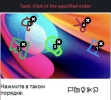
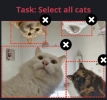
"points" اور "rectangles" ٹاسلکس کی ایک مثال
Python
Node.js
Go
PHP
C#
Java
Kotlin
C++
Rust
Ruby
bash
Python میں نقاط کے لیے تصویر کو کیسے حل کریں
#pip3 install anticaptchaofficial

from anticaptchaofficial.imagetocoordinates import *

solver = imagetocoordinates()
solver.set_verbose(1)
solver.set_key("YOUR_KEY")
solver.set_mode("points")
solver.set_comment("Select objects in specified order")

coordinates = solver.solve_and_return_solution("coordinates.png")
if coordinates != 0:
    print("coordinates: ", coordinates)
else:
    print("task finished with error "+solver.error_code)
Node.js میں نقاط کے لیے تصویر کو کیسے حل کریں
//npm install @antiadmin/anticaptchaofficial
//https://github.com/anti-captcha/anticaptcha-npm

const ac = require("@antiadmin/anticaptchaofficial");
const fs = require('fs');

const captcha = fs.readFileSync('captcha.png', { encoding: 'base64' });

ac.setAPIKey('YOUR_API_KEY_HERE');

//Specify softId to earn 10% commission with your app.
//Get your softId here: https://anti-captcha.com/clients/tools/devcenter
ac.setSoftId(0);

ac.solveImageToCoordinates(captcha, "Select all objects in specified order", "points")
    .then(coordinates => console.log('image coordinates:', coordinates))
    .catch(error => console.log('test received error '+error));
Go میں نقاط کے لیے تصویر کو کیسے حل کریں
// Install with:
// go get github.com/anti-captcha/anticaptcha-go

package main

import (
    "encoding/base64"
    "fmt"
    "github.com/anti-captcha/anticaptcha-go"
    "log"
)

func main() {
    // Create API client and set the API Key
    ac := anticaptcha.NewClient("API_KEY_HERE")

    // set to 'false' to turn off debug output
    ac.IsVerbose = true

    // Specify softId to earn 10% commission with your app.
    // Get your softId here: https://anti-captcha.com/clients/tools/devcenter
    //ac.SoftId = 1187

    // Make sure the API key funds balance is positive
    balance, err := ac.GetBalance()
    if err != nil {
        log.Fatal(err)
        // Exit program to make sure you don't DDoS API with requests, while having empty balance
        return
    }
    fmt.Println("Balance:", balance)

    // Solve image-to-coordinates captcha
    imageData, err := ac.ReadImageFile("coordinates.jpg")
    if err != nil {
        log.Fatal(err)
    }
    solution, err := ac.SolveImageToCoordinates(base64.StdEncoding.EncodeToString(imageData), anticaptcha.ImageToCoordinates{
        Comment: "Select object in the specified order",
        Mode:    "points",
    })
    if err != nil {
        log.Fatal(err)
    }
    fmt.Println("Objects X,Y coordinates:", solution)
}
PHP میں نقاط کے لیے تصویر کو کیسے حل کریں
//git clone https://github.com/anti-captcha/anticaptcha-php.git

include("../anticaptcha.php");
include("../imagetocoordinates.php");

$api = new ImageToCoordinates();
$api->setVerboseMode(true);

//your anti-captcha.com account key
$api->setKey(readline("You API key: "));

//setting file
$api->setFile("captcha.jpg");
$api->setComment("Select all elephants");
$api->setMode("rectangles");

//Specify softId to earn 10% commission with your app.
//Get your softId here: https://anti-captcha.com/clients/tools/devcenter
$api->setSoftId(0);

if (!$api->createTask()) {
    $api->debout("API v2 send failed - ".$api->getErrorMessage(), "red");
    return false;
}

$taskId = $api->getTaskId();


if (!$api->waitForResult()) {
    $api->debout("could not solve captcha", "red");
    $api->debout($api->getErrorMessage());
} else {
    $coordinates    =   $api->getTaskSolution();
    echo "\nresult:\n";
    print_r($coordinates);
    //check result, then if results is wrong:
    $api->reportIncorrectImageCaptcha();
}
C# میں نقاط کے لیے تصویر کو کیسے حل کریں
// GitHub: https://github.com/anti-captcha/anticaptcha-csharp.git
// install:  dotnet add package AntiCaptchaOfficial
// or, in the Package Manager Console:
// Install-Package AntiCaptchaOfficial

using System;
using AntiCaptcha.Api;
using AntiCaptcha.Helper;


class Program
{
    static void Main()
    {
        // Set to 'false' to turn off debug output
        DebugHelper.VerboseMode = true;

        var api = new ImageToCoordinates
        {
            ClientKey = "YOUR_API_KEY_HERE",
            FilePath = "captcha.jpg",
            // OR
            // BodyBase64 = "image-encoded-in-base64",

            // "points" to get single click coordinates, "rectangles" to get selection boxes
            Mode = "rectangles",
            Comment = "Select all elephants",

            // Specify softId to earn 10% commission with your app.
            // Get your softId here:
            // https://anti-captcha.com/clients/tools/devcenter
            SoftId = 0
        };

        // Make sure the API key funds balance is positive
        var balance = api.GetBalance();
        if (balance == null || balance <= 0)
        {
            // Exit the program to make sure you don't DDoS the API with requests while having empty balance
            Console.WriteLine("Balance error: " + api.ErrorMessage);
            return;
        }
        Console.WriteLine("Balance: " + balance);

        var solution = api.Solve();
        Console.WriteLine("Objects X,Y coordinates: " + solution?.Coordinates);
    }
}
Java میں نقاط کے لیے تصویر کو کیسے حل کریں
// GitHub: https://github.com/anti-captcha/anticaptcha-java
//
// Maven, add to pom.xml:
//   <dependency>
//     <groupId>com.anti-captcha</groupId>
//     <artifactId>anticaptcha</artifactId>
//     <version>1.0.0</version>
//   </dependency>
//
// Gradle, add to build.gradle:
//   implementation "com.anti-captcha:anticaptcha:1.0.0"

import com.anti_captcha.Api.ImageToCoordinates;
import com.anti_captcha.Helper.DebugHelper;

public class Main {

    public static void main(String[] args) throws InterruptedException {
        // Set to false to turn the debug output off
        DebugHelper.setVerboseMode(true);

        ImageToCoordinates api = new ImageToCoordinates();
        api.setClientKey("YOUR_API_KEY_HERE");

        // Specify softId to earn 10% commission with your app.
        // Get your softId here: https://anti-captcha.com/clients/tools/devcenter
        api.setSoftId(0);

        api.setFilePath("captcha.jpg");
        // OR api.setBodyBase64("image-encoded-in-base64");

        // "points" to get single click coordinates, "rectangles" to get selection boxes
        api.setMode("rectangles");
        api.setComment("Select all elephants");


        // Make sure the API key funds balance is positive
        Double balance = api.getBalance();
        if (balance == null || balance <= 0) {
            // Stop here to make sure you don't DDoS the API while having empty balance
            DebugHelper.out("Balance error: " + api.getErrorMessage(), DebugHelper.Type.ERROR);
            return;
        }
        DebugHelper.out("Balance: " + balance, DebugHelper.Type.SUCCESS);

        if (!api.createTask()) {
            DebugHelper.out("API v2 send failed. " + api.getErrorMessage(), DebugHelper.Type.ERROR);
        } else if (!api.waitForResult()) {
            DebugHelper.out("Could not solve the captcha.", DebugHelper.Type.ERROR);
        } else {
            DebugHelper.out("Objects X,Y coordinates: " + api.getTaskSolution().getCoordinates(), DebugHelper.Type.SUCCESS);
        }
    }
}
Kotlin میں نقاط کے لیے تصویر کو کیسے حل کریں
// GitHub: https://github.com/anti-captcha/anticaptcha-kotlin
//
// Gradle, add to build.gradle.kts:
//   implementation("com.anti-captcha:anticaptcha-kotlin:1.0.0")

import com.anticaptcha.AnticaptchaClient
import com.anticaptcha.AnticaptchaException
import com.anticaptcha.ApiException
import com.anticaptcha.ImageToCoordinates
import kotlinx.coroutines.runBlocking

fun main(): Unit = runBlocking {
    // Create the API client and set the API key
    val ac = AnticaptchaClient(
        apiKey = "YOUR_API_KEY_HERE",
        // Specify softId to earn 10% commission with your app.
        // Get your softId here: https://anti-captcha.com/clients/tools/devcenter
        softId = 0,
        // Set to false to turn the debug output off
        verbose = true,
    )

    try {
        // Make sure the API key funds balance is positive
        val balance = ac.getBalance()
        if (balance <= 0) {
            // Stop here to make sure you don't DDoS the API while having empty balance
            System.err.println("Empty balance")
            return@runBlocking
        }
        println("Balance: $balance")

        val solution = ac.solveImageToCoordinatesFile(
            "captcha.jpg",
            ImageToCoordinates(
                // "points" to get single click coordinates, "rectangles" to get selection boxes
                mode = "rectangles",
                comment = "Select all elephants",
            ),
        )

        println("Objects X,Y coordinates: ${solution.coordinates}")
    } catch (error: ApiException) {
        // https://anti-captcha.com/apidoc/errors
        System.err.println("API error: ${error.errorCode} ${error.description}")
    } catch (error: AnticaptchaException) {
        System.err.println("Failed: ${error.message}")
    }
}
C++ میں نقاط کے لیے تصویر کو کیسے حل کریں
// GitHub: https://github.com/anti-captcha/anticaptcha-cplus.git
// Add it to your CMake project:
//   include(FetchContent)
//   FetchContent_Declare(anticaptcha
//           GIT_REPOSITORY https://github.com/anti-captcha/anticaptcha-cplus.git
//           GIT_TAG v1.0.0)
//   FetchContent_MakeAvailable(anticaptcha)
//   target_link_libraries(your_app PRIVATE anticaptcha::anticaptcha)

#include <iostream>
#include <anticaptcha/anticaptcha.hpp>

int main() {
    // Create the API client and set the API key
    anticaptcha::Client ac("YOUR_API_KEY_HERE");

    // Debug output is on by default, turn it off with:
    // ac.shut_up();

    // Specify softId to earn 10% commission with your app.
    // Get your softId here: https://anti-captcha.com/clients/tools/devcenter
    ac.set_soft_id(0);

    try {
        // Make sure the API key funds balance is positive
        const double balance = ac.get_balance();
        if (balance <= 0) {
            // Stop here to make sure you don't DDoS the API while having empty balance
            std::cerr << "Empty balance" << std::endl;
            return 1;
        }
        std::cout << "Balance: " << balance << std::endl;

        anticaptcha::ImageToCoordinates params;
        // "points" to get single click coordinates, "rectangles" to get selection boxes
        params.mode = "rectangles";
        params.comment = "Select all elephants";

        const anticaptcha::Solution solution = ac.solve_image_to_coordinates_file("captcha.jpg", params);
        std::cout << "Objects X,Y coordinates: " << solution.coordinates().dump() << std::endl;
    } catch (const anticaptcha::ApiError& error) {
        // https://anti-captcha.com/apidoc/errors
        std::cerr << "API error: " << error.error_code() << " " << error.description() << std::endl;
        return 1;
    } catch (const anticaptcha::Error& error) {
        std::cerr << "Failed: " << error.what() << std::endl;
        return 1;
    }

    return 0;
}
Rust میں نقاط کے لیے تصویر کو کیسے حل کریں
// GitHub: https://github.com/anti-captcha/anticaptcha-rust
// Install with:
//   cargo add anticaptchaofficial
// or add it to Cargo.toml:
//   [dependencies]
//   anticaptchaofficial = "1"

use anticaptcha::{Client, ImageToCoordinates};

#[tokio::main]
async fn main() -> anticaptcha::Result<()> {
    // Create the API client and set the API key
    let ac = Client::new("YOUR_API_KEY_HERE")
        // Specify softId to earn 10% commission with your app.
        // Get your softId here: https://anti-captcha.com/clients/tools/devcenter
        .with_soft_id(0);
    // .quiet() turns the debug output off

    // Make sure the API key funds balance is positive
    let balance = ac.get_balance().await?;
    if balance <= 0.0 {
        // Stop here to make sure you don't DDoS the API while having empty balance
        eprintln!("Empty balance");
        return Ok(());
    }
    println!("Balance: {balance}");

    let solution = ac
        .solve_image_to_coordinates_file(
            "captcha.jpg",
            &ImageToCoordinates {
                // "points" to get single click coordinates, "rectangles" to get selection boxes
                mode: "rectangles".into(),
                comment: "Select all elephants".into(),
                ..Default::default()
            },
        )
        .await?;

    println!("Objects X,Y coordinates: {}", solution.coordinates().unwrap());

    Ok(())
}
Ruby میں نقاط کے لیے تصویر کو کیسے حل کریں
# GitHub: https://github.com/anti-captcha/anticaptcha-ruby
# Install with:
#   gem install anticaptchaofficial
# or add it to your Gemfile:
#   gem "anticaptchaofficial"

require "anticaptcha"

# Create the API client and set the API key
ac = Anticaptcha.new("YOUR_API_KEY_HERE")

# Specify softId to earn 10% commission with your app.
# Get your softId here: https://anti-captcha.com/clients/tools/devcenter
ac.soft_id = 0

# Set to false to turn the debug output off
ac.verbose = true

begin
  # Make sure the API key funds balance is positive
  balance = ac.balance
  # Stop here to make sure you don't DDoS the API while having empty balance
  abort "Empty balance" if balance <= 0
  puts "Balance: #{balance}"

  solution = ac.solve_image_to_coordinates_file(
    "captcha.jpg",
    # "points" to get single click coordinates, "rectangles" to get selection boxes
    mode: "rectangles",
    comment: "Select all elephants"
  )

  puts "Objects X,Y coordinates: #{solution.coordinates.inspect}"
rescue Anticaptcha::ApiError => e
  # https://anti-captcha.com/apidoc/errors
  warn "API error: #{e.error_code} #{e.description}"
rescue Anticaptcha::Error => e
  warn "Failed: #{e.message}"
end
bash میں نقاط کے لیے تصویر کو کیسے حل کریں
curl -i -H "Accept: application/json" \
-H "Content-Type: application/json" \
-X POST -d '{
    "clientKey":"YOUR_API_KEY_HERE",
    "task":
        {
            "type":"ImageToCoordinatesTask",
            "body":"BASE64_BODY_HERE__NO_NEWLINES__NO_EXTRA_TAGS__ONLY_CLEAN_BASE64",
            "comment":"Select all elephants",
            "mode":"rectangles"
        },
    "softId": 0
}' https://api.anti-captcha.com/createTask
ٹاسک آبجیکٹ
| پراپرٹی | قسم | درکار ہے | مقصد |
|---|---|---|---|
| type | اسٹرنگ | ہاں | ImageToCoordinatesTask ٹاسک کی ایک قسم کو بیان کرتا ہے۔ |
| body | اسٹرنگ | ہاں | base64 میں انکوڈ کی گئی فائل باڈی۔اسے لائن بریک کے بغیر بھیجنا یقینی بنائیں۔ 'data:image/png' یا اس طرح کے ٹیگ شامل نہ کریں، صرٖف صاف base64! |
| comment | اسٹرنگ | نہیں | صرف انگریزی حروف میں کام کے لیے تبصرے۔ مثال: "select all cars" یا "Select objects in specified order"۔ |
| mode | اسٹرنگ | نہیں | ٹاسک موڈ، "points" یا "rectangles" ہوسکتا ہے۔ ڈیفالٹ “points" ہے۔ |
| websiteURL | اسٹرنگ | نہیں | اخراجات کے اعدادوشمار میں تصویری captcha کے سورس کی تمیز کے لیے آپشنل پیرامیٹر۔ |
ٹاسک کے حل کا آبجیکٹ
| پراپرٹی | قسم | مقصد |
|---|---|---|
| coordinates | اسٹرنگ | کوآرڈینیٹس کے سیٹ کی صف۔ "points" موڈ کے لیے اے (x,y) سیٹ کریں۔ "rectangles" کے لیے یہ (x1,y1,x2,y2) ہے، اوپر سے بائیں سے نیچے سے دائیں تک۔ کوآرڈینیٹ کا اسٹارٹ اوپر بائیں کونے میں ہے۔ |
رسپانس کی مثال
{
    "errorId":0,
    "status":"ready",
    "solution":
    {
      "coordinates":[
        [17,48,54,83],
        [76,93,140,164]
      ]
    },
    "cost":"0.000700",
    "ip":"46.98.54.221",
    "createTime":1472205564,
    "endTime":1472205570,
    "solveCount":"0"
}