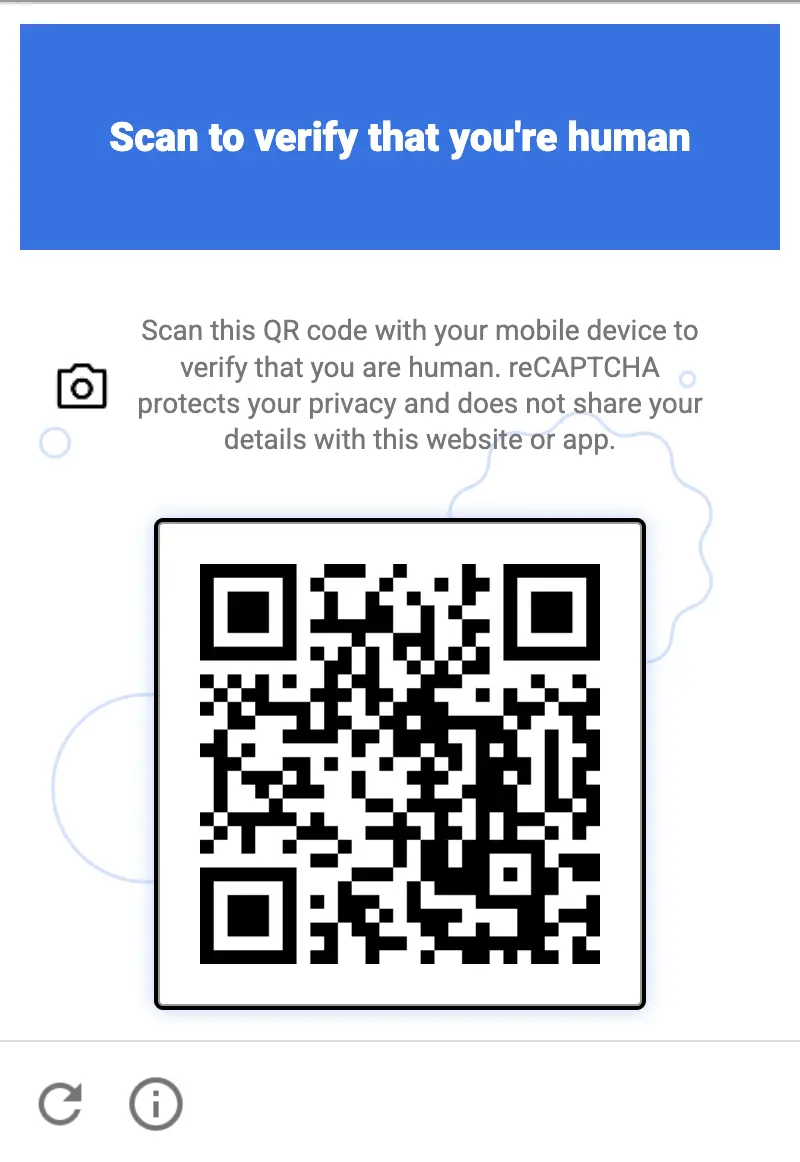
Ang bagong Recaptcha QR code challenge ay natively na sinusuportahan ng Anti-Captcha
Kinumpirma ng koponan ng Anti-Captcha na ang bagong Recaptcha challenge na may QR code ay natively na sinusuportahan ng aming serbisyo. Walang mga pagbabagong kailangan sa inyong integration: dahil ang bawat captcha sa Anti-Captcha ay nilulutas ng mga totoong tao, hinahawakan ng aming mga manggagawa ang bagong hamong ito sa parehong paraan na gagawin ng isang ordinaryong bisita ng website.
Ano ang hamon ng Recaptcha QR code
Ipinakita ng Google ang bagong challenge sa tag-init ng 2026. Sa kasalukuyan ito ay sinusubukan sa isang saradong mode sa limitadong bilang ng mga website, bago ito ilunsad sa lahat ng mga customer ng Recaptcha. Sa halip na pumili ng mga larawan o mag-tik sa isang checkbox, ang user ay ipinapakitaan ng isang QR code at hinihiling na kumpletuhin ang verification sa kanilang mobile phone. Ang QR code challenge ay hindi nakatali sa iisang bersyon ng Recaptcha: lumalabas ito sa mga website na gumagamit ng parehong Recaptcha V2 at Recaptcha V3.
Ang ideya sa likod nito ay simple: medyo mura para sa isang bot na gayahin ang isang desktop browser, ngunit mas mahirap gayahin ang isang totoong pisikal na smartphone na may camera, tunay na operating system at access sa mga opisyal na app store.
Mga teknikal na tampok
Mobile-centric. Ang hamon ay hindi maaaring kumpletuhin sa loob ng browser kung saan ito ipinapakita. Ang beripikasyon ay inililipat sa isang hiwalay na device — ang smartphone ng user — at ang browser ay naghihintay lamang para sa kumpirmasyon.
Sina-scan gamit ang camera ng telepono. Ang QR code ay sina-scan gamit ang ordinaryong camera app ng telepono. Walang third-party na QR scanner na kailangan: kinikilala ng camera ang code at nag-aalok na buksan ang beripikasyon.
Nilulutas ng mga mini-app mula sa Google Play at ang App Store. Ang pag-scan ng code ay naglulunsad ng magaan na mini-app na ipinapamahagi sa pamamagitan ng Google Play (Android na may Google Play Services 25.41.30) o ang App Store (iOS 15/16+). Ang mini-app ay bumubukas agad nang walang buong pag-install at nagsasagawa ng beripikasyon sa device.
Beripikasyong nakatali sa device. Ang resulta ay nakatali sa isang totoong pisikal na device, na ginagawang napakahirap i-automate ang hamon gamit ang mga headless browser, emulator o AI-based solver.
Paano ito hinahawakan ng mga manggagawa ng Anti-Captcha
Nagsagawa kami ng internal na pagsubok sa mga manggagawa ng Anti-Captcha: mga 50% sa kanila ay nakalutas agad ng bagong hamon gamit ang kanilang sariling mga telepono, nang walang anumang karagdagang mga tagubilin o paghahanda. Ang iba ay karaniwang kailangan lamang i-update ang kanilang operating system o lumipat sa isang suportadong device, na isang usapin ng oras sa halip na isang tunay na hadlang.
Ito mismo ang lugar kung saan may kalamangan ang isang serbisyong pinapatakbo ng tao kaysa sa mga automated na solver. Ang isang tao na may ordinaryong smartphone ay kumukumpleto ng hamon sa loob ng ilang segundo, samantalang ang isang bot ay kailangang magpatakbo ng isang farm ng mga totoong device para gawin ang parehong bagay.
Ano ang ibig sabihin nito para sa aming mga customer
Patuloy mo lang ipapadala ang mga task ng Recaptcha V2 o V3 sa parehong paraan na ginagawa mo ngayon. Kapag nagpakita ang isang website ng QR code challenge, niresolba ito ng aming mga manggagawa gamit ang kanilang mga telepono at makakatanggap ka ng karaniwang g-recaptcha-response token sa resulta ng task.
Paano malalaman kung aling bersyon ng Recaptcha ang ginagamit ng isang website
Buksan ang pahinang may captcha sa Chrome, buksan ang developer console (F12, pagkatapos ay ang Console tab), i-paste ang script sa ibaba at pindutin ang Enter. Patakbuhin ito pagkatapos lumitaw ang captcha sa pahina, halimbawa pagkatapos i-click ang submit button ng form.
(() => {
  const out = { scripts: [], iframes: [], clients: [], verdict: [] };

  // 1. Loaded Recaptcha scripts
  document.querySelectorAll('script[src*="recaptcha"]').forEach(s => {
    const u = new URL(s.src, location.href);
    out.scripts.push({
      src: u.pathname,
      enterprise: u.pathname.includes('enterprise'),
      render: u.searchParams.get('render'),
    });
  });

  // 2. Anchor-iframe
  document.querySelectorAll('iframe[src*="/anchor"]').forEach(f => {
    const u = new URL(f.src);
    out.iframes.push({
      enterprise: u.pathname.includes('/enterprise/'),
      sitekey: u.searchParams.get('k'),
      size: u.searchParams.get('size'),
      action: u.searchParams.get('sa'),
      s: u.searchParams.has('s'),
    });
  });

  // 3. Internal config: look for objects with a sitekey
  const seen = new WeakSet();
  const walk = (o, depth = 0) => {
    if (!o || typeof o !== 'object' || seen.has(o) || depth > 6) return;
    seen.add(o);
    if (typeof o.sitekey === 'string') {
      out.clients.push({
        sitekey: o.sitekey,
        size: o.size,
        action: o.action,
        callback: typeof o.callback === 'function' ? o.callback.name || 'fn'
                 : o.callback || null,
        badge: o.badge,
      });
    }
    for (const k in o) { try { walk(o[k], depth + 1); } catch {} }
  };
  try { walk(window.___grecaptcha_cfg?.clients); } catch {}

  // 4. Verdict
  const renderKey = out.scripts.find(s => s.render && s.render !== 'explicit' && s.render !== 'onload');
  const ent = out.scripts.some(s => s.enterprise) || !!window.grecaptcha?.enterprise;
  if (renderKey) out.verdict.push(`v3/score (render=${renderKey.render})`);
  out.iframes.forEach(i => {
    if (i.size === 'normal' || i.size === 'compact') out.verdict.push(`v2 checkbox (${i.sitekey})`);
    else if (i.size === 'invisible' && (!renderKey || renderKey.render !== i.sitekey))
      out.verdict.push(`v2 invisible (${i.sitekey})`);
  });
  if (ent) out.verdict.push('Enterprise');

  console.table(out.scripts);
  console.table(out.iframes);
  console.table(out.clients);
  console.log('VERDICT:', out.verdict.length ? out.verdict.join(' | ') : 'not found (the captcha may not be loaded yet)');
  return out;
})();
Ang script ay nagpi-print ng mga Recaptcha script, widget at ang kanilang mga setting (sitekey, size, action) bilang mga table, na sinusundan ng isang VERDICT na linya:
v3/score — Recaptcha V3: ang sitekey ay ipinapasa sa render parameter ng Recaptcha script.
v2 checkbox / v2 invisible — Recaptcha V2 na may checkbox o isang invisible na widget.
Enterprise — ginagamit ng website ang Recaptcha Enterprise (ang enterprise.js script).
Gamitin ang sitekey mula sa output bilang website key, at ang action value, kung mayroon, bilang page action sa mga halimbawa ng code sa ibaba.
Mga halimbawa ng code
Piliin ang bersyon ng Recaptcha na makikita sa website:
Python
Node.js
Go
PHP
Java
Kotlin
C#
C++
Rust
Ruby
bash
Paano lutasin ang Recaptcha QR sa Python
#pip3 install anticaptchaofficial

from anticaptchaofficial.recaptchav2enterpriseproxyless import *

solver = recaptchaV2EnterpriseProxyless()
solver.set_verbose(1)
solver.set_key("YOUR_API_KEY_HERE")
solver.set_website_url("https://website.com")
solver.set_website_key("YOUR_API_KEY_HERE")
# set to "true" if there's "size":"invisible" option in "grecaptcha.enterprise.render" function
solver.set_is_invisible(True)
# Set page action value:
solver.set_enterprise_payload({"action": "form_submit"})

g_response = solver.solve_and_return_solution()
if g_response != 0:
    print("g-response: "+g_response)
    # user-agent in case you need it:
    print("user-agent: "+solver.get_user_agent())
else:
    print("task finished with error "+solver.error_code)
Paano lutasin ang Recaptcha QR sa Node.js
//npm install @antiadmin/anticaptchaofficial
//https://github.com/anti-captcha/anticaptcha-npm

const ac = require("@antiadmin/anticaptchaofficial");

ac.setAPIKey('YOUR_API_KEY_HERE');

ac.solveRecaptchaV2EnterpriseProxyless(
    'http://DOMAIN.COM',
    'WEBSITE_KEY',
    {
        "action": "form_submit" // set page action value here
    },
    true)  // set to "true" if there's "size":"invisible" option in "grecaptcha.enterprise.render" function
    .then(gresponse => {
        console.log('g-response: '+gresponse);
    })
    .catch(error => console.log('test received error '+error));

// in case you need it
console.log("worker's user-agent:");
console.log(ac.getUserAgent());
Paano lutasin ang Recaptcha QR sa Go
// Install with:
// go get github.com/anti-captcha/anticaptcha-go
package main

import (
    "fmt"
    "github.com/anti-captcha/anticaptcha-go"
    "log"
)

func main() {
    // Create API client and set the API Key
    ac := anticaptcha.NewClient("API_KEY_HERE")

    // set to 'false' to turn off debug output
    ac.IsVerbose = true

    // Make sure the API key funds balance is positive
    balance, err := ac.GetBalance()
    if err != nil {
        log.Fatal(err)
        // Exit program to make sure you don't DDoS API with requests, while having empty balance
        return
    }
    fmt.Println("Balance:", balance)

    // Solve Recaptcha V2 Enterprise without proxy
    solution, err := ac.SolveRecaptchaV2Enterprise(anticaptcha.RecaptchaV2{
        WebsiteURL:  "https://huev.com/",
        WebsiteKey:  "6Lcyu8UZAAAAACwSh6Xf58WrNXTu0LLu4F85xf20",
        IsInvisible: true, // set to "true" if there's "size":"invisible" option in "grecaptcha.enterprise.render" function
        EnterprisePayload:  map[string]interface{}{
            "action": "form_submit", // set page action here
        },
    })
    if err != nil {
        log.Fatal(err)
    }
    fmt.Println("Recaptcha Enterprise g-response token:", solution)
}
Paano lutasin ang Recaptcha QR sa PHP
//git clone https://github.com/anti-captcha/anticaptcha-php.git

include("anticaptcha.php");
include("recaptchaV2Enterpriseproxyless.php");

$api = new Recaptchav2enterpriseProxyless();
$api->setVerboseMode(true);

//your anti-captcha.com account key
$api->setKey("YOUR_API_KEY_HERE");

//target website address
$api->setWebsiteURL("http://enteprisedomain.com/recaptcha/test.php");

//recaptcha key from target website
$api->setWebsiteKey("ENTERPRISE_SITEKEY_HERE");

//set page action here
$api->setEnterprisePayload(["action" => "form_submit"]);

//set to "true" if there's "size":"invisible" option in "grecaptcha.enterprise.render" function
$api->setIsInvisible();

//create task in API
if (!$api->createTask()) {
    $api->debout("API v2 send failed - ".$api->getErrorMessage(), "red");
    return false;
}

$taskId = $api->getTaskId();

//wait in a loop for max 300 seconds till task is solved
if (!$api->waitForResult(300)) {
    echo "could not solve captcha\n";
    echo $api->getErrorMessage()."\n";
} else {

    $gResponse    =   $api->getTaskSolution();
    echo "\your recaptcha token: $gResponse\n\n";
    echo "worker's user-agent in case you need it:\n";
    echo $api->getWorkersUserAgent()."\n";

}
Paano lutasin ang Recaptcha QR sa Java
// GitHub: https://github.com/anti-captcha/anticaptcha-java
//
// Maven, add to pom.xml:
//   <dependency>
//     <groupId>com.anti-captcha</groupId>
//     <artifactId>anticaptcha</artifactId>
//     <version>1.0.0</version>
//   </dependency>
//
// Gradle, add to build.gradle:
//   implementation "com.anti-captcha:anticaptcha:1.0.0"

import com.anti_captcha.Api.RecaptchaV2EnterpriseProxyless;
import com.anti_captcha.Helper.DebugHelper;
import org.json.JSONObject;

public class Main {

    public static void main(String[] args) throws InterruptedException {
        // Set to false to turn the debug output off
        DebugHelper.setVerboseMode(true);

        RecaptchaV2EnterpriseProxyless api = new RecaptchaV2EnterpriseProxyless();
        api.setClientKey("YOUR_API_KEY_HERE");

        api.setWebsiteUrl("http://makeawebsitehub.com/recaptcha/test.php");
        api.setWebsiteKey("6LfI9IsUAAAAAKuvopU0hfY8pWADfR_mogXokIIZ");

        // Set page action here:
        api.setEnterprisePayload(new JSONObject()
                .put("action", "form_submit"));

        // set to "true" if there's "size":"invisible" option in "grecaptcha.enterprise.render" function
        api.setIsInvisible(true);

        // Make sure the API key funds balance is positive
        Double balance = api.getBalance();
        if (balance == null || balance <= 0) {
            // Stop here to make sure you don't DDoS the API while having empty balance
            DebugHelper.out("Balance error: " + api.getErrorMessage(), DebugHelper.Type.ERROR);
            return;
        }
        DebugHelper.out("Balance: " + balance, DebugHelper.Type.SUCCESS);

        if (!api.createTask()) {
            DebugHelper.out("API v2 send failed. " + api.getErrorMessage(), DebugHelper.Type.ERROR);
        } else if (!api.waitForResult()) {
            DebugHelper.out("Could not solve the captcha.", DebugHelper.Type.ERROR);
        } else {
            DebugHelper.out("Recaptcha g-response token: " + api.getTaskSolution().getGRecaptchaResponse(), DebugHelper.Type.SUCCESS);
            DebugHelper.out("Worker's user-agent in case you need it: " + api.getTaskSolution().getUserAgent(), DebugHelper.Type.SUCCESS);
        }
    }
}
Paano lutasin ang Recaptcha QR sa Kotlin
// GitHub: https://github.com/anti-captcha/anticaptcha-kotlin
//
// Gradle, add to build.gradle.kts:
//   implementation("com.anti-captcha:anticaptcha-kotlin:1.0.0")

import com.anticaptcha.AnticaptchaClient
import com.anticaptcha.AnticaptchaException
import com.anticaptcha.ApiException
import com.anticaptcha.RecaptchaV2
import kotlinx.coroutines.runBlocking

fun main(): Unit = runBlocking {
    // Create the API client and set the API key
    val ac = AnticaptchaClient(
        apiKey = "YOUR_API_KEY_HERE",
        // Specify softId to earn 10% commission with your app.
        // Get your softId here: https://anti-captcha.com/clients/tools/devcenter
        softId = 0,
        // Set to false to turn the debug output off
        verbose = true,
    )

    try {
        // Make sure the API key funds balance is positive
        val balance = ac.getBalance()
        if (balance <= 0) {
            // Stop here to make sure you don't DDoS the API while having empty balance
            System.err.println("Empty balance")
            return@runBlocking
        }
        println("Balance: $balance")

        val solution = ac.solveRecaptchaV2(
            RecaptchaV2(
                websiteUrl = "http://makeawebsitehub.com/recaptcha/test.php",
                websiteKey = "6LfI9IsUAAAAAKuvopU0hfY8pWADfR_mogXokIIZ",
                isEnterprise = true,
                // set to "true" if there's "size":"invisible" option in "grecaptcha.enterprise.render" function
                isInvisible = true,
                // Set page action here
                enterprisePayload = mapOf(
                    "action" to "form_submit",
                ),
            ),
        )

        println("Recaptcha g-response token: ${solution.gRecaptchaResponse}")
        println("Worker's user-agent in case you need it: ${solution.userAgent}")
    } catch (error: ApiException) {
        // https://anti-captcha.com/apidoc/errors
        System.err.println("API error: ${error.errorCode} ${error.description}")
    } catch (error: AnticaptchaException) {
        System.err.println("Failed: ${error.message}")
    }
}
Paano lutasin ang Recaptcha QR sa C#
// GitHub: https://github.com/anti-captcha/anticaptcha-csharp.git
// install:  dotnet add package AntiCaptchaOfficial
// or, in the Package Manager Console:
// Install-Package AntiCaptchaOfficial

using System;
using AntiCaptcha.Api;
using AntiCaptcha.Helper;


class Program
{
    static void Main()
    {
        // Set to 'false' to turn off debug output
        DebugHelper.VerboseMode = true;

        var api = new RecaptchaV2EnterpriseProxyless
        {
            ClientKey = "YOUR_API_KEY_HERE",
            WebsiteUrl = new Uri("http://makeawebsitehub.com/recaptcha/test.php"),
            WebsiteKey = "6LfI9IsUAAAAAKuvopU0hfY8pWADfR_mogXokIIZ",
            IsInvisible = true  // set to "true" if there's "size":"invisible" option in "grecaptcha.enterprise.render" function
        };

        // set page action here
        api.EnterprisePayload.Add("action", "form_submit");

        // Make sure the API key funds balance is positive
        var balance = api.GetBalance();
        if (balance == null || balance <= 0)
        {
            // Exit the program to make sure you don't DDoS the API with requests while having empty balance
            Console.WriteLine("Balance error: " + api.ErrorMessage);
            return;
        }
        Console.WriteLine("Balance: " + balance);

        var solution = api.Solve();
        Console.WriteLine("Recaptcha g-response token: " + solution?.GRecaptchaResponse);
        Console.WriteLine("Worker's user-agent in case you need it: " + solution?.UserAgent);
    }
}
Paano lutasin ang Recaptcha QR sa C++
// GitHub: https://github.com/anti-captcha/anticaptcha-cplus.git
// Add it to your CMake project:
//   include(FetchContent)
//   FetchContent_Declare(anticaptcha
//           GIT_REPOSITORY https://github.com/anti-captcha/anticaptcha-cplus.git
//           GIT_TAG v1.1.0)
//   FetchContent_MakeAvailable(anticaptcha)
//   target_link_libraries(your_app PRIVATE anticaptcha::anticaptcha)

#include <iostream>
#include <anticaptcha/anticaptcha.hpp>

int main() {
    // Create the API client and set the API key
    anticaptcha::Client ac("YOUR_API_KEY_HERE");

    // Debug output is on by default, turn it off with:
    // ac.shut_up();

    // Specify softId to earn 10% commission with your app.
    // Get your softId here: https://anti-captcha.com/clients/tools/devcenter
    ac.set_soft_id(0);

    try {
        // Make sure the API key funds balance is positive
        const double balance = ac.get_balance();
        if (balance <= 0) {
            // Stop here to make sure you don't DDoS the API while having empty balance
            std::cerr << "Empty balance" << std::endl;
            return 1;
        }
        std::cout << "Balance: " << balance << std::endl;

        anticaptcha::RecaptchaV2 params;
        params.website_url = "http://makeawebsitehub.com/recaptcha/test.php";
        params.website_key = "6LfI9IsUAAAAAKuvopU0hfY8pWADfR_mogXokIIZ";
        params.is_enterprise = true;
        // set to "true" if there's "size":"invisible" option in "grecaptcha.enterprise.render" function
        params.is_invisible = true;
        // Set page action here
        params.enterprise_payload = { {"action", "form_submit"} };
        // params.api_domain = "recaptcha.net"; // only for a non-google.com script domain

        const anticaptcha::Solution solution = ac.solve_recaptcha_v2(params);
        std::cout << "Recaptcha g-response token: " << solution.g_recaptcha_response() << std::endl;
        std::cout << "Worker's user-agent in case you need it: " << solution.user_agent() << std::endl;
    } catch (const anticaptcha::ApiError& error) {
        // https://anti-captcha.com/apidoc/errors
        std::cerr << "API error: " << error.error_code() << " " << error.description() << std::endl;
        return 1;
    } catch (const anticaptcha::Error& error) {
        std::cerr << "Failed: " << error.what() << std::endl;
        return 1;
    }

    return 0;
}
Paano lutasin ang Recaptcha QR sa Rust
// GitHub: https://github.com/anti-captcha/anticaptcha-rust
// Install with:
//   cargo add anticaptchaofficial
// or add it to Cargo.toml:
//   [dependencies]
//   anticaptchaofficial = "1"

use std::collections::BTreeMap;
use anticaptcha::{Client, RecaptchaV2};

#[tokio::main]
async fn main() -> anticaptcha::Result<()> {
    // Create the API client and set the API key
    let ac = Client::new("YOUR_API_KEY_HERE")
        // Specify softId to earn 10% commission with your app.
        // Get your softId here: https://anti-captcha.com/clients/tools/devcenter
        .with_soft_id(0);
    // .quiet() turns the debug output off

    // Make sure the API key funds balance is positive
    let balance = ac.get_balance().await?;
    if balance <= 0.0 {
        // Stop here to make sure you don't DDoS the API while having empty balance
        eprintln!("Empty balance");
        return Ok(());
    }
    println!("Balance: {balance}");

    // set page action here
    let mut enterprise_payload = BTreeMap::new();
    enterprise_payload.insert("action".to_owned(), "form_submit".to_owned());

    let solution = ac
        .solve_recaptcha_v2(&RecaptchaV2 {
            website_url: "http://makeawebsitehub.com/recaptcha/test.php".into(),
            website_key: "6LfI9IsUAAAAAKuvopU0hfY8pWADfR_mogXokIIZ".into(),
            is_enterprise: true,
            is_invisible: true, // set to "true" if there's "size":"invisible" option in "grecaptcha.enterprise.render" function
            // Additional parameters passed to the grecaptcha.enterprise.render call
            enterprise_payload,
            // api_domain: "recaptcha.net".into(), // only for a non-google.com script domain
            ..Default::default()
        })
        .await?;

    println!("Recaptcha g-response token: {}", solution.g_recaptcha_response());
    println!("Worker's user-agent in case you need it: {}", solution.user_agent());

    Ok(())
}
Paano lutasin ang Recaptcha QR sa Ruby
# GitHub: https://github.com/anti-captcha/anticaptcha-ruby
# Install with:
#   gem install anticaptchaofficial
# or add it to your Gemfile:
#   gem "anticaptchaofficial"

require "anticaptcha"

# Create the API client and set the API key
ac = Anticaptcha.new("YOUR_API_KEY_HERE")

# Specify softId to earn 10% commission with your app.
# Get your softId here: https://anti-captcha.com/clients/tools/devcenter
ac.soft_id = 0

# Set to false to turn the debug output off
ac.verbose = true

begin
  # Make sure the API key funds balance is positive
  balance = ac.balance
  # Stop here to make sure you don't DDoS the API while having empty balance
  abort "Empty balance" if balance <= 0
  puts "Balance: #{balance}"

  solution = ac.solve_recaptcha_v2(
    website_url: "http://makeawebsitehub.com/recaptcha/test.php",
    website_key: "6LfI9IsUAAAAAKuvopU0hfY8pWADfR_mogXokIIZ",
    is_enterprise: true,
    # set to "true" if there's "size":"invisible" option in "grecaptcha.enterprise.render" function
    # is_invisible: true,
    # Set page action here
    enterprise_payload: { "action" => "form_submit" }
    # api_domain: "recaptcha.net", # only for a non-google.com script domain
  )

  puts "Recaptcha g-response token: #{solution.g_recaptcha_response}"
  puts "Worker's user-agent in case you need it: #{solution.user_agent}"
rescue Anticaptcha::ApiError => e
  # https://anti-captcha.com/apidoc/errors
  warn "API error: #{e.error_code} #{e.description}"
rescue Anticaptcha::Error => e
  warn "Failed: #{e.message}"
end
#pip3 install anticaptchaofficial

from anticaptchaofficial.recaptchav3enterpriseproxyless import *

solver = recaptchaV3EnterpriseProxyless()
solver.set_verbose(1)
solver.set_key("YOUR_API_KEY_HERE")
solver.set_website_url("https://website.com")
solver.set_website_key("SITE_KEY")
solver.set_page_action("home_page")
solver.set_min_score(0.9)

# Specify softId to earn 10% commission with your app.
# Get your softId here: https://anti-captcha.com/clients/tools/devcenter
solver.set_soft_id(0)

g_response = solver.solve_and_return_solution()
if g_response != 0:
    print("g-response: "+g_response)
    # user-agent in case you need it:
    print("user-agent: "+solver.get_user_agent())
else:
    print("task finished with error "+solver.error_code)
Paano lutasin ang Recaptcha QR sa Node.js
//npm install @antiadmin/anticaptchaofficial
//https://github.com/anti-captcha/anticaptcha-npm

const ac = require("@antiadmin/anticaptchaofficial");

ac.setAPIKey('YOUR_API_KEY_HERE');

//Specify softId to earn 10% commission with your app.
//Get your softId here: https://anti-captcha.com/clients/tools/devcenter
ac.setSoftId(0);

ac.solveRecaptchaV3Enterprise('http://DOMAIN.COM',
    'WEBSITE_KEY',
    0.3, //minimum score required: 0.3, 0.7 or 0.9
    'PAGE_ACTION_CAN_BE_EMPTY')
    .then(gresponse => {
        console.log('g-response: '+gresponse);
    })
    .catch(error => console.log('test received error '+error));

// in case you need it
console.log("worker's user-agent:");
console.log(ac.getUserAgent());
Paano lutasin ang Recaptcha QR sa Go
// Install with:
// go get github.com/anti-captcha/anticaptcha-go
package main

import (
    "fmt"
    "github.com/anti-captcha/anticaptcha-go"
    "log"
)

func main() {
    // Create API client and set the API Key
    ac := anticaptcha.NewClient("API_KEY_HERE")

    // set to 'false' to turn off debug output
    ac.IsVerbose = true

    // Specify softId to earn 10% commission with your app.
    // Get your softId here: https://anti-captcha.com/clients/tools/devcenter
    //ac.SoftId = 1187

    // Make sure the API key funds balance is positive
    balance, err := ac.GetBalance()
    if err != nil {
        log.Fatal(err)
        // Exit program to make sure you don't DDoS API with requests, while having empty balance
        return
    }
    fmt.Println("Balance:", balance)

    // Solve Recaptcha V3 Enterprise
    solution, err := ac.SolveRecaptchaV3(anticaptcha.RecaptchaV3{
        WebsiteURL: "https://onlyfans.com/",
        WebsiteKey: "6LcvNcwdAAAAAMWAuNRXH74u3QePsEzTm6GEjx0J",
        PageAction: "somefun",
        MinScore:   0.9,
        IsEnterprise: true, // Set to 'true' if you are solving a Recaptcha V3 Enterprise
    })
    if err != nil {
        log.Fatal(err)
    }
    fmt.Println("Recaptcha g-response token:", solution)
    // In case you need the worker's user-agent
    fmt.Println("User-Agent:", ac.WorkersUserAgent)
}
Paano lutasin ang Recaptcha QR sa PHP
//git clone https://github.com/anti-captcha/anticaptcha-php.git

include("anticaptcha.php");
include("recaptchav3enterprise.php");

$api = new RecaptchaV3Enterprise();
$api->setVerboseMode(true);

//your anti-captcha.com account key
$api->setKey("YOUR_API_KEY_HERE");

//target website address
$api->setWebsiteURL("http://makeawebsitehub.com/recaptcha/test.php");

//recaptcha key from target website
$api->setWebsiteKey("6LfI9IsUAAAAAKuvopU0hfY8pWADfR_mogXokIIZ");

//parameters for V3
//score you would like to have
$api->setMinScore(0.9);
//optional page action
$api->setPageAction("some_action");

//Specify softId to earn 10% commission with your app.
//Get your softId here: https://anti-captcha.com/clients/tools/devcenter
$api->setSoftId(0);

//create task in API
if (!$api->createTask()) {
    $api->debout("API v2 send failed - ".$api->getErrorMessage(), "red");
    return false;
}

$taskId = $api->getTaskId();

//wait in a loop for max 300 seconds till task is solved
if (!$api->waitForResult(300)) {
    echo "could not solve captcha\n";
    echo $api->getErrorMessage()."\n";
} else {

    $gResponse    =   $api->getTaskSolution();
    echo "your recaptcha token: $gResponse\n\n";
    echo "worker's user-agent in case you need it:\n";
    echo $api->getWorkersUserAgent()."\n";

}
Paano lutasin ang Recaptcha QR sa Java
// GitHub: https://github.com/anti-captcha/anticaptcha-java
//
// Maven, add to pom.xml:
//   <dependency>
//     <groupId>com.anti-captcha</groupId>
//     <artifactId>anticaptcha</artifactId>
//     <version>1.0.0</version>
//   </dependency>
//
// Gradle, add to build.gradle:
//   implementation "com.anti-captcha:anticaptcha:1.0.0"

import com.anti_captcha.Api.RecaptchaV3EnterpriseProxyless;
import com.anti_captcha.Helper.DebugHelper;

public class Main {

    public static void main(String[] args) throws InterruptedException {
        // Set to false to turn the debug output off
        DebugHelper.setVerboseMode(true);

        RecaptchaV3EnterpriseProxyless api = new RecaptchaV3EnterpriseProxyless();
        api.setClientKey("YOUR_API_KEY_HERE");

        // Specify softId to earn 10% commission with your app.
        // Get your softId here: https://anti-captcha.com/clients/tools/devcenter
        api.setSoftId(0);

        api.setWebsiteUrl("http://makeawebsitehub.com/recaptcha/test.php");
        api.setWebsiteKey("6LfI9IsUAAAAAKuvopU0hfY8pWADfR_mogXokIIZ");
        api.setPageAction("login_or_register");

        // Score you need, one of 0.3, 0.7 or 0.9
        api.setMinScore(0.3);

        // Make sure the API key funds balance is positive
        Double balance = api.getBalance();
        if (balance == null || balance <= 0) {
            // Stop here to make sure you don't DDoS the API while having empty balance
            DebugHelper.out("Balance error: " + api.getErrorMessage(), DebugHelper.Type.ERROR);
            return;
        }
        DebugHelper.out("Balance: " + balance, DebugHelper.Type.SUCCESS);

        if (!api.createTask()) {
            DebugHelper.out("API v2 send failed. " + api.getErrorMessage(), DebugHelper.Type.ERROR);
        } else if (!api.waitForResult()) {
            DebugHelper.out("Could not solve the captcha.", DebugHelper.Type.ERROR);
        } else {
            DebugHelper.out("Recaptcha g-response token: " + api.getTaskSolution().getGRecaptchaResponse(), DebugHelper.Type.SUCCESS);
            DebugHelper.out("Worker's user-agent in case you need it: " + api.getTaskSolution().getUserAgent(), DebugHelper.Type.SUCCESS);
        }
    }
}
Paano lutasin ang Recaptcha QR sa Kotlin
// GitHub: https://github.com/anti-captcha/anticaptcha-kotlin
//
// Gradle, add to build.gradle.kts:
//   implementation("com.anti-captcha:anticaptcha-kotlin:1.0.0")

import com.anticaptcha.AnticaptchaClient
import com.anticaptcha.AnticaptchaException
import com.anticaptcha.ApiException
import com.anticaptcha.RecaptchaV3
import kotlinx.coroutines.runBlocking

fun main(): Unit = runBlocking {
    // Create the API client and set the API key
    val ac = AnticaptchaClient(
        apiKey = "YOUR_API_KEY_HERE",
        // Specify softId to earn 10% commission with your app.
        // Get your softId here: https://anti-captcha.com/clients/tools/devcenter
        softId = 0,
        // Set to false to turn the debug output off
        verbose = true,
    )

    try {
        // Make sure the API key funds balance is positive
        val balance = ac.getBalance()
        if (balance <= 0) {
            // Stop here to make sure you don't DDoS the API while having empty balance
            System.err.println("Empty balance")
            return@runBlocking
        }
        println("Balance: $balance")

        val solution = ac.solveRecaptchaV3(
            RecaptchaV3(
                websiteUrl = "http://makeawebsitehub.com/recaptcha/test.php",
                websiteKey = "6LfI9IsUAAAAAKuvopU0hfY8pWADfR_mogXokIIZ",
                pageAction = "login_or_register",
                isEnterprise = true,

                // Score you need, one of 0.3, 0.7 or 0.9
                minScore = 0.3,
            ),
        )

        println("Recaptcha g-response token: ${solution.gRecaptchaResponse}")
        println("Worker's user-agent in case you need it: ${solution.userAgent}")
    } catch (error: ApiException) {
        // https://anti-captcha.com/apidoc/errors
        System.err.println("API error: ${error.errorCode} ${error.description}")
    } catch (error: AnticaptchaException) {
        System.err.println("Failed: ${error.message}")
    }
}
Paano lutasin ang Recaptcha QR sa C#
// GitHub: https://github.com/anti-captcha/anticaptcha-csharp.git
// install:  dotnet add package AntiCaptchaOfficial
// or, in the Package Manager Console:
// Install-Package AntiCaptchaOfficial

using System;
using AntiCaptcha.Api;
using AntiCaptcha.Helper;


class Program
{
    static void Main()
    {
        // Set to 'false' to turn off debug output
        DebugHelper.VerboseMode = true;

        var api = new RecaptchaV3Proxyless
        {
            ClientKey = "YOUR_API_KEY_HERE",
            WebsiteUrl = new Uri("http://makeawebsitehub.com/recaptcha/test.php"),
            WebsiteKey = "6LfI9IsUAAAAAKuvopU0hfY8pWADfR_mogXokIIZ",
            PageAction = "login_or_register",
            IsEnterprise = true,
            // Score you need, one of 0.3, 0.7 or 0.9
            MinScore = 0.3,
            // Specify softId to earn 10% commission with your app.
            // Get your softId here:
            // https://anti-captcha.com/clients/tools/devcenter
            SoftId = 0
        };

        // Make sure the API key funds balance is positive
        var balance = api.GetBalance();
        if (balance == null || balance <= 0)
        {
            // Exit the program to make sure you don't DDoS the API with requests while having empty balance
            Console.WriteLine("Balance error: " + api.ErrorMessage);
            return;
        }
        Console.WriteLine("Balance: " + balance);

        var solution = api.Solve();
        Console.WriteLine("Recaptcha g-response token: " + solution?.GRecaptchaResponse);
        Console.WriteLine("Worker's user-agent in case you need it: " + solution?.UserAgent);
    }
}
Paano lutasin ang Recaptcha QR sa C++
// GitHub: https://github.com/anti-captcha/anticaptcha-cplus.git
// Add it to your CMake project:
//   include(FetchContent)
//   FetchContent_Declare(anticaptcha
//           GIT_REPOSITORY https://github.com/anti-captcha/anticaptcha-cplus.git
//           GIT_TAG v1.0.0)
//   FetchContent_MakeAvailable(anticaptcha)
//   target_link_libraries(your_app PRIVATE anticaptcha::anticaptcha)

#include <iostream>
#include <anticaptcha/anticaptcha.hpp>

int main() {
    // Create the API client and set the API key
    anticaptcha::Client ac("YOUR_API_KEY_HERE");

    // Debug output is on by default, turn it off with:
    // ac.shut_up();

    // Specify softId to earn 10% commission with your app.
    // Get your softId here: https://anti-captcha.com/clients/tools/devcenter
    ac.set_soft_id(0);

    try {
        // Make sure the API key funds balance is positive
        const double balance = ac.get_balance();
        if (balance <= 0) {
            // Stop here to make sure you don't DDoS the API while having empty balance
            std::cerr << "Empty balance" << std::endl;
            return 1;
        }
        std::cout << "Balance: " << balance << std::endl;

        anticaptcha::RecaptchaV3 params;
        params.website_url = "http://makeawebsitehub.com/recaptcha/test.php";
        params.website_key = "6LfI9IsUAAAAAKuvopU0hfY8pWADfR_mogXokIIZ";
        params.page_action = "login_or_register";
        params.is_enterprise = true;
        // Score you need, one of 0.3, 0.7 or 0.9
        params.min_score = 0.3;

        const anticaptcha::Solution solution = ac.solve_recaptcha_v3(params);
        std::cout << "Recaptcha g-response token: " << solution.g_recaptcha_response() << std::endl;
        std::cout << "Worker's user-agent in case you need it: " << solution.user_agent() << std::endl;
    } catch (const anticaptcha::ApiError& error) {
        // https://anti-captcha.com/apidoc/errors
        std::cerr << "API error: " << error.error_code() << " " << error.description() << std::endl;
        return 1;
    } catch (const anticaptcha::Error& error) {
        std::cerr << "Failed: " << error.what() << std::endl;
        return 1;
    }

    return 0;
}
Paano lutasin ang Recaptcha QR sa Rust
// GitHub: https://github.com/anti-captcha/anticaptcha-rust
// Install with:
//   cargo add anticaptchaofficial
// or add it to Cargo.toml:
//   [dependencies]
//   anticaptchaofficial = "1"

use anticaptcha::{Client, RecaptchaV3};

#[tokio::main]
async fn main() -> anticaptcha::Result<()> {
    // Create the API client and set the API key
    let ac = Client::new("YOUR_API_KEY_HERE")
        // Specify softId to earn 10% commission with your app.
        // Get your softId here: https://anti-captcha.com/clients/tools/devcenter
        .with_soft_id(0);
    // .quiet() turns the debug output off

    // Make sure the API key funds balance is positive
    let balance = ac.get_balance().await?;
    if balance <= 0.0 {
        // Stop here to make sure you don't DDoS the API while having empty balance
        eprintln!("Empty balance");
        return Ok(());
    }
    println!("Balance: {balance}");

    let solution = ac
        .solve_recaptcha_v3(&RecaptchaV3 {
            website_url: "http://makeawebsitehub.com/recaptcha/test.php".into(),
            website_key: "6LfI9IsUAAAAAKuvopU0hfY8pWADfR_mogXokIIZ".into(),
            page_action: "login_or_register".into(),
            is_enterprise: true,
            // Score you need, one of 0.3, 0.7 or 0.9
            min_score: 0.3,
            ..Default::default()
        })
        .await?;

    println!("Recaptcha g-response token: {}", solution.g_recaptcha_response());
    println!("Worker's user-agent in case you need it: {}", solution.user_agent());

    Ok(())
}
Paano lutasin ang Recaptcha QR sa Ruby
# GitHub: https://github.com/anti-captcha/anticaptcha-ruby
# Install with:
#   gem install anticaptchaofficial
# or add it to your Gemfile:
#   gem "anticaptchaofficial"

require "anticaptcha"

# Create the API client and set the API key
ac = Anticaptcha.new("YOUR_API_KEY_HERE")

# Specify softId to earn 10% commission with your app.
# Get your softId here: https://anti-captcha.com/clients/tools/devcenter
ac.soft_id = 0

# Set to false to turn the debug output off
ac.verbose = true

begin
  # Make sure the API key funds balance is positive
  balance = ac.balance
  # Stop here to make sure you don't DDoS the API while having empty balance
  abort "Empty balance" if balance <= 0
  puts "Balance: #{balance}"

  solution = ac.solve_recaptcha_v3(
    website_url: "http://makeawebsitehub.com/recaptcha/test.php",
    website_key: "6LfI9IsUAAAAAKuvopU0hfY8pWADfR_mogXokIIZ",
    page_action: "login_or_register",
    is_enterprise: true,
    # Score you need, one of 0.3, 0.7 or 0.9
    min_score: 0.3
  )

  puts "Recaptcha g-response token: #{solution.g_recaptcha_response}"
  puts "Worker's user-agent in case you need it: #{solution.user_agent}"
rescue Anticaptcha::ApiError => e
  # https://anti-captcha.com/apidoc/errors
  warn "API error: #{e.error_code} #{e.description}"
rescue Anticaptcha::Error => e
  warn "Failed: #{e.message}"
end