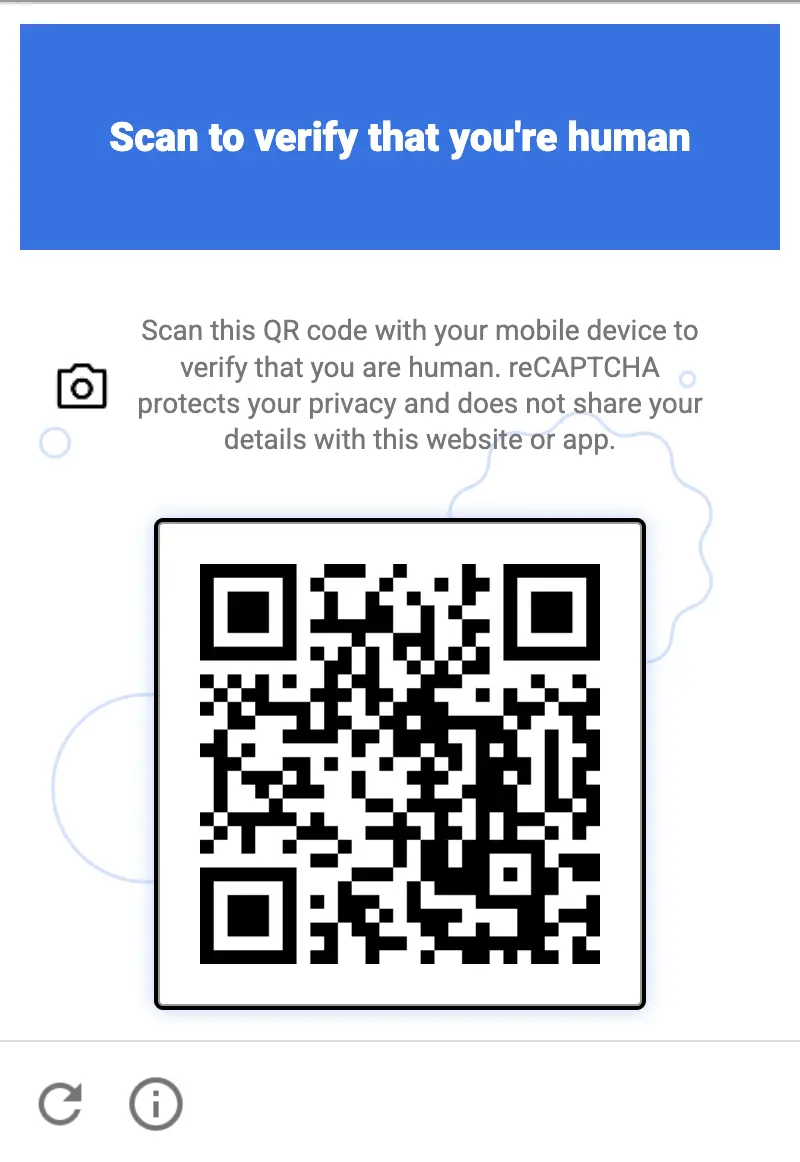
Nowe wyzwanie Recaptcha z kodem QR jest natywnie obsługiwane przez Anti-Captcha
Zespół Anti-Captcha potwierdził, że nowe Wyzwanie Recaptcha z kodem QR jest natywnie obsługiwane przez nasz serwis. Nie są wymagane żadne zmiany w Twojej integracji: ponieważ każda captcha w Anti-Captcha jest rozwiązywana przez prawdziwych ludzi, nasi pracownicy radzą sobie z tym nowym wyzwaniem tak samo, jak zrobiłby to zwykły odwiedzający witrynę.
Czym jest wyzwanie Recaptcha z kodem QR
Google zaprezentowało nowe wyzwanie w latem 2026 roku. Obecnie jest ono testowane w trybie zamkniętym na ograniczonym zbiorze stron, zanim zostanie udostępnione wszystkim klientom Recaptcha. Zamiast wybierania obrazków lub zaznaczania pola wyboru użytkownikowi wyświetlany jest kod QR i prośba o dokończenie weryfikacji na telefonie komórkowym. Wyzwanie z kodem QR nie jest powiązane z jedną wersją Recaptcha: pojawia się na stronach używających zarówno Recaptcha V2, jak i Recaptcha V3.
Idea, która za tym stoi, jest prosta: emulacja przeglądarki na komputerze stacjonarnym jest dla bota stosunkowo tania, ale znacznie trudniejsza jest emulacja prawdziwego fizycznego smartfona z kamerą, autentycznym systemem operacyjnym i dostępem do oficjalnych sklepów z aplikacjami.
Cechy techniczne
Zorientowane na urządzenia mobilne. Wyzwania nie można ukończyć w przeglądarce, w której jest wyświetlane. Weryfikacja zostaje przeniesiona na oddzielne urządzenie — smartfon użytkownika — a przeglądarka jedynie czeka na potwierdzenie.
Skanowane aparatem telefonu. Kod QR jest skanowany za pomocą zwykłej aplikacji aparatu w telefonie. Nie jest potrzebny żaden zewnętrzny skaner kodów QR: aparat rozpoznaje kod i proponuje otwarcie weryfikacji.
Rozwiązywane przez mini-aplikacje z Google Play i App Store. Zeskanowanie kodu uruchamia lekką mini-aplikację dystrybuowaną przez Google Play (Android z Google Play Services 25.41.30) lub App Store (iOS 15/16+). Mini-aplikacja otwiera się natychmiast, bez pełnej instalacji, i przeprowadza weryfikację na urządzeniu.
Weryfikacja powiązana z urządzeniem. Wynik jest powiązany z prawdziwym fizycznym urządzeniem, co sprawia, że wyzwanie jest bardzo trudne do zautomatyzowania za pomocą przeglądarek headless, emulatorów lub rozwiązań opartych na sztucznej inteligencji.
Jak radzą sobie z tym pracownicy Anti-Captcha
Przeprowadziliśmy wewnętrzny test wśród pracowników Anti-Captcha: około 50% z nich było w stanie rozwiązać nowe wyzwanie od razu przy użyciu własnych telefonów, bez żadnych dodatkowych instrukcji ani przygotowań. Reszta w większości musi zaktualizować swój system operacyjny lub przełączyć się na obsługiwane urządzenie, co jest kwestią czasu, a nie realną przeszkodą.
To właśnie tutaj serwis oparty na pracy ludzi ma przewagę nad rozwiązaniami zautomatyzowanymi. Osoba ze zwykłym smartfonem ukończy wyzwanie w kilka sekund, podczas gdy bot musiałby obsługiwać farmę prawdziwych urządzeń, aby zrobić to samo.
Co to oznacza dla naszych klientów
Nadal wysyłasz zadania Recaptcha V2 lub V3 w taki sam sposób, jak obecnie. Gdy strona wyświetli wyzwanie z kodem QR, jest ono rozwiązywane przez naszych pracowników na ich telefonach, a Ty otrzymujesz zwykły token g-recaptcha-response w wyniku zadania.
Jak sprawdzić, której wersji Recaptcha używa strona
Otwórz stronę z captchą w Chrome, otwórz konsolę deweloperską (F12, następnie zakładka Console), wklej poniższy skrypt i naciśnij Enter. Uruchom go po pojawieniu się captchy na stronie, na przykład po kliknięciu przycisku wysyłania formularza.
(() => {
  const out = { scripts: [], iframes: [], clients: [], verdict: [] };

  // 1. Loaded Recaptcha scripts
  document.querySelectorAll('script[src*="recaptcha"]').forEach(s => {
    const u = new URL(s.src, location.href);
    out.scripts.push({
      src: u.pathname,
      enterprise: u.pathname.includes('enterprise'),
      render: u.searchParams.get('render'),
    });
  });

  // 2. Anchor-iframe
  document.querySelectorAll('iframe[src*="/anchor"]').forEach(f => {
    const u = new URL(f.src);
    out.iframes.push({
      enterprise: u.pathname.includes('/enterprise/'),
      sitekey: u.searchParams.get('k'),
      size: u.searchParams.get('size'),
      action: u.searchParams.get('sa'),
      s: u.searchParams.has('s'),
    });
  });

  // 3. Internal config: look for objects with a sitekey
  const seen = new WeakSet();
  const walk = (o, depth = 0) => {
    if (!o || typeof o !== 'object' || seen.has(o) || depth > 6) return;
    seen.add(o);
    if (typeof o.sitekey === 'string') {
      out.clients.push({
        sitekey: o.sitekey,
        size: o.size,
        action: o.action,
        callback: typeof o.callback === 'function' ? o.callback.name || 'fn'
                 : o.callback || null,
        badge: o.badge,
      });
    }
    for (const k in o) { try { walk(o[k], depth + 1); } catch {} }
  };
  try { walk(window.___grecaptcha_cfg?.clients); } catch {}

  // 4. Verdict
  const renderKey = out.scripts.find(s => s.render && s.render !== 'explicit' && s.render !== 'onload');
  const ent = out.scripts.some(s => s.enterprise) || !!window.grecaptcha?.enterprise;
  if (renderKey) out.verdict.push(`v3/score (render=${renderKey.render})`);
  out.iframes.forEach(i => {
    if (i.size === 'normal' || i.size === 'compact') out.verdict.push(`v2 checkbox (${i.sitekey})`);
    else if (i.size === 'invisible' && (!renderKey || renderKey.render !== i.sitekey))
      out.verdict.push(`v2 invisible (${i.sitekey})`);
  });
  if (ent) out.verdict.push('Enterprise');

  console.table(out.scripts);
  console.table(out.iframes);
  console.table(out.clients);
  console.log('VERDICT:', out.verdict.length ? out.verdict.join(' | ') : 'not found (the captcha may not be loaded yet)');
  return out;
})();
Skrypt wypisuje skrypty Recaptcha, widżety oraz ich ustawienia (sitekey, size, action) w formie tabel, a następnie wiersz VERDICT:
v3/score — Recaptcha V3: sitekey jest przekazywany w parametrze render skryptu Recaptcha.
v2 checkbox / v2 invisible — Recaptcha V2 z polem wyboru lub niewidocznym widżetem.
Enterprise — strona używa Recaptcha Enterprise (skrypt enterprise.js).
Użyj sitekey z wyniku jako klucza strony, a wartości action, jeśli występuje, jako akcji strony w poniższych przykładach kodu.
Przykłady kodu
Wybierz wersję Recaptcha znalezioną na stronie:
Python
Node.js
Go
PHP
Java
Kotlin
C#
C++
Rust
Ruby
bash
Jak rozwiązać Recaptcha QR w Python
#pip3 install anticaptchaofficial

from anticaptchaofficial.recaptchav2enterpriseproxyless import *

solver = recaptchaV2EnterpriseProxyless()
solver.set_verbose(1)
solver.set_key("YOUR_API_KEY_HERE")
solver.set_website_url("https://website.com")
solver.set_website_key("YOUR_API_KEY_HERE")
# set to "true" if there's "size":"invisible" option in "grecaptcha.enterprise.render" function
solver.set_is_invisible(True)
# Set page action value:
solver.set_enterprise_payload({"action": "form_submit"})

g_response = solver.solve_and_return_solution()
if g_response != 0:
    print("g-response: "+g_response)
    # user-agent in case you need it:
    print("user-agent: "+solver.get_user_agent())
else:
    print("task finished with error "+solver.error_code)
Jak rozwiązać Recaptcha QR w Node.js
//npm install @antiadmin/anticaptchaofficial
//https://github.com/anti-captcha/anticaptcha-npm

const ac = require("@antiadmin/anticaptchaofficial");

ac.setAPIKey('YOUR_API_KEY_HERE');

ac.solveRecaptchaV2EnterpriseProxyless(
    'http://DOMAIN.COM',
    'WEBSITE_KEY',
    {
        "action": "form_submit" // set page action value here
    },
    true)  // set to "true" if there's "size":"invisible" option in "grecaptcha.enterprise.render" function
    .then(gresponse => {
        console.log('g-response: '+gresponse);
    })
    .catch(error => console.log('test received error '+error));

// in case you need it
console.log("worker's user-agent:");
console.log(ac.getUserAgent());
Jak rozwiązać Recaptcha QR w Go
// Install with:
// go get github.com/anti-captcha/anticaptcha-go
package main

import (
    "fmt"
    "github.com/anti-captcha/anticaptcha-go"
    "log"
)

func main() {
    // Create API client and set the API Key
    ac := anticaptcha.NewClient("API_KEY_HERE")

    // set to 'false' to turn off debug output
    ac.IsVerbose = true

    // Make sure the API key funds balance is positive
    balance, err := ac.GetBalance()
    if err != nil {
        log.Fatal(err)
        // Exit program to make sure you don't DDoS API with requests, while having empty balance
        return
    }
    fmt.Println("Balance:", balance)

    // Solve Recaptcha V2 Enterprise without proxy
    solution, err := ac.SolveRecaptchaV2Enterprise(anticaptcha.RecaptchaV2{
        WebsiteURL:  "https://huev.com/",
        WebsiteKey:  "6Lcyu8UZAAAAACwSh6Xf58WrNXTu0LLu4F85xf20",
        IsInvisible: true, // set to "true" if there's "size":"invisible" option in "grecaptcha.enterprise.render" function
        EnterprisePayload:  map[string]interface{}{
            "action": "form_submit", // set page action here
        },
    })
    if err != nil {
        log.Fatal(err)
    }
    fmt.Println("Recaptcha Enterprise g-response token:", solution)
}
Jak rozwiązać Recaptcha QR w PHP
//git clone https://github.com/anti-captcha/anticaptcha-php.git

include("anticaptcha.php");
include("recaptchaV2Enterpriseproxyless.php");

$api = new Recaptchav2enterpriseProxyless();
$api->setVerboseMode(true);

//your anti-captcha.com account key
$api->setKey("YOUR_API_KEY_HERE");

//target website address
$api->setWebsiteURL("http://enteprisedomain.com/recaptcha/test.php");

//recaptcha key from target website
$api->setWebsiteKey("ENTERPRISE_SITEKEY_HERE");

//set page action here
$api->setEnterprisePayload(["action" => "form_submit"]);

//set to "true" if there's "size":"invisible" option in "grecaptcha.enterprise.render" function
$api->setIsInvisible();

//create task in API
if (!$api->createTask()) {
    $api->debout("API v2 send failed - ".$api->getErrorMessage(), "red");
    return false;
}

$taskId = $api->getTaskId();

//wait in a loop for max 300 seconds till task is solved
if (!$api->waitForResult(300)) {
    echo "could not solve captcha\n";
    echo $api->getErrorMessage()."\n";
} else {

    $gResponse    =   $api->getTaskSolution();
    echo "\your recaptcha token: $gResponse\n\n";
    echo "worker's user-agent in case you need it:\n";
    echo $api->getWorkersUserAgent()."\n";

}
Jak rozwiązać Recaptcha QR w Java
// GitHub: https://github.com/anti-captcha/anticaptcha-java
//
// Maven, add to pom.xml:
//   <dependency>
//     <groupId>com.anti-captcha</groupId>
//     <artifactId>anticaptcha</artifactId>
//     <version>1.0.0</version>
//   </dependency>
//
// Gradle, add to build.gradle:
//   implementation "com.anti-captcha:anticaptcha:1.0.0"

import com.anti_captcha.Api.RecaptchaV2EnterpriseProxyless;
import com.anti_captcha.Helper.DebugHelper;
import org.json.JSONObject;

public class Main {

    public static void main(String[] args) throws InterruptedException {
        // Set to false to turn the debug output off
        DebugHelper.setVerboseMode(true);

        RecaptchaV2EnterpriseProxyless api = new RecaptchaV2EnterpriseProxyless();
        api.setClientKey("YOUR_API_KEY_HERE");

        api.setWebsiteUrl("http://makeawebsitehub.com/recaptcha/test.php");
        api.setWebsiteKey("6LfI9IsUAAAAAKuvopU0hfY8pWADfR_mogXokIIZ");

        // Set page action here:
        api.setEnterprisePayload(new JSONObject()
                .put("action", "form_submit"));

        // set to "true" if there's "size":"invisible" option in "grecaptcha.enterprise.render" function
        api.setIsInvisible(true);

        // Make sure the API key funds balance is positive
        Double balance = api.getBalance();
        if (balance == null || balance <= 0) {
            // Stop here to make sure you don't DDoS the API while having empty balance
            DebugHelper.out("Balance error: " + api.getErrorMessage(), DebugHelper.Type.ERROR);
            return;
        }
        DebugHelper.out("Balance: " + balance, DebugHelper.Type.SUCCESS);

        if (!api.createTask()) {
            DebugHelper.out("API v2 send failed. " + api.getErrorMessage(), DebugHelper.Type.ERROR);
        } else if (!api.waitForResult()) {
            DebugHelper.out("Could not solve the captcha.", DebugHelper.Type.ERROR);
        } else {
            DebugHelper.out("Recaptcha g-response token: " + api.getTaskSolution().getGRecaptchaResponse(), DebugHelper.Type.SUCCESS);
            DebugHelper.out("Worker's user-agent in case you need it: " + api.getTaskSolution().getUserAgent(), DebugHelper.Type.SUCCESS);
        }
    }
}
Jak rozwiązać Recaptcha QR w Kotlin
// GitHub: https://github.com/anti-captcha/anticaptcha-kotlin
//
// Gradle, add to build.gradle.kts:
//   implementation("com.anti-captcha:anticaptcha-kotlin:1.0.0")

import com.anticaptcha.AnticaptchaClient
import com.anticaptcha.AnticaptchaException
import com.anticaptcha.ApiException
import com.anticaptcha.RecaptchaV2
import kotlinx.coroutines.runBlocking

fun main(): Unit = runBlocking {
    // Create the API client and set the API key
    val ac = AnticaptchaClient(
        apiKey = "YOUR_API_KEY_HERE",
        // Specify softId to earn 10% commission with your app.
        // Get your softId here: https://anti-captcha.com/clients/tools/devcenter
        softId = 0,
        // Set to false to turn the debug output off
        verbose = true,
    )

    try {
        // Make sure the API key funds balance is positive
        val balance = ac.getBalance()
        if (balance <= 0) {
            // Stop here to make sure you don't DDoS the API while having empty balance
            System.err.println("Empty balance")
            return@runBlocking
        }
        println("Balance: $balance")

        val solution = ac.solveRecaptchaV2(
            RecaptchaV2(
                websiteUrl = "http://makeawebsitehub.com/recaptcha/test.php",
                websiteKey = "6LfI9IsUAAAAAKuvopU0hfY8pWADfR_mogXokIIZ",
                isEnterprise = true,
                // set to "true" if there's "size":"invisible" option in "grecaptcha.enterprise.render" function
                isInvisible = true,
                // Set page action here
                enterprisePayload = mapOf(
                    "action" to "form_submit",
                ),
            ),
        )

        println("Recaptcha g-response token: ${solution.gRecaptchaResponse}")
        println("Worker's user-agent in case you need it: ${solution.userAgent}")
    } catch (error: ApiException) {
        // https://anti-captcha.com/apidoc/errors
        System.err.println("API error: ${error.errorCode} ${error.description}")
    } catch (error: AnticaptchaException) {
        System.err.println("Failed: ${error.message}")
    }
}
Jak rozwiązać Recaptcha QR w C#
// GitHub: https://github.com/anti-captcha/anticaptcha-csharp.git
// install:  dotnet add package AntiCaptchaOfficial
// or, in the Package Manager Console:
// Install-Package AntiCaptchaOfficial

using System;
using AntiCaptcha.Api;
using AntiCaptcha.Helper;


class Program
{
    static void Main()
    {
        // Set to 'false' to turn off debug output
        DebugHelper.VerboseMode = true;

        var api = new RecaptchaV2EnterpriseProxyless
        {
            ClientKey = "YOUR_API_KEY_HERE",
            WebsiteUrl = new Uri("http://makeawebsitehub.com/recaptcha/test.php"),
            WebsiteKey = "6LfI9IsUAAAAAKuvopU0hfY8pWADfR_mogXokIIZ",
            IsInvisible = true  // set to "true" if there's "size":"invisible" option in "grecaptcha.enterprise.render" function
        };

        // set page action here
        api.EnterprisePayload.Add("action", "form_submit");

        // Make sure the API key funds balance is positive
        var balance = api.GetBalance();
        if (balance == null || balance <= 0)
        {
            // Exit the program to make sure you don't DDoS the API with requests while having empty balance
            Console.WriteLine("Balance error: " + api.ErrorMessage);
            return;
        }
        Console.WriteLine("Balance: " + balance);

        var solution = api.Solve();
        Console.WriteLine("Recaptcha g-response token: " + solution?.GRecaptchaResponse);
        Console.WriteLine("Worker's user-agent in case you need it: " + solution?.UserAgent);
    }
}
Jak rozwiązać Recaptcha QR w C++
// GitHub: https://github.com/anti-captcha/anticaptcha-cplus.git
// Add it to your CMake project:
//   include(FetchContent)
//   FetchContent_Declare(anticaptcha
//           GIT_REPOSITORY https://github.com/anti-captcha/anticaptcha-cplus.git
//           GIT_TAG v1.1.0)
//   FetchContent_MakeAvailable(anticaptcha)
//   target_link_libraries(your_app PRIVATE anticaptcha::anticaptcha)

#include <iostream>
#include <anticaptcha/anticaptcha.hpp>

int main() {
    // Create the API client and set the API key
    anticaptcha::Client ac("YOUR_API_KEY_HERE");

    // Debug output is on by default, turn it off with:
    // ac.shut_up();

    // Specify softId to earn 10% commission with your app.
    // Get your softId here: https://anti-captcha.com/clients/tools/devcenter
    ac.set_soft_id(0);

    try {
        // Make sure the API key funds balance is positive
        const double balance = ac.get_balance();
        if (balance <= 0) {
            // Stop here to make sure you don't DDoS the API while having empty balance
            std::cerr << "Empty balance" << std::endl;
            return 1;
        }
        std::cout << "Balance: " << balance << std::endl;

        anticaptcha::RecaptchaV2 params;
        params.website_url = "http://makeawebsitehub.com/recaptcha/test.php";
        params.website_key = "6LfI9IsUAAAAAKuvopU0hfY8pWADfR_mogXokIIZ";
        params.is_enterprise = true;
        // set to "true" if there's "size":"invisible" option in "grecaptcha.enterprise.render" function
        params.is_invisible = true;
        // Set page action here
        params.enterprise_payload = { {"action", "form_submit"} };
        // params.api_domain = "recaptcha.net"; // only for a non-google.com script domain

        const anticaptcha::Solution solution = ac.solve_recaptcha_v2(params);
        std::cout << "Recaptcha g-response token: " << solution.g_recaptcha_response() << std::endl;
        std::cout << "Worker's user-agent in case you need it: " << solution.user_agent() << std::endl;
    } catch (const anticaptcha::ApiError& error) {
        // https://anti-captcha.com/apidoc/errors
        std::cerr << "API error: " << error.error_code() << " " << error.description() << std::endl;
        return 1;
    } catch (const anticaptcha::Error& error) {
        std::cerr << "Failed: " << error.what() << std::endl;
        return 1;
    }

    return 0;
}
Jak rozwiązać Recaptcha QR w Rust
// GitHub: https://github.com/anti-captcha/anticaptcha-rust
// Install with:
//   cargo add anticaptchaofficial
// or add it to Cargo.toml:
//   [dependencies]
//   anticaptchaofficial = "1"

use std::collections::BTreeMap;
use anticaptcha::{Client, RecaptchaV2};

#[tokio::main]
async fn main() -> anticaptcha::Result<()> {
    // Create the API client and set the API key
    let ac = Client::new("YOUR_API_KEY_HERE")
        // Specify softId to earn 10% commission with your app.
        // Get your softId here: https://anti-captcha.com/clients/tools/devcenter
        .with_soft_id(0);
    // .quiet() turns the debug output off

    // Make sure the API key funds balance is positive
    let balance = ac.get_balance().await?;
    if balance <= 0.0 {
        // Stop here to make sure you don't DDoS the API while having empty balance
        eprintln!("Empty balance");
        return Ok(());
    }
    println!("Balance: {balance}");

    // set page action here
    let mut enterprise_payload = BTreeMap::new();
    enterprise_payload.insert("action".to_owned(), "form_submit".to_owned());

    let solution = ac
        .solve_recaptcha_v2(&RecaptchaV2 {
            website_url: "http://makeawebsitehub.com/recaptcha/test.php".into(),
            website_key: "6LfI9IsUAAAAAKuvopU0hfY8pWADfR_mogXokIIZ".into(),
            is_enterprise: true,
            is_invisible: true, // set to "true" if there's "size":"invisible" option in "grecaptcha.enterprise.render" function
            // Additional parameters passed to the grecaptcha.enterprise.render call
            enterprise_payload,
            // api_domain: "recaptcha.net".into(), // only for a non-google.com script domain
            ..Default::default()
        })
        .await?;

    println!("Recaptcha g-response token: {}", solution.g_recaptcha_response());
    println!("Worker's user-agent in case you need it: {}", solution.user_agent());

    Ok(())
}
Jak rozwiązać Recaptcha QR w Ruby
# GitHub: https://github.com/anti-captcha/anticaptcha-ruby
# Install with:
#   gem install anticaptchaofficial
# or add it to your Gemfile:
#   gem "anticaptchaofficial"

require "anticaptcha"

# Create the API client and set the API key
ac = Anticaptcha.new("YOUR_API_KEY_HERE")

# Specify softId to earn 10% commission with your app.
# Get your softId here: https://anti-captcha.com/clients/tools/devcenter
ac.soft_id = 0

# Set to false to turn the debug output off
ac.verbose = true

begin
  # Make sure the API key funds balance is positive
  balance = ac.balance
  # Stop here to make sure you don't DDoS the API while having empty balance
  abort "Empty balance" if balance <= 0
  puts "Balance: #{balance}"

  solution = ac.solve_recaptcha_v2(
    website_url: "http://makeawebsitehub.com/recaptcha/test.php",
    website_key: "6LfI9IsUAAAAAKuvopU0hfY8pWADfR_mogXokIIZ",
    is_enterprise: true,
    # set to "true" if there's "size":"invisible" option in "grecaptcha.enterprise.render" function
    # is_invisible: true,
    # Set page action here
    enterprise_payload: { "action" => "form_submit" }
    # api_domain: "recaptcha.net", # only for a non-google.com script domain
  )

  puts "Recaptcha g-response token: #{solution.g_recaptcha_response}"
  puts "Worker's user-agent in case you need it: #{solution.user_agent}"
rescue Anticaptcha::ApiError => e
  # https://anti-captcha.com/apidoc/errors
  warn "API error: #{e.error_code} #{e.description}"
rescue Anticaptcha::Error => e
  warn "Failed: #{e.message}"
end
#pip3 install anticaptchaofficial

from anticaptchaofficial.recaptchav3enterpriseproxyless import *

solver = recaptchaV3EnterpriseProxyless()
solver.set_verbose(1)
solver.set_key("YOUR_API_KEY_HERE")
solver.set_website_url("https://website.com")
solver.set_website_key("SITE_KEY")
solver.set_page_action("home_page")
solver.set_min_score(0.9)

# Specify softId to earn 10% commission with your app.
# Get your softId here: https://anti-captcha.com/clients/tools/devcenter
solver.set_soft_id(0)

g_response = solver.solve_and_return_solution()
if g_response != 0:
    print("g-response: "+g_response)
    # user-agent in case you need it:
    print("user-agent: "+solver.get_user_agent())
else:
    print("task finished with error "+solver.error_code)
Jak rozwiązać Recaptcha QR w Node.js
//npm install @antiadmin/anticaptchaofficial
//https://github.com/anti-captcha/anticaptcha-npm

const ac = require("@antiadmin/anticaptchaofficial");

ac.setAPIKey('YOUR_API_KEY_HERE');

//Specify softId to earn 10% commission with your app.
//Get your softId here: https://anti-captcha.com/clients/tools/devcenter
ac.setSoftId(0);

ac.solveRecaptchaV3Enterprise('http://DOMAIN.COM',
    'WEBSITE_KEY',
    0.3, //minimum score required: 0.3, 0.7 or 0.9
    'PAGE_ACTION_CAN_BE_EMPTY')
    .then(gresponse => {
        console.log('g-response: '+gresponse);
    })
    .catch(error => console.log('test received error '+error));

// in case you need it
console.log("worker's user-agent:");
console.log(ac.getUserAgent());
Jak rozwiązać Recaptcha QR w Go
// Install with:
// go get github.com/anti-captcha/anticaptcha-go
package main

import (
    "fmt"
    "github.com/anti-captcha/anticaptcha-go"
    "log"
)

func main() {
    // Create API client and set the API Key
    ac := anticaptcha.NewClient("API_KEY_HERE")

    // set to 'false' to turn off debug output
    ac.IsVerbose = true

    // Specify softId to earn 10% commission with your app.
    // Get your softId here: https://anti-captcha.com/clients/tools/devcenter
    //ac.SoftId = 1187

    // Make sure the API key funds balance is positive
    balance, err := ac.GetBalance()
    if err != nil {
        log.Fatal(err)
        // Exit program to make sure you don't DDoS API with requests, while having empty balance
        return
    }
    fmt.Println("Balance:", balance)

    // Solve Recaptcha V3 Enterprise
    solution, err := ac.SolveRecaptchaV3(anticaptcha.RecaptchaV3{
        WebsiteURL: "https://onlyfans.com/",
        WebsiteKey: "6LcvNcwdAAAAAMWAuNRXH74u3QePsEzTm6GEjx0J",
        PageAction: "somefun",
        MinScore:   0.9,
        IsEnterprise: true, // Set to 'true' if you are solving a Recaptcha V3 Enterprise
    })
    if err != nil {
        log.Fatal(err)
    }
    fmt.Println("Recaptcha g-response token:", solution)
    // In case you need the worker's user-agent
    fmt.Println("User-Agent:", ac.WorkersUserAgent)
}
Jak rozwiązać Recaptcha QR w PHP
//git clone https://github.com/anti-captcha/anticaptcha-php.git

include("anticaptcha.php");
include("recaptchav3enterprise.php");

$api = new RecaptchaV3Enterprise();
$api->setVerboseMode(true);

//your anti-captcha.com account key
$api->setKey("YOUR_API_KEY_HERE");

//target website address
$api->setWebsiteURL("http://makeawebsitehub.com/recaptcha/test.php");

//recaptcha key from target website
$api->setWebsiteKey("6LfI9IsUAAAAAKuvopU0hfY8pWADfR_mogXokIIZ");

//parameters for V3
//score you would like to have
$api->setMinScore(0.9);
//optional page action
$api->setPageAction("some_action");

//Specify softId to earn 10% commission with your app.
//Get your softId here: https://anti-captcha.com/clients/tools/devcenter
$api->setSoftId(0);

//create task in API
if (!$api->createTask()) {
    $api->debout("API v2 send failed - ".$api->getErrorMessage(), "red");
    return false;
}

$taskId = $api->getTaskId();

//wait in a loop for max 300 seconds till task is solved
if (!$api->waitForResult(300)) {
    echo "could not solve captcha\n";
    echo $api->getErrorMessage()."\n";
} else {

    $gResponse    =   $api->getTaskSolution();
    echo "your recaptcha token: $gResponse\n\n";
    echo "worker's user-agent in case you need it:\n";
    echo $api->getWorkersUserAgent()."\n";

}
Jak rozwiązać Recaptcha QR w Java
// GitHub: https://github.com/anti-captcha/anticaptcha-java
//
// Maven, add to pom.xml:
//   <dependency>
//     <groupId>com.anti-captcha</groupId>
//     <artifactId>anticaptcha</artifactId>
//     <version>1.0.0</version>
//   </dependency>
//
// Gradle, add to build.gradle:
//   implementation "com.anti-captcha:anticaptcha:1.0.0"

import com.anti_captcha.Api.RecaptchaV3EnterpriseProxyless;
import com.anti_captcha.Helper.DebugHelper;

public class Main {

    public static void main(String[] args) throws InterruptedException {
        // Set to false to turn the debug output off
        DebugHelper.setVerboseMode(true);

        RecaptchaV3EnterpriseProxyless api = new RecaptchaV3EnterpriseProxyless();
        api.setClientKey("YOUR_API_KEY_HERE");

        // Specify softId to earn 10% commission with your app.
        // Get your softId here: https://anti-captcha.com/clients/tools/devcenter
        api.setSoftId(0);

        api.setWebsiteUrl("http://makeawebsitehub.com/recaptcha/test.php");
        api.setWebsiteKey("6LfI9IsUAAAAAKuvopU0hfY8pWADfR_mogXokIIZ");
        api.setPageAction("login_or_register");

        // Score you need, one of 0.3, 0.7 or 0.9
        api.setMinScore(0.3);

        // Make sure the API key funds balance is positive
        Double balance = api.getBalance();
        if (balance == null || balance <= 0) {
            // Stop here to make sure you don't DDoS the API while having empty balance
            DebugHelper.out("Balance error: " + api.getErrorMessage(), DebugHelper.Type.ERROR);
            return;
        }
        DebugHelper.out("Balance: " + balance, DebugHelper.Type.SUCCESS);

        if (!api.createTask()) {
            DebugHelper.out("API v2 send failed. " + api.getErrorMessage(), DebugHelper.Type.ERROR);
        } else if (!api.waitForResult()) {
            DebugHelper.out("Could not solve the captcha.", DebugHelper.Type.ERROR);
        } else {
            DebugHelper.out("Recaptcha g-response token: " + api.getTaskSolution().getGRecaptchaResponse(), DebugHelper.Type.SUCCESS);
            DebugHelper.out("Worker's user-agent in case you need it: " + api.getTaskSolution().getUserAgent(), DebugHelper.Type.SUCCESS);
        }
    }
}
Jak rozwiązać Recaptcha QR w Kotlin
// GitHub: https://github.com/anti-captcha/anticaptcha-kotlin
//
// Gradle, add to build.gradle.kts:
//   implementation("com.anti-captcha:anticaptcha-kotlin:1.0.0")

import com.anticaptcha.AnticaptchaClient
import com.anticaptcha.AnticaptchaException
import com.anticaptcha.ApiException
import com.anticaptcha.RecaptchaV3
import kotlinx.coroutines.runBlocking

fun main(): Unit = runBlocking {
    // Create the API client and set the API key
    val ac = AnticaptchaClient(
        apiKey = "YOUR_API_KEY_HERE",
        // Specify softId to earn 10% commission with your app.
        // Get your softId here: https://anti-captcha.com/clients/tools/devcenter
        softId = 0,
        // Set to false to turn the debug output off
        verbose = true,
    )

    try {
        // Make sure the API key funds balance is positive
        val balance = ac.getBalance()
        if (balance <= 0) {
            // Stop here to make sure you don't DDoS the API while having empty balance
            System.err.println("Empty balance")
            return@runBlocking
        }
        println("Balance: $balance")

        val solution = ac.solveRecaptchaV3(
            RecaptchaV3(
                websiteUrl = "http://makeawebsitehub.com/recaptcha/test.php",
                websiteKey = "6LfI9IsUAAAAAKuvopU0hfY8pWADfR_mogXokIIZ",
                pageAction = "login_or_register",
                isEnterprise = true,

                // Score you need, one of 0.3, 0.7 or 0.9
                minScore = 0.3,
            ),
        )

        println("Recaptcha g-response token: ${solution.gRecaptchaResponse}")
        println("Worker's user-agent in case you need it: ${solution.userAgent}")
    } catch (error: ApiException) {
        // https://anti-captcha.com/apidoc/errors
        System.err.println("API error: ${error.errorCode} ${error.description}")
    } catch (error: AnticaptchaException) {
        System.err.println("Failed: ${error.message}")
    }
}
Jak rozwiązać Recaptcha QR w C#
// GitHub: https://github.com/anti-captcha/anticaptcha-csharp.git
// install:  dotnet add package AntiCaptchaOfficial
// or, in the Package Manager Console:
// Install-Package AntiCaptchaOfficial

using System;
using AntiCaptcha.Api;
using AntiCaptcha.Helper;


class Program
{
    static void Main()
    {
        // Set to 'false' to turn off debug output
        DebugHelper.VerboseMode = true;

        var api = new RecaptchaV3Proxyless
        {
            ClientKey = "YOUR_API_KEY_HERE",
            WebsiteUrl = new Uri("http://makeawebsitehub.com/recaptcha/test.php"),
            WebsiteKey = "6LfI9IsUAAAAAKuvopU0hfY8pWADfR_mogXokIIZ",
            PageAction = "login_or_register",
            IsEnterprise = true,
            // Score you need, one of 0.3, 0.7 or 0.9
            MinScore = 0.3,
            // Specify softId to earn 10% commission with your app.
            // Get your softId here:
            // https://anti-captcha.com/clients/tools/devcenter
            SoftId = 0
        };

        // Make sure the API key funds balance is positive
        var balance = api.GetBalance();
        if (balance == null || balance <= 0)
        {
            // Exit the program to make sure you don't DDoS the API with requests while having empty balance
            Console.WriteLine("Balance error: " + api.ErrorMessage);
            return;
        }
        Console.WriteLine("Balance: " + balance);

        var solution = api.Solve();
        Console.WriteLine("Recaptcha g-response token: " + solution?.GRecaptchaResponse);
        Console.WriteLine("Worker's user-agent in case you need it: " + solution?.UserAgent);
    }
}
Jak rozwiązać Recaptcha QR w C++
// GitHub: https://github.com/anti-captcha/anticaptcha-cplus.git
// Add it to your CMake project:
//   include(FetchContent)
//   FetchContent_Declare(anticaptcha
//           GIT_REPOSITORY https://github.com/anti-captcha/anticaptcha-cplus.git
//           GIT_TAG v1.0.0)
//   FetchContent_MakeAvailable(anticaptcha)
//   target_link_libraries(your_app PRIVATE anticaptcha::anticaptcha)

#include <iostream>
#include <anticaptcha/anticaptcha.hpp>

int main() {
    // Create the API client and set the API key
    anticaptcha::Client ac("YOUR_API_KEY_HERE");

    // Debug output is on by default, turn it off with:
    // ac.shut_up();

    // Specify softId to earn 10% commission with your app.
    // Get your softId here: https://anti-captcha.com/clients/tools/devcenter
    ac.set_soft_id(0);

    try {
        // Make sure the API key funds balance is positive
        const double balance = ac.get_balance();
        if (balance <= 0) {
            // Stop here to make sure you don't DDoS the API while having empty balance
            std::cerr << "Empty balance" << std::endl;
            return 1;
        }
        std::cout << "Balance: " << balance << std::endl;

        anticaptcha::RecaptchaV3 params;
        params.website_url = "http://makeawebsitehub.com/recaptcha/test.php";
        params.website_key = "6LfI9IsUAAAAAKuvopU0hfY8pWADfR_mogXokIIZ";
        params.page_action = "login_or_register";
        params.is_enterprise = true;
        // Score you need, one of 0.3, 0.7 or 0.9
        params.min_score = 0.3;

        const anticaptcha::Solution solution = ac.solve_recaptcha_v3(params);
        std::cout << "Recaptcha g-response token: " << solution.g_recaptcha_response() << std::endl;
        std::cout << "Worker's user-agent in case you need it: " << solution.user_agent() << std::endl;
    } catch (const anticaptcha::ApiError& error) {
        // https://anti-captcha.com/apidoc/errors
        std::cerr << "API error: " << error.error_code() << " " << error.description() << std::endl;
        return 1;
    } catch (const anticaptcha::Error& error) {
        std::cerr << "Failed: " << error.what() << std::endl;
        return 1;
    }

    return 0;
}
Jak rozwiązać Recaptcha QR w Rust
// GitHub: https://github.com/anti-captcha/anticaptcha-rust
// Install with:
//   cargo add anticaptchaofficial
// or add it to Cargo.toml:
//   [dependencies]
//   anticaptchaofficial = "1"

use anticaptcha::{Client, RecaptchaV3};

#[tokio::main]
async fn main() -> anticaptcha::Result<()> {
    // Create the API client and set the API key
    let ac = Client::new("YOUR_API_KEY_HERE")
        // Specify softId to earn 10% commission with your app.
        // Get your softId here: https://anti-captcha.com/clients/tools/devcenter
        .with_soft_id(0);
    // .quiet() turns the debug output off

    // Make sure the API key funds balance is positive
    let balance = ac.get_balance().await?;
    if balance <= 0.0 {
        // Stop here to make sure you don't DDoS the API while having empty balance
        eprintln!("Empty balance");
        return Ok(());
    }
    println!("Balance: {balance}");

    let solution = ac
        .solve_recaptcha_v3(&RecaptchaV3 {
            website_url: "http://makeawebsitehub.com/recaptcha/test.php".into(),
            website_key: "6LfI9IsUAAAAAKuvopU0hfY8pWADfR_mogXokIIZ".into(),
            page_action: "login_or_register".into(),
            is_enterprise: true,
            // Score you need, one of 0.3, 0.7 or 0.9
            min_score: 0.3,
            ..Default::default()
        })
        .await?;

    println!("Recaptcha g-response token: {}", solution.g_recaptcha_response());
    println!("Worker's user-agent in case you need it: {}", solution.user_agent());

    Ok(())
}
Jak rozwiązać Recaptcha QR w Ruby
# GitHub: https://github.com/anti-captcha/anticaptcha-ruby
# Install with:
#   gem install anticaptchaofficial
# or add it to your Gemfile:
#   gem "anticaptchaofficial"

require "anticaptcha"

# Create the API client and set the API key
ac = Anticaptcha.new("YOUR_API_KEY_HERE")

# Specify softId to earn 10% commission with your app.
# Get your softId here: https://anti-captcha.com/clients/tools/devcenter
ac.soft_id = 0

# Set to false to turn the debug output off
ac.verbose = true

begin
  # Make sure the API key funds balance is positive
  balance = ac.balance
  # Stop here to make sure you don't DDoS the API while having empty balance
  abort "Empty balance" if balance <= 0
  puts "Balance: #{balance}"

  solution = ac.solve_recaptcha_v3(
    website_url: "http://makeawebsitehub.com/recaptcha/test.php",
    website_key: "6LfI9IsUAAAAAKuvopU0hfY8pWADfR_mogXokIIZ",
    page_action: "login_or_register",
    is_enterprise: true,
    # Score you need, one of 0.3, 0.7 or 0.9
    min_score: 0.3
  )

  puts "Recaptcha g-response token: #{solution.g_recaptcha_response}"
  puts "Worker's user-agent in case you need it: #{solution.user_agent}"
rescue Anticaptcha::ApiError => e
  # https://anti-captcha.com/apidoc/errors
  warn "API error: #{e.error_code} #{e.description}"
rescue Anticaptcha::Error => e
  warn "Failed: #{e.message}"
end