Menu

บายพาส Amazon WAF ด้วยพร็อกซี

มี 2 ​​ตัวเลือกว่า Captcha นี้ใช้ในหน้าปลายทาง:

1. หน้าการกรองบอทซึ่ง Amazon จะแสดงโดยอัตโนมัติเมื่อคุณเยี่ยมชมเว็บไซต์ที่อยู่เบื้องหลังไฟร์วอลล์ของพวกเขา เราเรียกมันว่า "gokuProps" เพราะคุณสามารถค้นหาพารามิเตอร์ window.gokuprops ที่ซอร์สโค้ดหน้านี้

2. วิดเจ็ต Captcha แบบสแตนด์อโลนซึ่งถูกกระตุ้นโดยการกระทำของผู้ใช้ เราเรียกมันว่า Widget

ระบุประเภทของ CAPTCHA ด้วยตัวเองและใช้สวิตช์ด้านล่างเพื่อแสดงเอกสารและตัวอย่างที่แตกต่างกัน

gokuProps
Widget

ใช้งานประเภทนี้เพื่อรับโทเค็นคุกกี้ Amazon WAF เพียงแค่คว้าโทเค็น iv และ context ชั่วคราวพร้อมกับคีย์ไซต์ key ถาวรส่งไปยัง API ของเรา ผลลัพธ์ของงานคือโทเค็นที่คุณสามารถใช้ในคำขอ HTTP ของคุณเป็นค่าคุกกี้ที่มีชื่อ amazon-waf-token

งานประเภทนี้ต้องการพร็อกซี โปรดใช้มันเฉพาะในกรณีที่งานพร็อกซีปิด (Amazontaskproxyless) ล้มเหลวเนื่องจากมันช้าลงคนงานของเรา การแก้ Captchas ด้วยพร็อกซียังต้องการพร็อกซีที่มีคุณภาพสูงมากซึ่งคุณควรติดตั้งตัวเองบนเซิร์ฟเวอร์ VPS ของคุณเองและไม่เคยใช้บริการพร็อกซีที่ซื้อมา
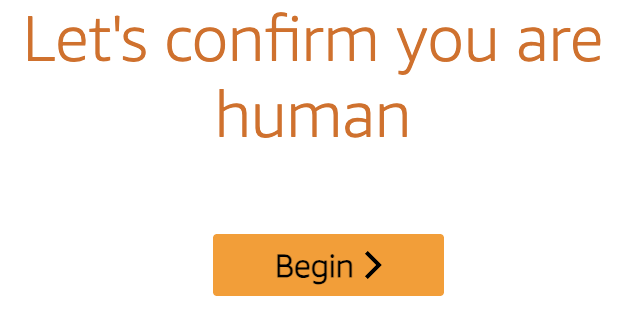
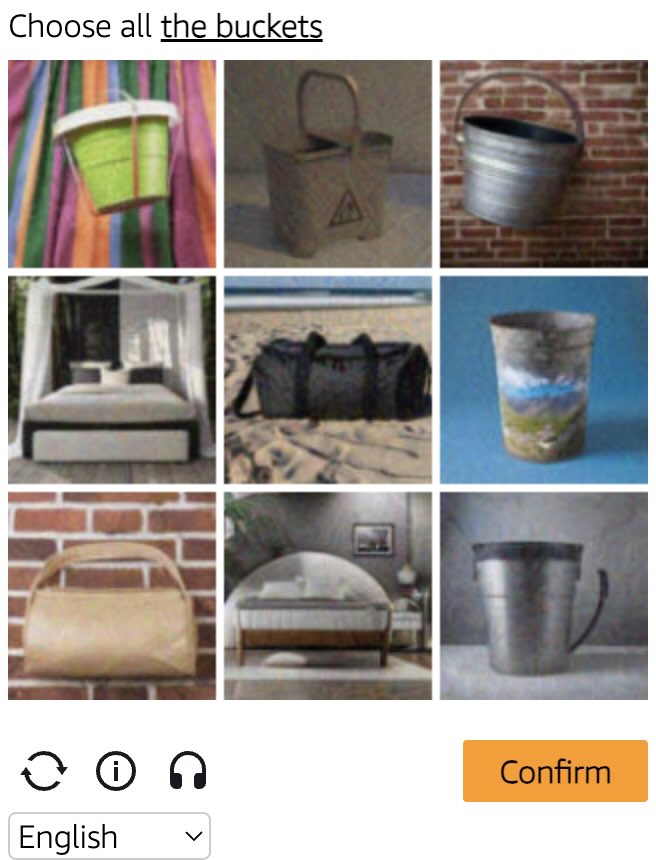
Amazon WAF captcha example Amazon WAF widget captcha example
ตัวอย่าง Captcha
gokuProps
Widget
Python
Node.js
Go
PHP
Java
C#
bash

วิธีแก้ Amazon proxy-on WAF gokuProps ใน Python

#pip3 install anticaptchaofficial

from anticaptchaofficial.amazonproxyon import *

solver = amazonProxon()
solver.set_verbose(1)
solver.set_key("YOUR_API_KEY")
solver.set_website_url("https://website.com")
solver.set_website_key("key_value_from_window.gokuProps_object")
solver.set_iv("iv_value_from_window.gokuProps_object")
solver.set_context("context_value_from_window.gokuProps_object")
solver.set_proxy_address("PROXY_ADDRESS")
solver.set_proxy_port(1234)
solver.set_proxy_login("proxylogin")
solver.set_proxy_password("proxypassword")

# Optional script URLs
solver.set_captcha_script("https://e9b10f157f38.9a96e8b4.us-gov-west-1.captcha.awswaf.com/e9b10f157f38/76cbcde1c834/2a564e323e7b/captcha.js")
solver.set_challenge_script("https://e9b10f157f38.9a96e8b4.us-gov-west-1.token.awswaf.com/e9b10f157f38/76cbcde1c834/2a564e323e7b/challenge.js")

# Specify softId to earn 10% commission with your app.
# Get your softId here: https://anti-captcha.com/clients/tools/devcenter
solver.set_soft_id(0)

token = solver.solve_and_return_solution()
if token != 0:
    print("token: "+token)
    # user-agent in case you need it:
    print("user-agent: "+solver.get_user_agent())
else:
    print("task finished with error "+solver.error_code)

วิธีแก้ Amazon proxy-on WAF gokuProps ใน Node.js

//npm install @antiadmin/anticaptchaofficial
//https://github.com/anti-captcha/anticaptcha-npm

const ac = require("@antiadmin/anticaptchaofficial");

ac.setAPIKey('YOUR_API_KEY_HERE');

//Specify softId to earn 10% commission with your app.
//Get your softId here: https://anti-captcha.com/clients/tools/devcenter
ac.setSoftId(0);

ac.solveAmazonProxyOn('http://DOMAIN.COM',
    'key_value_from_window.gokuProps_object',
    'http', //http, socks4, socks5
    'PROXY_ADDRESS',
    'PROXY_PORT',
    'PROXY_LOGIN',
    'PROXY_PASSWORD',
    'iv_value_from_window.gokuProps_object',
    'context_value_from_window.gokuProps_object',
    'https://e9b10f157f38.9a96e8b4.us-gov-west-1.captcha.awswaf.com/e9b10f157f38/76cbcde1c834/2a564e323e7b/captcha.js', //optional
    'https://e9b10f157f38.9a96e8b4.us-gov-west-1.token.awswaf.com/e9b10f157f38/76cbcde1c834/2a564e323e7b/challenge.js'  //optional
).then(token => {
    console.log('token: '+token);
})
.catch(error => console.log('test received error '+error));

// in case you need it
console.log("worker's user-agent:");
console.log(ac.getUserAgent());`;

วิธีแก้ Amazon proxy-on WAF gokuProps ใน Go

// Install with:
// go get github.com/anti-captcha/anticaptcha-go
package main

import (
    "fmt"
    "github.com/anti-captcha/anticaptcha-go"
    "log"
)

func main() {
    // Create API client and set the API Key
    ac := anticaptcha.NewClient("API_KEY_HERE")

    // set to 'false' to turn off debug output
    ac.IsVerbose = true

    // Specify softId to earn 10% commission with your app.
    // Get your softId here: https://anti-captcha.com/clients/tools/devcenter
    //ac.SoftId = 1187

    // Make sure the API key funds balance is positive
    balance, err := ac.GetBalance()
    if err != nil {
        log.Fatal(err)
        // Exit program to make sure you don't DDoS API with requests, while having empty balance
        return
    }
    fmt.Println("Balance:", balance)

    // Get Amazon WAF token without proxy
    solution, err := ac.SolveAmazonProxyOn(anticaptcha.AmazonCaptcha{
        WebsiteURL: "https://www.website.com/",
        WebsiteKey: "key_value_from_window.gokuProps_object",
        Iv: "iv_value_from_window.gokuProps_object",
        Context: "context_value_from_window.gokuProps_object",
        //optional scripts:
        //CaptchaScript: "https://e9b10f157f38.9a96e8b4.us-gov-west-1.captcha.awswaf.com/e9b10f157f38/76cbcde1c834/2a564e323e7b/captcha.js",
        //ChallengeScript: "https://e9b10f157f38.9a96e8b4.us-gov-west-1.token.awswaf.com/e9b10f157f38/76cbcde1c834/2a564e323e7b/challenge.js",
        Proxy: &anticaptcha.Proxy{
            Type:      "http",
            IPAddress: "1.2.3.4",
            Port:      1234,
            Login:     "login-optional",
            Password:  "pass-optional",
        },
    })
    if err != nil {
        log.Fatal(err)
    }
    fmt.Println("amazon-waf-token:", solution)
    // In case you need the worker's user-agent
    fmt.Println("User-Agent:", ac.WorkersUserAgent)
}

วิธีแก้ Amazon proxy-on WAF gokuProps ใน PHP

//git clone https://github.com/anti-captcha/anticaptcha-php.git

include("anticaptcha.php");
include("amazon.php");

$api = new Amazon();
$api->setVerboseMode(true);

//your anti-captcha.com account key
$api->setKey("YOUR_API_KEY_HERE");

//target website address
$api->setWebsiteURL("http://website.com/");

//key value from window.gokuProps object (see html source)
$api->setWebsiteKey("key_value_from_window.gokuProps_object");

//iv and context values from window.gokuProps object (see html source)
$api->setIv("iv_value_from_window.gokuProps_object")
$api->setContext("context_value_from_window.gokuProps_object");

//optional scripts
$api->setCaptchaScript("https://e9b10f157f38.9a96e8b4.us-gov-west-1.captcha.awswaf.com/e9b10f157f38/76cbcde1c834/2a564e323e7b/captcha.js");
$api->setChallengeScript("https://e9b10f157f38.9a96e8b4.us-gov-west-1.token.awswaf.com/e9b10f157f38/76cbcde1c834/2a564e323e7b/challenge.js");

// proxy access parameters
// DO NOT USE PURCHASED/RENTED PROXIES ON PROXY SERVICES!!!
// THEY WILL NOT WORK!
// USE ONLY PROXIES YOU INSTALL YOURSELF ON YOUR OWN SERVER OR FAST VPS
// USE PROPER PROXY SOFTWARE LIKE SQUID !
// INSTALLATION INSTRUCTIONS:
// https://anti-captcha.com/apidoc/articles/how-to-install-squid
$api->setProxyType("http");
$api->setProxyAddress("8.8.8.8");
$api->setProxyPort(1234);
//optional login and password
$api->setProxyLogin("login");
$api->setProxyPassword("password");

//Specify softId to earn 10% commission with your app.
//Get your softId here: https://anti-captcha.com/clients/tools/devcenter
$api->setSoftId(0);

//create task in API
if (!$api->createTask()) {
    $api->debout("API v2 send failed - ".$api->getErrorMessage(), "red");
    return false;
}

$taskId = $api->getTaskId();

//wait in a loop for max 300 seconds till task is solved
if (!$api->waitForResult(300)) {
    echo "could not solve captcha\n";
    echo $api->getErrorMessage()."\n";
} else {

    $token = $api->getTaskSolution();
    echo "\n";
    echo "your aws-waf-token: $token\n\n";
    echo "worker's user-agent in case you need it:\n";
    echo $api->getWorkersUserAgent()."\n";

}

วิธีแก้ Amazon proxy-on WAF gokuProps ใน Java

//git clone https://github.com/anti-captcha/anticaptcha-java.git

package com.anti_captcha;

import com.anti_captcha.Api.Amazon;
import com.anti_captcha.Helper.DebugHelper;

import org.json.JSONArray;
import org.json.JSONException;
import org.json.JSONObject;

import java.net.MalformedURLException;
import java.net.URL;
import java.util.Iterator;
import java.util.concurrent.ThreadLocalRandom;

public class Main {

    public static void main(String[] args) throws InterruptedException, MalformedURLException, JSONException {

        DebugHelper.setVerboseMode(true);

        AmazonProxyless api = new Amazon();
        api.setClientKey("YOUR_API_KEY_HERE");
        api.setWebsiteUrl(new URL("http://website.com/"));
        api.setWebsiteKey("key_value_from_window.gokuProps_object");
        api.setIv("iv_value_from_window.gokuProps_objec");
        api.setContext("context_value_from_window.gokuProps_object");

        //Optional scripts
        api.setCaptchaScript("https://e9b10f157f38.9a96e8b4.us-gov-west-1.captcha.awswaf.com/e9b10f157f38/76cbcde1c834/2a564e323e7b/captcha.js");
        api.setChallengeScript("https://e9b10f157f38.9a96e8b4.us-gov-west-1.token.awswaf.com/e9b10f157f38/76cbcde1c834/2a564e323e7b/challenge.js");

        // proxy access parameters
        // DO NOT USE PURCHASED/RENTED PROXIES WITH PROXY SERVICES!!!
        // THEY WILL NOT WORK!
        // USE ONLY PROXIES YOU INSTALL YOURSELF ON YOUR OWN SERVER OR FAST VPS
        // USE PROPER PROXY SOFTWARE LIKE SQUID !
        // INSTALLATION INSTRUCTIONS:
        // https://anti-captcha.com/apidoc/articles/how-to-install-squid
        api.setProxyType(NoCaptcha.ProxyTypeOption.HTTP);
        api.setProxyAddress("xx.xxx.xx.xx");
        api.setProxyPort(8282);
        api.setProxyLogin("login");
        api.setProxyPassword("password");

        //Specify softId to earn 10% commission with your app.
        //Get your softId here: https://anti-captcha.com/clients/tools/devcenter
        api.setSoftId(0);

        if (!api.createTask()) {
            DebugHelper.out(
                    "API v2 send failed. " + api.getErrorMessage(),
                    DebugHelper.Type.ERROR
            );
        } else if (!api.waitForResult()) {
            DebugHelper.out("Could not solve the captcha.", DebugHelper.Type.ERROR);
        } else {
            DebugHelper.out("Result: " + api.getTaskSolution().getToken(), DebugHelper.Type.SUCCESS);
        }
    }
}

วิธีแก้ Amazon proxy-on WAF gokuProps ใน C#

//git clone git@github.com:AdminAnticaptcha/anticaptcha-csharp.git

using System;
using Anticaptcha_example.Api;
using Anticaptcha_example.Helper;
using Newtonsoft.Json.Linq;

namespace Anticaptcha_example
{
    internal class Program
    {
        private static void Main() {

            DebugHelper.VerboseMode = true;

            var api = new Amazon
            {
                ClientKey = "YOUR_API_KEY_HERE",
                WebsiteUrl = new Uri("http://website.com/"),
                WebsiteKey = "key_value_from_window.gokuProps_object",
                Iv = "iv_value_from_window.gokuProps_object",
                Context = "context_value_from_window.gokuProps_object",
                ProxyAddress = "xxx.xx.xx.xx",
                ProxyPort = 1234,
                ProxyLogin = "login",
                ProxyPassword = "password",

                // Optional scripts
                CaptchaScript = "https://e9b10f157f38.9a96e8b4.us-gov-west-1.captcha.awswaf.com/e9b10f157f38/76cbcde1c834/2a564e323e7b/captcha.js",
                ChallengeScript = "https://e9b10f157f38.9a96e8b4.us-gov-west-1.token.awswaf.com/e9b10f157f38/76cbcde1c834/2a564e323e7b/challenge.js",

                // Specify softId to earn 10% commission with your app.
                // Get your softId here:
                // https://anti-captcha.com/clients/tools/devcenter
                SoftId = 0
            };

            if (!api.CreateTask())
                DebugHelper.Out("API v2 send failed. " + api.ErrorMessage, DebugHelper.Type.Error);
            else if (!api.WaitForResult())
                DebugHelper.Out("Could not solve the captcha.", DebugHelper.Type.Error);
            else
                DebugHelper.Out("Result: " + api.GetTaskSolution().token, DebugHelper.Type.Success);

        }
    }
}

วิธีแก้ Amazon proxy-on WAF gokuProps ใน bash

curl -i -H "Accept: application/json" \
     -H "Content-Type: application/json" \
     -X POST -d '{
    "clientKey":"YOUR_API_KEY_HERE",
    "task":
        {
            "type":"AmazonTask",
            "websiteURL":"https://website.com/",
            "websiteKey":"key_value_from_window.gokuProps_object",
            "iv":"iv_value_from_window.gokuProps_object",
            "context":"context_value_from_window.gokuProps_object",
            "captchaScript": "https://e9b10f157f38.9a96e8b4.us-gov-west-1.captcha.awswaf.com/e9b10f157f38/76cbcde1c834/2a564e323e7b/captcha.js",
            "challengeScript": "https://e9b10f157f38.9a96e8b4.us-gov-west-1.token.awswaf.com/e9b10f157f38/76cbcde1c834/2a564e323e7b/challenge.js",
            "proxyType":"http",
            "proxyAddress":"8.8.8.8",
            "proxyPort":8080,
            "proxyLogin":"proxyLoginHere",
            "proxyPassword":"proxyPasswordHere"
        },
    "softId": 0
}' https://api.anti-captcha.com/createTask
gokuProps
Widget

อ็อบเจ็กต์งาน

คุณสมบัติ ประเภท จำเป็น วัตถุประสงค์
type สตริง ใช่ AmazonTask
websiteURL สตริง ใช่ ที่อยู่ของหน้าเว็บเป้าหมาย สามารถอยู่ที่ใดก็ได้ในเว็บไซต์ แม้ในพื้นที่สมาชิก พนักงานของเราไม่ได้ไปยังที่นั่น แต่จะจำลองการเข้าชมแทน
websiteKey สตริง ใช่ ค่าของ key จากวัตถุ window.gokuProps ในซอร์สโค้ดหน้า WAF
iv สตริง ใช่ ค่าของ iv จากวัตถุ window.gokuProps ในซอร์สโค้ดหน้า WAF
context สตริง ใช่ ค่าของ context จากวัตถุ window.gokuProps ในซอร์สโค้ดหน้า WAF
captchaScript สตริง ไม่ URL เสริมที่นำไปสู่ ​​captcha.js
challengeScript สตริง ไม่ URL เสริมที่นำไปสู่ความท้าทาย js
proxyType สตริง ใช่ ประเภทพร็อกซี
http - พร็อกซี http/https ปกติ
socks4 - พร็อกซี socks4
socks5 - พร็อกซี socks5
proxyAddress สตริง ใช่ ที่อยู่ IP ของพร็อกซี ipv4/ipv6 ไม่มีชื่อโฮสต์หรือที่อยู่ IP จากเครือข่ายระยใกล้
proxyPort จำนวนเต็ม ใช่ พอร์ตพร็อกซี
proxyLogin สตริง ใช่ ล็อกอินสำหรับพร็อกซีที่ต้องได้รับอนุญาต (พื้นฐาน)
proxyPassword สตริง ใช่ รหัสผ่านพร็อกซี

อ็อบเจ็กต์โซลูชันงาน

คุณสมบัติ ประเภท วัตถุประสงค์
token สตริง ใช้โทเค็นนี้เป็นค่าคุกกี้ที่มีชื่อ "AWS-WAF-TOKEN" ในคำขอของคุณไปยังหน้าเว็บเป้าหมาย
userAgent สตริง User-Agent ของเบราว์เซอร์ของพนักงาน ใช้เมื่อคุณส่งโทเค็นตอบกลับ

ตัวอย่างการตอบกลับ

{
    "errorId":0,
    "status":"ready",
    "solution": {
      "token": "fe4c2ff3-6ed6-40fa-95c9-4c738a7dad49:FgoAe0ZLBmYBAAAA:LK0S/m1nGbfjDk/9i6tMmiUWGecMfyjvuAx9lY6ZhaBUmjrILEqW00UAsEliykPjwebdzn9J3...",
      "userAgent":"Mozilla\5.0 (Windows NT 10.0; Win64; x64) AppleWebKit\/537.36 (KHTML, like Gecko) Chrome\/145.0.0.0 Safari\/537.36"
    },
    "cost":"0.002000",
    "ip":"46.98.54.221",
    "createTime":1472205564,
    "endTime":1472205570,
    "solveCount":"0"
}