Menu

แก้ FunCaptcha จาก Arkose Labs โดยใช้พรอกซี

งานประเภทนี้แก้ปริศนาของ arkoselabs.com ในเบราว์เซอร์ของพนักงานของเรา แอปของคุณจะส่งที่อยู่ Public Key และรับโทเค็นหลังจากเสร็จงาน ใช้โทเค็นนี้เพื่อส่งแบบฟอร์มด้วย Captcha ของ Arkose Labs

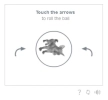
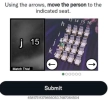
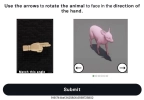
FunCaptcha Arkoselabs example
FunCaptcha Arkoselabs example with seatings
FunCaptcha Arkoselabs example with finger
ตัวอย่าง
Python
Node.js
Go
PHP
Java
C#
bash

วิธีแก้ FunCaptcha proxy-on ใน Python

#pip3 install anticaptchaofficial

from anticaptchaofficial.funcaptchaproxyon import *

solver = funcaptchaProxyon()
solver.set_verbose(1)
solver.set_key("YOUR_API_KEY_HERE")
solver.set_website_url("https://website.com")
solver.set_website_key("XXXXXXX-XXXX-XXXX-XXXX-XXXXXXXXX")

# optional funcaptcha API subdomain, see our Funcaptcha documentation for details
# solver.set_js_api_domain("custom-api-subdomain.arkoselabs.com")

# optional data[blob] value, read the docs
# solver.set_data_blob("{\"blob\":\"DATA_BLOB_VALUE_HERE\"}")

solver.set_proxy_address("PROXY_ADDRESS")
solver.set_proxy_port(1234)
solver.set_proxy_login("proxylogin")
solver.set_proxy_password("proxypassword")
solver.set_user_agent("Mozilla/5.0")

# Specify softId to earn 10% commission with your app.
# Get your softId here: https://anti-captcha.com/clients/tools/devcenter
solver.set_soft_id(0)

token = solver.solve_and_return_solution()
if token != 0:
    print("result token: "+token)
    # user-agent in case you need it:
    print("user-agent: "+solver.get_user_agent())
else:
    print("task finished with error "+solver.error_code)

วิธีแก้ FunCaptcha proxy-on ใน Node.js

//npm install @antiadmin/anticaptchaofficial
//https://github.com/anti-captcha/anticaptcha-npm

const ac = require("@antiadmin/anticaptchaofficial");

ac.setAPIKey('YOUR_API_KEY_HERE');

//optional, but often required:
ac.settings.funcaptchaApiJSSubdomain = 'custom-api.arkoselabs.com';
ac.settings.funcaptchaDataBlob = 'DATA[BLOB]_HERE';

//Specify softId to earn 10% commission with your app.
//Get your softId here: https://anti-captcha.com/clients/tools/devcenter
ac.setSoftId(0);

//solve and receive token
ac.solveFunCaptchaProxyOn('http://DOMAIN.COM',
    'WEBSITE_KEY',
    'http', //http, socks4, socks5
    'PROXY_ADDRESS',
    'PROXY_PORT',
    'PROXY_LOGIN',
    'PROXY_PASSWORD',
    'Mozilla/5.0 (Macintosh; Intel Mac OS X 10_11_6) AppleWebKit/537.36 (KHTML, like Gecko) Chrome/52.0.2743.116',
    'some=cookies')
    .then(token => {
        console.log('response: '+token);
    })
    .catch(error => console.log('test received error '+error));

// in case you need it
console.log("worker's user-agent:");
console.log(ac.getUserAgent());

วิธีแก้ FunCaptcha proxy-on ใน Go

// Install with:
// go get github.com/anti-captcha/anticaptcha-go
package main

import (
    "fmt"
    "github.com/anti-captcha/anticaptcha-go"
    "log"
)

func main() {
    // Create API client and set the API Key
    ac := anticaptcha.NewClient("API_KEY_HERE")

    // set to 'false' to turn off debug output
    ac.IsVerbose = true

    // Specify softId to earn 10% commission with your app.
    // Get your softId here: https://anti-captcha.com/clients/tools/devcenter
    //ac.SoftId = 1187

    // Make sure the API key funds balance is positive
    balance, err := ac.GetBalance()
    if err != nil {
        log.Fatal(err)
        // Exit program to make sure you don't DDoS API with requests, while having empty balance
        return
    }
    fmt.Println("Balance:", balance)

    // Solve FunCaptcha with proxy
    solution, err := ac.SolveFunCaptchaProxyOn(anticaptcha.FunCaptcha{
        WebsiteURL:       "https://www.website.com/",
        WebsitePublicKey: "00000000-1111-2222-3333-444444444444",
        ApiSubdomain:     "somewebsite-api.arkoselabs.com",
        Proxy: &anticaptcha.Proxy{
            Type:      "http",
            IPAddress: "1.2.3.4",
            Port:      1234,
            Login:     "login-optional",
            Password:  "pass-optional",
        },
    })
    if err != nil {
        log.Fatal(err)
    }
    fmt.Println("Funcaptcha Token:", solution)
    // In case you need the worker's user-agent
    fmt.Println("User-Agent:", ac.WorkersUserAgent)
}

วิธีแก้ FunCaptcha proxy-on ใน PHP

//git clone https://github.com/anti-captcha/anticaptcha-php.git

include("anticaptcha.php");
include("funcaptcha.php");

$api = new FunCaptcha();
$api->setVerboseMode(true);

//your anti-captcha.com account key
$api->setKey("YOUR_API_KEY_HERE");

//target website address
$api->setWebsiteURL("http://mywebsite.com/funcaptcha/");

//recaptcha key from target website
$api->setWebsitePublicKey("3B24C078-2DF1-771D-913A-11F824CD5A7C");

//optional Arkose Labs API subdomain, see our documentation for details
//$api->setJSSubdomain("custom-api.arkoselabs.com");

//optional data[blob] value
//$api->setDataBlob("DATA_BLOB_VALUE_HERE");

//proxy access parameters
$api->setProxyType("http");
$api->setProxyAddress("8.8.8.8");
$api->setProxyPort(8080);
//optional login and password
$api->setProxyLogin("theLogin");
$api->setProxyPassword("thePassword");

//Specify softId to earn 10% commission with your app.
//Get your softId here: https://anti-captcha.com/clients/tools/devcenter
$api->setSoftId(0);

//create task in API
if (!$api->createTask()) {
    $api->debout("API v2 send failed - ".$api->getErrorMessage(), "red");
    return false;
}

$taskId = $api->getTaskId();

//wait in a loop for max 300 seconds till task is solved
if (!$api->waitForResult(300)) {
    echo "could not solve captcha\n";
    echo $api->getErrorMessage()."\n";
} else {

    $gResponse    =   $api->getTaskSolution();
    echo "your arkose labs token: $gResponse\n\n";
    echo "worker's user-agent in case you need it:\n";
    echo $api->getWorkersUserAgent()."\n";

}

วิธีแก้ FunCaptcha proxy-on ใน Java

//git clone https://github.com/anti-captcha/anticaptcha-java.git

package com.anti_captcha;

import com.anti_captcha.Api.FunCaptcha;
import com.anti_captcha.Helper.DebugHelper;

import org.json.JSONArray;
import org.json.JSONException;
import org.json.JSONObject;

import java.net.MalformedURLException;
import java.net.URL;
import java.util.Iterator;
import java.util.concurrent.ThreadLocalRandom;

public class Main {

    public static void main(String[] args) throws InterruptedException, MalformedURLException, JSONException {

        DebugHelper.setVerboseMode(true);

        FunCaptcha api = new FunCaptcha();
        api.setClientKey("YOUR_API_KEY_HERE");
        api.setWebsiteUrl(new URL("http://mywebsite.com/funcaptcha/"));
        api.setWebsitePublicKey("3B24C078-2DF1-771D-913A-11F824CD5A7C");
        api.setUserAgent("Mozilla/5.0 (Macintosh; Intel Mac OS X 10_11_6) AppleWebKit/537.36 (KHTML, like Gecko) Chrome/52.0.2743.116");

        //optional parameters, read the docs, be careful!
        api.setApiSubdomain("custom-domain-api.arkoselabs.com");
        api.setDataBlob("{\"blob\":\"DATA_BLOB_VALUE_HERE\"}");

        // proxy access parameters
        api.setProxyType(NoCaptcha.ProxyTypeOption.HTTP);
        api.setProxyAddress("8.8.8.8");
        api.setProxyPort(8080);
        api.setProxyLogin("theLogin");
        api.setProxyPassword("thePassword");

        //Specify softId to earn 10% commission with your app.
        //Get your softId here: https://anti-captcha.com/clients/tools/devcenter
        api.setSoftId(0);

        if (!api.createTask()) {
            DebugHelper.out(
                    "API v2 send failed. " + api.getErrorMessage(),
                    DebugHelper.Type.ERROR
            );
        } else if (!api.waitForResult()) {
            DebugHelper.out("Could not solve the captcha.", DebugHelper.Type.ERROR);
        } else {
            DebugHelper.out("Result token: " + api.getTaskSolution().getToken(), DebugHelper.Type.SUCCESS);
        }

    }

}

วิธีแก้ FunCaptcha proxy-on ใน C#

//git clone https://github.com/anti-captcha/anticaptcha-csharp.git

using System;
using Anticaptcha_example.Api;
using Anticaptcha_example.Helper;
using Newtonsoft.Json.Linq;

namespace Anticaptcha_example
{
    internal class Program
    {
        private static void Main() {

            DebugHelper.VerboseMode = true;

            var api = new FunCaptcha
            {
                ClientKey = "YOUR_API_KEY_HERE",
                WebsiteUrl = new Uri("http://http.myjino.ru/funcaptcha_test/"),
                WebsitePublicKey = "DE0B0BB7-1EE4-4D70-1853-31B835D4506B",
                ApiJSSubdomain = "something.arkoselabs.com",
                DataBlob = "{\"blob\":\"HERE_COMES_THE_blob_VALUE\"}",
                UserAgent =
                    "Mozilla/5.0 (Macintosh; Intel Mac OS X 10_11_6) AppleWebKit/537.36 (KHTML, like Gecko) Chrome/52.0.2743.116",
                // proxy access parameters
                ProxyType = AnticaptchaBase.ProxyTypeOption.Http,
                ProxyAddress = "xx.xx.xx.xx",
                ProxyPort = 8282,
                ProxyLogin = "123",
                ProxyPassword = "456",
                // Specify softId to earn 10% commission with your app.
                // Get your softId here:
                // https://anti-captcha.com/clients/tools/devcenter
                SoftId = 0
            };

            if (!api.CreateTask())
                DebugHelper.Out("API v2 send failed. " + api.ErrorMessage, DebugHelper.Type.Error);
            else if (!api.WaitForResult())
                DebugHelper.Out("Could not solve the captcha.", DebugHelper.Type.Error);
            else
                DebugHelper.Out("Result: " + api.GetTaskSolution().Token, DebugHelper.Type.Success);

        }
    }
}

วิธีแก้ FunCaptcha proxy-on ใน bash

curl -i -H "Accept: application/json" \
     -H "Content-Type: application/json" \
     -X POST -d '{
    "clientKey":"YOUR_API_KEY_HERE",
    "task":
        {
            "type":"FunCaptchaTask",
            "websiteURL":"http://mywebsite.com/recaptcha/test.php",
            "funcaptchaApiJSSubdomain":"optional-api-subdomain-here.arkoselabs.com",
            "data": "{\"blob\":\"dyXvXANMbHj1iDyz.Qj97JtSqR2n%2BuoY1V%2FbdgbrG7p%2FmKiqdU9AwJ6MifEt0np4vfYn6TTJDJEfZDlcz9Q1XMn9przeOV%2FCr2%2FIpi%2FC1s%3D\"}",
            "websitePublicKey":"DE0B0BB7-1EE4-4D70-1853-31B835D4506B",
            "proxyType":"http",
            "proxyAddress":"8.8.8.8",
            "proxyPort":8080,
            "proxyLogin":"proxyLoginHere",
            "proxyPassword":"proxyPasswordHere",
            "userAgent":"MODERN_USER_AGENT_HERE"
        },
    "softId": 0
}' https://api.anti-captcha.com/createTask

อ็อบเจ็กต์งาน

คุณสมบัติ ประเภท จำเป็น วัตถุประสงค์
type สตริง ใช่ FunCaptchaTask
websiteURL สตริง ใช่ ที่อยู่ของหน้าเว็บเป้าหมาย สามารถอยู่ที่ใดก็ได้ในเว็บไซต์ แม้ในพื้นที่สมาชิก พนักงานของเราไม่ได้ไปยังที่นั่น แต่จะจำลองการเข้าชมแทน
websitePublicKey สตริง ใช่ Public Key ของ Arkose Labs
funcaptchaApiJSSubdomain สตริง ไม่ โดเมนย่อย Arkose Labs ที่กำหนดเองซึ่งจะโหลด JavaScript ของวิดเจ็ต จำเป็นสำหรับบางกรณี แต่การผสานรวม Arkose Labs ส่วนใหญ่ทำงานได้แม้ไม่มี
data สตริง ไม่ พารามิเตอร์เพิ่มเติมที่อาจจำเป็นสำหรับการใช้งาน Arkose Labs ใช้คุณสมบัตินี้เพื่อส่งค่า "blob" เป็นอ็อบเจ็กต์ที่แปลงเป็นสตริง ดูตัวอย่างว่าอาจมีลักษณะอย่างไร
{"\blob\":\"HERE_COMES_THE_blob_VALUE\"}
proxyType สตริง ใช่ ประเภทพร็อกซี
http - พร็อกซี http/https ปกติ
socks4 - พร็อกซี socks4
socks5 - พร็อกซี socks5
proxyAddress สตริง ใช่ ที่อยู่ IP ของพร็อกซี ipv4/ipv6 ไม่มีชื่อโฮสต์หรือที่อยู่ IP จากเครือข่ายระยใกล้
proxyPort จำนวนเต็ม ใช่ พอร์ตพร็อกซี
proxyLogin สตริง ใช่ ล็อกอินสำหรับพร็อกซีที่ต้องได้รับอนุญาต (พื้นฐาน)
proxyPassword สตริง ใช่ รหัสผ่านพร็อกซี
userAgent สตริง ใช่ ระบุ User-Agent ที่คุณใช้เพื่อไปยังส่วนต่างๆ ของเว็บไซต์ พนักงานของเราจะใช้ค่าเดียวกันระหว่างกระบวนการแก้ hCaptcha

อ็อบเจ็กต์โซลูชันงาน

คุณสมบัติ ประเภท วัตถุประสงค์
token สตริง สตริงโทเค็นที่จำเป็นสำหรับการโต้ตอบกับการส่งแบบฟอร์มบนเว็บไซต์เป้าหมาย
userAgent สตริง User-Agent ของเบราว์เซอร์ของพนักงาน ใช้เมื่อคุณส่งโทเค็นตอบกลับ

ตัวอย่างการตอบกลับ

{
    "errorId":0,
    "status":"ready",
    "solution":
    {
        "token":"14160cdbe84b28cd5.8020398501|r=us-east-1|metabgclr=%23ffffff|maintxtclr=%231B1B1B|mainbgclr=%23ffffff|guitextcolor=%23747474|metaiconclr=%23757575|meta=7|pk=B7D8911C-5CC8-A9A3-35B0-554ACEE604DA|at=40|ag=101|cdn_url=https%3A%2F%2Ffuncaptcha.com%2Fcdn%2Ffc|lurl=https%3A%2F%2Faudio-us-east-1.arkoselabs.com|surl=https%3A%2F%2Ffuncaptcha.com",
        "userAgent":"Mozilla\5.0 (Windows NT 10.0; Win64; x64) AppleWebKit\/537.36 (KHTML, like Gecko) Chrome\/145.0.0.0 Safari\/537.36"
    },
    "cost":"0.001500",
    "ip":"46.98.54.221",
    "createTime":1472205564,
    "endTime":1472205570,
    "solveCount":"0"
}