Menu

Kunin ang mga coordinate ng mga bagay na nasa isang imahe

Mag-post ng katawan ng imahe, isang komento sa Ingles at makatatanggap ng hanggang 6 na hanay ng mga coordinate ng mga ibinigay na bagay. Maaari kang humiling ng mga coordinate na punto, pati na rin mga coordinate ng parihaba. Ang pinakamalaking haba ng larawan sa isang gilid ay 500 pixels. Ang mga mas malalaking larawan ay ida-downscale sa interface ng manggagawa.
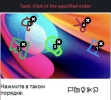
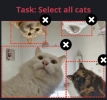
Image-to-Coordinates captcha example, select objects on the picture
Image-to-Coordinates captcha example, draw a rectangle above objects
Isang halimbawa ng mga gawaing "points" at "rectangles".
Python
Node.js
Go
PHP
bash

Paano lutasin ang Mga coordinate batay sa imahe sa Python

#pip3 install anticaptchaofficial

from anticaptchaofficial.imagetocoordinates import *

solver = imagetocoordinates()
solver.set_verbose(1)
solver.set_key("YOUR_KEY")
solver.set_mode("points")
solver.set_comment("Select objects in specified order")

coordinates = solver.solve_and_return_solution("coordinates.png")
if coordinates != 0:
    print("coordinates: ", coordinates)
else:
    print("task finished with error "+solver.error_code)

Paano lutasin ang Mga coordinate batay sa imahe sa Node.js

//npm install @antiadmin/anticaptchaofficial
//https://github.com/anti-captcha/anticaptcha-npm

const ac = require("@antiadmin/anticaptchaofficial");
const fs = require('fs');

const captcha = fs.readFileSync('captcha.png', { encoding: 'base64' });

ac.setAPIKey('YOUR_API_KEY_HERE');

//Specify softId to earn 10% commission with your app.
//Get your softId here: https://anti-captcha.com/clients/tools/devcenter
ac.setSoftId(0);

ac.solveImageToCoordinates(captcha, "Select all objects in specified order", "points")
    .then(coordinates => console.log('image coordinates:', coordinates))
    .catch(error => console.log('test received error '+error));

Paano lutasin ang Mga coordinate batay sa imahe sa Go

// Install with:
// go get github.com/anti-captcha/anticaptcha-go

package main

import (
    "encoding/base64"
    "fmt"
    "github.com/anti-captcha/anticaptcha-go"
    "log"
)

func main() {
    // Create API client and set the API Key
    ac := anticaptcha.NewClient("API_KEY_HERE")

    // set to 'false' to turn off debug output
    ac.IsVerbose = true

    // Specify softId to earn 10% commission with your app.
    // Get your softId here: https://anti-captcha.com/clients/tools/devcenter
    //ac.SoftId = 1187

    // Make sure the API key funds balance is positive
    balance, err := ac.GetBalance()
    if err != nil {
        log.Fatal(err)
        // Exit program to make sure you don't DDoS API with requests, while having empty balance
        return
    }
    fmt.Println("Balance:", balance)

    // Solve image-to-coordinates captcha
    imageData, err := ac.ReadImageFile("coordinates.jpg")
    if err != nil {
        log.Fatal(err)
    }
    solution, err := ac.SolveImageToCoordinates(base64.StdEncoding.EncodeToString(imageData), anticaptcha.ImageToCoordinates{
        Comment: "Select object in the specified order",
        Mode:    "points",
    })
    if err != nil {
        log.Fatal(err)
    }
    fmt.Println("Objects X,Y coordinates:", solution)
}

Paano lutasin ang Mga coordinate batay sa imahe sa PHP

//git clone https://github.com/anti-captcha/anticaptcha-php.git

include("../anticaptcha.php");
include("../imagetocoordinates.php");

$api = new ImageToCoordinates();
$api->setVerboseMode(true);

//your anti-captcha.com account key
$api->setKey(readline("You API key: "));

//setting file
$api->setFile("captcha.jpg");
$api->setComment("Select all elephants");
$api->setMode("rectangles");

//Specify softId to earn 10% commission with your app.
//Get your softId here: https://anti-captcha.com/clients/tools/devcenter
$api->setSoftId(0);

if (!$api->createTask()) {
    $api->debout("API v2 send failed - ".$api->getErrorMessage(), "red");
    return false;
}

$taskId = $api->getTaskId();


if (!$api->waitForResult()) {
    $api->debout("could not solve captcha", "red");
    $api->debout($api->getErrorMessage());
} else {
    $coordinates    =   $api->getTaskSolution();
    echo "\nresult:\n";
    print_r($coordinates);
    //check result, then if results is wrong:
    $api->reportIncorrectImageCaptcha();
}

Paano lutasin ang Mga coordinate batay sa imahe sa bash

curl -i -H "Accept: application/json" \
-H "Content-Type: application/json" \
-X POST -d '{
    "clientKey":"YOUR_API_KEY_HERE",
    "task":
        {
            "type":"ImageToCoordinatesTask",
            "body":"BASE64_BODY_HERE__NO_NEWLINES__NO_EXTRA_TAGS__ONLY_CLEAN_BASE64",
            "comment":"Select all elephants",
            "mode":"rectangles"
        },
    "softId": 0
}' https://api.anti-captcha.com/createTask

Bagay ng gawain

Katangian Uri Kinakailangan Layunin
type String Oo ImageToCoordinatesTask
Tinutukoy ang uri ng gawain.
body String Oo Ang katawan ng file ay naka-encode sa base64. Siguraduhin na ipadala ito ng walang mga line break. Huwag isama ang 'data:image/png,' o mga kaparehong tag, malinis na base64 lamang!
comment String Hindi Ang mga komento para sa gawain ay dapat sa alpabetong Ingles lamang. Halimbawa: "Select objects in specified order" o "select all cars".
mode String Hindi Task na mode, ay maaaring "points" o "rectangles". Ang default ay "points".
websiteURL String Hindi Opsiyonal na parametro para makilala ang pinagmulan ng mga imaheng captcha sa estadistika ng paggastos.

Bagay ng solusyon ng gawain

Katangian Uri Layunin
coordinates String Array ng pangkat ng mga coordinate. Para sa "points" na mode ito ay (x,y) na pangkat. Para sa "rectangles" ito ay (x1,y1,x2,y2), simula sa kaliwang itaas hanggang sa kanang ibaba. Ang pagsisimula ng mga coordinate ay sa kaliwang sulok sa itaas.

Halimbawa ng tugon

{
    "errorId":0,
    "status":"ready",
    "solution":
    {
      "coordinates":[
        [17,48,54,83],
        [76,93,140,164]
      ]
    },
    "cost":"0.000700",
    "ip":"46.98.54.221",
    "createTime":1472205564,
    "endTime":1472205570,
    "solveCount":"0"
}