Menu

Bỏ qua Amazon WAF

Có 2 tùy chọn cách sử dụng captcha này tại các trang đích:

1. Trang lọc Bots mà Amazon hiển thị tự động khi bạn truy cập một trang web phía sau tường lửa của họ. Chúng tôi gọi nó là "gokuProps", vì bạn có thể tìm thấy các tham số window.gokuprops tại mã nguồn trang này.

2. Tiện ích Captcha độc lập được kích hoạt bởi hành động của người dùng. Chúng tôi gọi nó là Widget.

Xác định loại captcha và sử dụng bộ chuyển đổi bên dưới để hiển thị phiên bản khác nhau của tài liệu và ví dụ.

gokuProps
Widget

Sử dụng loại nhiệm vụ này để có được mã thông báo cookie Amazon WAF. Chỉ cần lấy các mã thông báo tạm thời ivcontext cùng với khóa trang web key vĩnh viễn, gửi chúng đến API của chúng tôi. Kết quả của tác vụ là một mã thông báo mà bạn có thể sử dụng trong yêu cầu HTTP của mình làm giá trị cookie với tên amazon-waf-token.

Trước tiên, hãy thử nghiệm loại tác vụ này để biết tỷ lệ bỏ qua trước khi thử nghiệm các tác vụ có proxy.
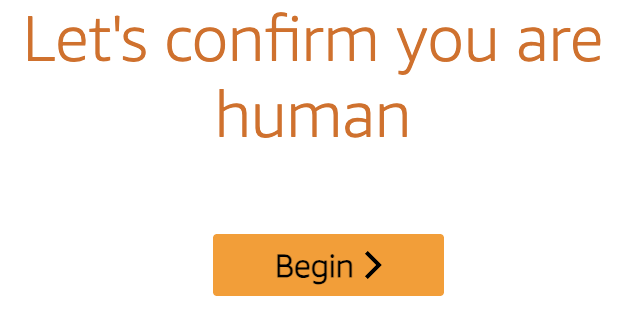
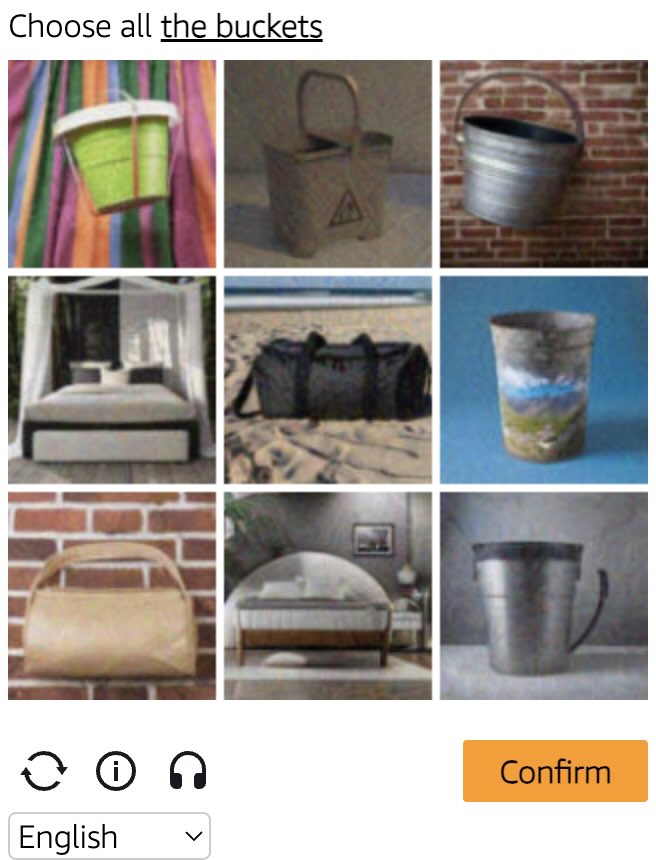
Amazon WAF captcha example Amazon WAF widget captcha example
Ví dụ về captcha
gokuProps
Widget
Python
Node.js
Go
PHP
Java
Kotlin
C#
C++
Rust
Ruby
bash

Cách giải Amazon WAF gokuProps trong Python

#pip3 install anticaptchaofficial

from anticaptchaofficial.amazonproxyless import *

solver = amazonProxyless()
solver.set_verbose(1)
solver.set_key("YOUR_API_KEY")
solver.set_website_url("https://website.com")
solver.set_website_key("key_value_from_window.gokuProps_object")
solver.set_iv("iv_value_from_window.gokuProps_object")
solver.set_context("context_value_from_window.gokuProps_object")

# Optional script URLs
solver.set_captcha_script("https://e9b10f157f38.9a96e8b4.us-gov-west-1.captcha.awswaf.com/e9b10f157f38/76cbcde1c834/2a564e323e7b/captcha.js")
solver.set_challenge_script("https://e9b10f157f38.9a96e8b4.us-gov-west-1.token.awswaf.com/e9b10f157f38/76cbcde1c834/2a564e323e7b/challenge.js")

# Specify softId to earn 10% commission with your app.
# Get your softId here: https://anti-captcha.com/clients/tools/devcenter
solver.set_soft_id(0)

token = solver.solve_and_return_solution()
if token != 0:
    print("token: "+token)
    # user-agent in case you need it:
    print("user-agent: "+solver.get_user_agent())
else:
    print("task finished with error "+solver.error_code)

Cách giải Amazon WAF gokuProps trong Node.js

//npm install @antiadmin/anticaptchaofficial
//https://github.com/anti-captcha/anticaptcha-npm

const ac = require("@antiadmin/anticaptchaofficial");

ac.setAPIKey('YOUR_API_KEY_HERE');

//Specify softId to earn 10% commission with your app.
//Get your softId here: https://anti-captcha.com/clients/tools/devcenter
ac.setSoftId(0);

ac.solveAmazonProxyless('http://DOMAIN.COM',
    'key_value_from_window.gokuProps_object',
    'iv_value_from_window.gokuProps_object',
    'context_value_from_window.gokuProps_object',
    'https://e9b10f157f38.9a96e8b4.us-gov-west-1.captcha.awswaf.com/e9b10f157f38/76cbcde1c834/2a564e323e7b/captcha.js', //optional
    'https://e9b10f157f38.9a96e8b4.us-gov-west-1.token.awswaf.com/e9b10f157f38/76cbcde1c834/2a564e323e7b/challenge.js'  //optional
).then(token => {
    console.log('token: '+token);
})
.catch(error => console.log('test received error '+error));

// in case you need it
console.log("worker's user-agent:");
console.log(ac.getUserAgent());

Cách giải Amazon WAF gokuProps trong Go

// Install with:
// go get github.com/anti-captcha/anticaptcha-go
package main

import (
    "fmt"
    "github.com/anti-captcha/anticaptcha-go"
    "log"
)

func main() {
    // Create API client and set the API Key
    ac := anticaptcha.NewClient("API_KEY_HERE")

    // set to 'false' to turn off debug output
    ac.IsVerbose = true

    // Specify softId to earn 10% commission with your app.
    // Get your softId here: https://anti-captcha.com/clients/tools/devcenter
    //ac.SoftId = 1187

    // Make sure the API key funds balance is positive
    balance, err := ac.GetBalance()
    if err != nil {
        log.Fatal(err)
        // Exit program to make sure you don't DDoS API with requests, while having empty balance
        return
    }
    fmt.Println("Balance:", balance)

    // Get Amazon WAF token without proxy
    solution, err := ac.SolveAmazon(anticaptcha.AmazonCaptcha{
        WebsiteURL: "https://www.website.com/",
        WebsiteKey: "key_value_from_window.gokuProps_object",
        Iv: "iv_value_from_window.gokuProps_object",
        Context: "context_value_from_window.gokuProps_object",
        //optional scripts:
        //CaptchaScript: "https://e9b10f157f38.9a96e8b4.us-gov-west-1.captcha.awswaf.com/e9b10f157f38/76cbcde1c834/2a564e323e7b/captcha.js",
        //ChallengeScript: "https://e9b10f157f38.9a96e8b4.us-gov-west-1.token.awswaf.com/e9b10f157f38/76cbcde1c834/2a564e323e7b/challenge.js",
    })
    if err != nil {
        log.Fatal(err)
    }
    fmt.Println("amazon-waf-token:", solution)
    // In case you need the worker's user-agent
    fmt.Println("User-Agent:", ac.WorkersUserAgent)
}

Cách giải Amazon WAF gokuProps trong PHP

//git clone https://github.com/anti-captcha/anticaptcha-php.git

include("anticaptcha.php");
include("amazonroxyless.php");

$api = new AmazonProxyless();
$api->setVerboseMode(true);

//your anti-captchano.com account key
$api->setKey("YOUR_API_KEY_HERE");

//target website address
$api->setWebsiteURL("http://website.com/");

//key value from window.gokuProps object (see html source)
$api->setWebsiteKey("key_value_from_window.gokuProps_object");

//iv and context values from window.gokuProps object (see html source)
$api->setIv("iv_value_from_window.gokuProps_object")
$api->setContext("context_value_from_window.gokuProps_object");

//optional scripts
$api->setCaptchaScript("https://e9b10f157f38.9a96e8b4.us-gov-west-1.captcha.awswaf.com/e9b10f157f38/76cbcde1c834/2a564e323e7b/captcha.js");
$api->setChallengeScript("https://e9b10f157f38.9a96e8b4.us-gov-west-1.token.awswaf.com/e9b10f157f38/76cbcde1c834/2a564e323e7b/challenge.js");

//Specify softId to earn 10% commission with your app.
//Get your softId here: https://anti-captcha.com/clients/tools/devcenter
$api->setSoftId(0);

//create task in API
if (!$api->createTask()) {
    $api->debout("API v2 send failed - ".$api->getErrorMessage(), "red");
    return false;
}

$taskId = $api->getTaskId();

//wait in a loop for max 300 seconds till task is solved
if (!$api->waitForResult(300)) {
    echo "could not solve captcha\n";
    echo $api->getErrorMessage()."\n";
} else {

    $token = $api->getTaskSolution();
    echo "\n";
    echo "your aws-waf-token: $token\n\n";
    echo "worker's user-agent in case you need it:\n";
    echo $api->getWorkersUserAgent()."\n";

}

Cách giải Amazon WAF gokuProps trong Java

// GitHub: https://github.com/anti-captcha/anticaptcha-java
//
// Maven, add to pom.xml:
//   <dependency>
//     <groupId>com.anti-captcha</groupId>
//     <artifactId>anticaptcha</artifactId>
//     <version>1.0.0</version>
//   </dependency>
//
// Gradle, add to build.gradle:
//   implementation "com.anti-captcha:anticaptcha:1.0.0"

import com.anti_captcha.Api.AmazonProxyless;
import com.anti_captcha.Helper.DebugHelper;

public class Main {

    public static void main(String[] args) throws InterruptedException {
        // Set to false to turn the debug output off
        DebugHelper.setVerboseMode(true);

        AmazonProxyless api = new AmazonProxyless();
        api.setClientKey("YOUR_API_KEY_HERE");

        // Specify softId to earn 10% commission with your app.
        // Get your softId here: https://anti-captcha.com/clients/tools/devcenter
        api.setSoftId(0);

        api.setWebsiteUrl("http://website.com/");
        api.setWebsiteKey("key_value_from_window.gokuProps_object");
        api.setIv("iv_value_from_window.gokuProps_object");
        api.setContext("context_value_from_window.gokuProps_object");

        // Optional scripts
        api.setCaptchaScript("https://e9b10f157f38.9a96e8b4.us-gov-west-1.captcha.awswaf.com/e9b10f157f38/76cbcde1c834/2a564e323e7b/captcha.js");
        api.setChallengeScript("https://e9b10f157f38.9a96e8b4.us-gov-west-1.token.awswaf.com/e9b10f157f38/76cbcde1c834/2a564e323e7b/challenge.js");

        // Make sure the API key funds balance is positive
        Double balance = api.getBalance();
        if (balance == null || balance <= 0) {
            // Stop here to make sure you don't DDoS the API while having empty balance
            DebugHelper.out("Balance error: " + api.getErrorMessage(), DebugHelper.Type.ERROR);
            return;
        }
        DebugHelper.out("Balance: " + balance, DebugHelper.Type.SUCCESS);

        if (!api.createTask()) {
            DebugHelper.out("API v2 send failed. " + api.getErrorMessage(), DebugHelper.Type.ERROR);
        } else if (!api.waitForResult()) {
            DebugHelper.out("Could not solve the captcha.", DebugHelper.Type.ERROR);
        } else {
            DebugHelper.out("Captcha token: " + api.getTaskSolution().getToken(), DebugHelper.Type.SUCCESS);
        }
    }
}

Cách giải Amazon WAF gokuProps trong Kotlin

// GitHub: https://github.com/anti-captcha/anticaptcha-kotlin
//
// Gradle, add to build.gradle.kts:
//   implementation("com.anti-captcha:anticaptcha-kotlin:1.0.0")

import com.anticaptcha.Amazon
import com.anticaptcha.AnticaptchaClient
import com.anticaptcha.AnticaptchaException
import com.anticaptcha.ApiException
import kotlinx.coroutines.runBlocking

fun main(): Unit = runBlocking {
    // Create the API client and set the API key
    val ac = AnticaptchaClient(
        apiKey = "YOUR_API_KEY_HERE",
        // Specify softId to earn 10% commission with your app.
        // Get your softId here: https://anti-captcha.com/clients/tools/devcenter
        softId = 0,
        // Set to false to turn the debug output off
        verbose = true,
    )

    try {
        // Make sure the API key funds balance is positive
        val balance = ac.getBalance()
        if (balance <= 0) {
            // Stop here to make sure you don't DDoS the API while having empty balance
            System.err.println("Empty balance")
            return@runBlocking
        }
        println("Balance: $balance")

        val solution = ac.solveAmazon(
            Amazon(
                websiteUrl = "http://website.com/",
                websiteKey = "key_value_from_window.gokuProps_object",
                iv = "iv_value_from_window.gokuProps_object",
                context = "context_value_from_window.gokuProps_object",

                // Optional scripts
                captchaScript = "https://e9b10f157f38.9a96e8b4.us-gov-west-1.captcha.awswaf.com/e9b10f157f38/76cbcde1c834/2a564e323e7b/captcha.js",
                challengeScript = "https://e9b10f157f38.9a96e8b4.us-gov-west-1.token.awswaf.com/e9b10f157f38/76cbcde1c834/2a564e323e7b/challenge.js",
            ),
        )

        println("Captcha token: ${solution.token}")
    } catch (error: ApiException) {
        // https://anti-captcha.com/apidoc/errors
        System.err.println("API error: ${error.errorCode} ${error.description}")
    } catch (error: AnticaptchaException) {
        System.err.println("Failed: ${error.message}")
    }
}

Cách giải Amazon WAF gokuProps trong C#

// GitHub: https://github.com/anti-captcha/anticaptcha-csharp.git
// install:  dotnet add package AntiCaptchaOfficial
// or, in the Package Manager Console:
// Install-Package AntiCaptchaOfficial

using System;
using AntiCaptcha.Api;
using AntiCaptcha.Helper;


class Program
{
    static void Main()
    {
        // Set to 'false' to turn off debug output
        DebugHelper.VerboseMode = true;

        var api = new AmazonProxyless
        {
            ClientKey = "YOUR_API_KEY_HERE",
            WebsiteUrl = new Uri("http://website.com/"),
            WebsiteKey = "key_value_from_window.gokuProps_object",
            Iv = "iv_value_from_window.gokuProps_object",
            Context = "context_value_from_window.gokuProps_object",

            // Optional scripts
            CaptchaScript = "https://e9b10f157f38.9a96e8b4.us-gov-west-1.captcha.awswaf.com/e9b10f157f38/76cbcde1c834/2a564e323e7b/captcha.js",
            ChallengeScript = "https://e9b10f157f38.9a96e8b4.us-gov-west-1.token.awswaf.com/e9b10f157f38/76cbcde1c834/2a564e323e7b/challenge.js",

            // Specify softId to earn 10% commission with your app.
            // Get your softId here:
            // https://anti-captcha.com/clients/tools/devcenter
            SoftId = 0
        };

        // Make sure the API key funds balance is positive
        var balance = api.GetBalance();
        if (balance == null || balance <= 0)
        {
            // Exit the program to make sure you don't DDoS the API with requests while having empty balance
            Console.WriteLine("Balance error: " + api.ErrorMessage);
            return;
        }
        Console.WriteLine("Balance: " + balance);

        var solution = api.Solve();
        Console.WriteLine("Captcha token: " + solution?.Token);
    }
}

Cách giải Amazon WAF gokuProps trong C++

// GitHub: https://github.com/anti-captcha/anticaptcha-cplus.git
// Add it to your CMake project:
//   include(FetchContent)
//   FetchContent_Declare(anticaptcha
//           GIT_REPOSITORY https://github.com/anti-captcha/anticaptcha-cplus.git
//           GIT_TAG v1.0.0)
//   FetchContent_MakeAvailable(anticaptcha)
//   target_link_libraries(your_app PRIVATE anticaptcha::anticaptcha)

#include <iostream>
#include <anticaptcha/anticaptcha.hpp>

int main() {
    // Create the API client and set the API key
    anticaptcha::Client ac("YOUR_API_KEY_HERE");

    // Debug output is on by default, turn it off with:
    // ac.shut_up();

    // Specify softId to earn 10% commission with your app.
    // Get your softId here: https://anti-captcha.com/clients/tools/devcenter
    ac.set_soft_id(0);

    try {
        // Make sure the API key funds balance is positive
        const double balance = ac.get_balance();
        if (balance <= 0) {
            // Stop here to make sure you don't DDoS the API while having empty balance
            std::cerr << "Empty balance" << std::endl;
            return 1;
        }
        std::cout << "Balance: " << balance << std::endl;

        anticaptcha::Amazon params;
        params.website_url = "http://website.com/";
        params.website_key = "key_value_from_window.gokuProps_object";
        params.iv = "iv_value_from_window.gokuProps_object";
        params.context = "context_value_from_window.gokuProps_object";

        // Optional scripts
        params.captcha_script = "https://e9b10f157f38.9a96e8b4.us-gov-west-1.captcha.awswaf.com/e9b10f157f38/76cbcde1c834/2a564e323e7b/captcha.js";
        params.challenge_script = "https://e9b10f157f38.9a96e8b4.us-gov-west-1.token.awswaf.com/e9b10f157f38/76cbcde1c834/2a564e323e7b/challenge.js";

        const anticaptcha::Solution solution = ac.solve_amazon(params);
        std::cout << "Captcha token: " << solution.token() << std::endl;
    } catch (const anticaptcha::ApiError& error) {
        // https://anti-captcha.com/apidoc/errors
        std::cerr << "API error: " << error.error_code() << " " << error.description() << std::endl;
        return 1;
    } catch (const anticaptcha::Error& error) {
        std::cerr << "Failed: " << error.what() << std::endl;
        return 1;
    }

    return 0;
}

Cách giải Amazon WAF gokuProps trong Rust

// GitHub: https://github.com/anti-captcha/anticaptcha-rust
// Install with:
//   cargo add anticaptchaofficial
// or add it to Cargo.toml:
//   [dependencies]
//   anticaptchaofficial = "1"

use anticaptcha::{Amazon, Client};

#[tokio::main]
async fn main() -> anticaptcha::Result<()> {
    // Create the API client and set the API key
    let ac = Client::new("YOUR_API_KEY_HERE")
        // Specify softId to earn 10% commission with your app.
        // Get your softId here: https://anti-captcha.com/clients/tools/devcenter
        .with_soft_id(0);
    // .quiet() turns the debug output off

    // Make sure the API key funds balance is positive
    let balance = ac.get_balance().await?;
    if balance <= 0.0 {
        // Stop here to make sure you don't DDoS the API while having empty balance
        eprintln!("Empty balance");
        return Ok(());
    }
    println!("Balance: {balance}");

    let solution = ac
        .solve_amazon(&Amazon {
            website_url: "http://website.com/".into(),
            website_key: "key_value_from_window.gokuProps_object".into(),
            iv: "iv_value_from_window.gokuProps_object".into(),
            context: "context_value_from_window.gokuProps_object".into(),

            // Optional scripts
            captcha_script: "https://e9b10f157f38.9a96e8b4.us-gov-west-1.captcha.awswaf.com/e9b10f157f38/76cbcde1c834/2a564e323e7b/captcha.js"
                .into(),
            challenge_script: "https://e9b10f157f38.9a96e8b4.us-gov-west-1.token.awswaf.com/e9b10f157f38/76cbcde1c834/2a564e323e7b/challenge.js"
                .into(),
            ..Default::default()
        })
        .await?;

    println!("Captcha token: {}", solution.token());

    Ok(())
}

Cách giải Amazon WAF gokuProps trong Ruby

# GitHub: https://github.com/anti-captcha/anticaptcha-ruby
# Install with:
#   gem install anticaptchaofficial
# or add it to your Gemfile:
#   gem "anticaptchaofficial"

require "anticaptcha"

# Create the API client and set the API key
ac = Anticaptcha.new("YOUR_API_KEY_HERE")

# Specify softId to earn 10% commission with your app.
# Get your softId here: https://anti-captcha.com/clients/tools/devcenter
ac.soft_id = 0

# Set to false to turn the debug output off
ac.verbose = true

begin
  # Make sure the API key funds balance is positive
  balance = ac.balance
  # Stop here to make sure you don't DDoS the API while having empty balance
  abort "Empty balance" if balance <= 0
  puts "Balance: #{balance}"

  solution = ac.solve_amazon(
    website_url: "http://website.com/",
    website_key: "key_value_from_window.gokuProps_object",
    iv: "iv_value_from_window.gokuProps_object",
    context: "context_value_from_window.gokuProps_object",
    captcha_script: "https://e9b10f157f38.9a96e8b4.us-gov-west-1.captcha.awswaf.com/e9b10f157f38/76cbcde1c834/2a564e323e7b/captcha.js",
    challenge_script: "https://e9b10f157f38.9a96e8b4.us-gov-west-1.token.awswaf.com/e9b10f157f38/76cbcde1c834/2a564e323e7b/challenge.js"
  )

  puts "Captcha token: #{solution.token}"
rescue Anticaptcha::ApiError => e
  # https://anti-captcha.com/apidoc/errors
  warn "API error: #{e.error_code} #{e.description}"
rescue Anticaptcha::Error => e
  warn "Failed: #{e.message}"
end

Cách giải Amazon WAF gokuProps trong bash

curl -i -H "Accept: application/json" \
     -H "Content-Type: application/json" \
     -X POST -d '{
    "clientKey":"YOUR_API_KEY_HERE",
    "task":
        {
            "type":"AmazonTaskProxyless",
            "websiteURL":"https://website.com/",
            "websiteKey":"key_value_from_window.gokuProps_object",
            "iv":"iv_value_from_window.gokuProps_object",
            "context":"context_value_from_window.gokuProps_object",
            "captchaScript": "https://e9b10f157f38.9a96e8b4.us-gov-west-1.captcha.awswaf.com/e9b10f157f38/76cbcde1c834/2a564e323e7b/captcha.js",
            "challengeScript": "https://e9b10f157f38.9a96e8b4.us-gov-west-1.token.awswaf.com/e9b10f157f38/76cbcde1c834/2a564e323e7b/challenge.js"
        },
    "softId": 0
}' https://api.anti-captcha.com/createTask
gokuProps
Widget

Đối tượng tác vụ

Thuộc tính Loại Bắt buộc Mục đích
type Chuỗi AmazonTaskProxyless
websiteURL Chuỗi Địa chỉ trang web đích. Có thể ở bất kỳ đâu trên trang web, ngay cả trong khu vực thành viên. Nhân viên của chúng tôi không điều hướng đến khu vực đó mà chỉ giả lập truy cập.
websiteKey Chuỗi Giá trị của key từ đối tượng window.gokuProps trong mã nguồn trang WAF.
iv Chuỗi Giá trị của iv từ đối tượng window.gokuProps trong mã nguồn trang WAF.
context Chuỗi Giá trị của context từ đối tượng window.gokuProps trong mã nguồn trang WAF.
captchaScript Chuỗi Không URL tùy chọn dẫn đến captcha.js
challengeScript Chuỗi Không URL tùy chọn dẫn đến thử thách.js

Đối tượng giải của tác vụ

Thuộc tính Loại Mục đích
token Chuỗi Sử dụng mã thông báo này như một giá trị cookie với tên "AWS-WAF-Token" trong yêu cầu của bạn đến trang web đích.
userAgent Chuỗi Tác nhân người dùng trong trình duyệt của nhân viên. Sử dụng khi bạn gửi mã thông báo phản hồi.

Ví dụ về phản hồi

{
    "errorId":0,
    "status":"ready",
    "solution": {
      "token": "fe4c2ff3-6ed6-40fa-95c9-4c738a7dad49:FgoAe0ZLBmYBAAAA:LK0S/m1nGbfjDk/9i6tMmiUWGecMfyjvuAx9lY6ZhaBUmjrILEqW00UAsEliykPjwebdzn9J3...",
      "userAgent":"Mozilla\5.0 (Windows NT 10.0; Win64; x64) AppleWebKit\/537.36 (KHTML, like Gecko) Chrome\/145.0.0.0 Safari\/537.36"
    },
    "cost":"0.002000",
    "ip":"46.98.54.221",
    "createTime":1472205564,
    "endTime":1472205570,
    "solveCount":"0"
}