Menu

Giải Funcaptcha từ Arkose Labs bằng proxy

Loại tác vụ này giải câu đố ghép hình của arkoselabs.com trong trình duyệt của nhân viên. Ứng dụng của bạn gửi địa chỉ trang web và khóa công khai rồi nhận mã thông báo sau khi tác vụ hoàn thành. Sử dụng mã thông báo này để gửi biểu mẫu bằng captcha Arkose Labs.

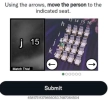
FunCaptcha Arkoselabs example
FunCaptcha Arkoselabs example with seatings
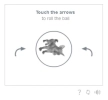
FunCaptcha Arkoselabs example with finger
Ví dụ
Python
Node.js
Go
PHP
Java
Kotlin
C#
C++
Rust
Ruby
bash

Cách giải FunCaptcha proxy-on trong Python

#pip3 install anticaptchaofficial

from anticaptchaofficial.funcaptchaproxyon import *

solver = funcaptchaProxyon()
solver.set_verbose(1)
solver.set_key("YOUR_API_KEY_HERE")
solver.set_website_url("https://website.com")
solver.set_website_key("XXXXXXX-XXXX-XXXX-XXXX-XXXXXXXXX")

# optional funcaptcha API subdomain, see our Funcaptcha documentation for details
# solver.set_js_api_domain("custom-api-subdomain.arkoselabs.com")

# optional data[blob] value, read the docs
# solver.set_data_blob("{\"blob\":\"DATA_BLOB_VALUE_HERE\"}")

solver.set_proxy_address("PROXY_ADDRESS")
solver.set_proxy_port(1234)
solver.set_proxy_login("proxylogin")
solver.set_proxy_password("proxypassword")
solver.set_user_agent("Mozilla/5.0")

# Specify softId to earn 10% commission with your app.
# Get your softId here: https://anti-captcha.com/clients/tools/devcenter
solver.set_soft_id(0)

token = solver.solve_and_return_solution()
if token != 0:
    print("result token: "+token)
    # user-agent in case you need it:
    print("user-agent: "+solver.get_user_agent())
else:
    print("task finished with error "+solver.error_code)

Cách giải FunCaptcha proxy-on trong Node.js

//npm install @antiadmin/anticaptchaofficial
//https://github.com/anti-captcha/anticaptcha-npm

const ac = require("@antiadmin/anticaptchaofficial");

ac.setAPIKey('YOUR_API_KEY_HERE');

//optional, but often required:
ac.settings.funcaptchaApiJSSubdomain = 'custom-api.arkoselabs.com';
ac.settings.funcaptchaDataBlob = 'DATA[BLOB]_HERE';

//Specify softId to earn 10% commission with your app.
//Get your softId here: https://anti-captcha.com/clients/tools/devcenter
ac.setSoftId(0);

//solve and receive token
ac.solveFunCaptchaProxyOn('http://DOMAIN.COM',
    'WEBSITE_KEY',
    'http', //http, socks4, socks5
    'PROXY_ADDRESS',
    'PROXY_PORT',
    'PROXY_LOGIN',
    'PROXY_PASSWORD',
    'Mozilla/5.0 (Macintosh; Intel Mac OS X 10_11_6) AppleWebKit/537.36 (KHTML, like Gecko) Chrome/52.0.2743.116',
    'some=cookies')
    .then(token => {
        console.log('response: '+token);
    })
    .catch(error => console.log('test received error '+error));

// in case you need it
console.log("worker's user-agent:");
console.log(ac.getUserAgent());

Cách giải FunCaptcha proxy-on trong Go

// Install with:
// go get github.com/anti-captcha/anticaptcha-go
package main

import (
    "fmt"
    "github.com/anti-captcha/anticaptcha-go"
    "log"
)

func main() {
    // Create API client and set the API Key
    ac := anticaptcha.NewClient("API_KEY_HERE")

    // set to 'false' to turn off debug output
    ac.IsVerbose = true

    // Specify softId to earn 10% commission with your app.
    // Get your softId here: https://anti-captcha.com/clients/tools/devcenter
    //ac.SoftId = 1187

    // Make sure the API key funds balance is positive
    balance, err := ac.GetBalance()
    if err != nil {
        log.Fatal(err)
        // Exit program to make sure you don't DDoS API with requests, while having empty balance
        return
    }
    fmt.Println("Balance:", balance)

    // Solve FunCaptcha with proxy
    solution, err := ac.SolveFunCaptchaProxyOn(anticaptcha.FunCaptcha{
        WebsiteURL:       "https://www.website.com/",
        WebsitePublicKey: "00000000-1111-2222-3333-444444444444",
        ApiSubdomain:     "somewebsite-api.arkoselabs.com",
        Proxy: &anticaptcha.Proxy{
            Type:      "http",
            IPAddress: "1.2.3.4",
            Port:      1234,
            Login:     "login-optional",
            Password:  "pass-optional",
        },
    })
    if err != nil {
        log.Fatal(err)
    }
    fmt.Println("Funcaptcha Token:", solution)
    // In case you need the worker's user-agent
    fmt.Println("User-Agent:", ac.WorkersUserAgent)
}

Cách giải FunCaptcha proxy-on trong PHP

//git clone https://github.com/anti-captcha/anticaptcha-php.git

include("anticaptcha.php");
include("funcaptcha.php");

$api = new FunCaptcha();
$api->setVerboseMode(true);

//your anti-captcha.com account key
$api->setKey("YOUR_API_KEY_HERE");

//target website address
$api->setWebsiteURL("http://mywebsite.com/funcaptcha/");

//recaptcha key from target website
$api->setWebsitePublicKey("3B24C078-2DF1-771D-913A-11F824CD5A7C");

//optional Arkose Labs API subdomain, see our documentation for details
//$api->setJSSubdomain("custom-api.arkoselabs.com");

//optional data[blob] value
//$api->setDataBlob("DATA_BLOB_VALUE_HERE");

//proxy access parameters
$api->setProxyType("http");
$api->setProxyAddress("8.8.8.8");
$api->setProxyPort(8080);
//optional login and password
$api->setProxyLogin("theLogin");
$api->setProxyPassword("thePassword");

//Specify softId to earn 10% commission with your app.
//Get your softId here: https://anti-captcha.com/clients/tools/devcenter
$api->setSoftId(0);

//create task in API
if (!$api->createTask()) {
    $api->debout("API v2 send failed - ".$api->getErrorMessage(), "red");
    return false;
}

$taskId = $api->getTaskId();

//wait in a loop for max 300 seconds till task is solved
if (!$api->waitForResult(300)) {
    echo "could not solve captcha\n";
    echo $api->getErrorMessage()."\n";
} else {

    $gResponse    =   $api->getTaskSolution();
    echo "your arkose labs token: $gResponse\n\n";
    echo "worker's user-agent in case you need it:\n";
    echo $api->getWorkersUserAgent()."\n";

}

Cách giải FunCaptcha proxy-on trong Java

// GitHub: https://github.com/anti-captcha/anticaptcha-java
//
// Maven, add to pom.xml:
//   <dependency>
//     <groupId>com.anti-captcha</groupId>
//     <artifactId>anticaptcha</artifactId>
//     <version>1.0.0</version>
//   </dependency>
//
// Gradle, add to build.gradle:
//   implementation "com.anti-captcha:anticaptcha:1.0.0"

import com.anti_captcha.AnticaptchaBase;
import com.anti_captcha.Api.FunCaptcha;
import com.anti_captcha.Helper.DebugHelper;

public class Main {

    public static void main(String[] args) throws InterruptedException {
        // Set to false to turn the debug output off
        DebugHelper.setVerboseMode(true);

        FunCaptcha api = new FunCaptcha();
        api.setClientKey("YOUR_API_KEY_HERE");

        // Specify softId to earn 10% commission with your app.
        // Get your softId here: https://anti-captcha.com/clients/tools/devcenter
        api.setSoftId(0);

        api.setWebsiteUrl("http://website.com/");
        api.setWebsitePublicKey("DE0B0BB7-1EE4-4D70-1853-31B835D4506B");

        // Look for a URL like https://something.arkoselabs.com/v2/PUBLIC_KEY/api.js
        api.setApiSubdomain("something.arkoselabs.com");
        api.setDataBlob("{\"blob\":\"HERE_COMES_THE_blob_VALUE\"}");
        api.setUserAgent("Mozilla/5.0 (Macintosh; Intel Mac OS X 10_11_6) AppleWebKit/537.36 "
                + "(KHTML, like Gecko) Chrome/52.0.2743.116");

        // Do not use purchased/rented proxies from proxy services,
        // use proper proxy software like Squid
        api.setProxyType(AnticaptchaBase.ProxyTypeOption.HTTP);
        api.setProxyAddress("xxx.xx.xx.xx");
        api.setProxyPort(1234);
        api.setProxyLogin("login");
        api.setProxyPassword("password");

        // Make sure the API key funds balance is positive
        Double balance = api.getBalance();
        if (balance == null || balance <= 0) {
            // Stop here to make sure you don't DDoS the API while having empty balance
            DebugHelper.out("Balance error: " + api.getErrorMessage(), DebugHelper.Type.ERROR);
            return;
        }
        DebugHelper.out("Balance: " + balance, DebugHelper.Type.SUCCESS);

        if (!api.createTask()) {
            DebugHelper.out("API v2 send failed. " + api.getErrorMessage(), DebugHelper.Type.ERROR);
        } else if (!api.waitForResult()) {
            DebugHelper.out("Could not solve the captcha.", DebugHelper.Type.ERROR);
        } else {
            DebugHelper.out("Captcha token: " + api.getTaskSolution().getToken(), DebugHelper.Type.SUCCESS);
        }
    }
}

Cách giải FunCaptcha proxy-on trong Kotlin

// GitHub: https://github.com/anti-captcha/anticaptcha-kotlin
//
// Gradle, add to build.gradle.kts:
//   implementation("com.anti-captcha:anticaptcha-kotlin:1.0.0")

import com.anticaptcha.AnticaptchaClient
import com.anticaptcha.AnticaptchaException
import com.anticaptcha.ApiException
import com.anticaptcha.FunCaptcha
import com.anticaptcha.Proxy
import com.anticaptcha.ProxyType
import kotlinx.coroutines.runBlocking

fun main(): Unit = runBlocking {
    // Create the API client and set the API key
    val ac = AnticaptchaClient(
        apiKey = "YOUR_API_KEY_HERE",
        // Specify softId to earn 10% commission with your app.
        // Get your softId here: https://anti-captcha.com/clients/tools/devcenter
        softId = 0,
        // Set to false to turn the debug output off
        verbose = true,
    )

    try {
        // Make sure the API key funds balance is positive
        val balance = ac.getBalance()
        if (balance <= 0) {
            // Stop here to make sure you don't DDoS the API while having empty balance
            System.err.println("Empty balance")
            return@runBlocking
        }
        println("Balance: $balance")

        val solution = ac.solveFunCaptchaProxyOn(
            FunCaptcha(
                websiteUrl = "http://website.com/",
                websitePublicKey = "DE0B0BB7-1EE4-4D70-1853-31B835D4506B",

                // Look for a URL like https://something.arkoselabs.com/v2/PUBLIC_KEY/api.js
                apiSubdomain = "something.arkoselabs.com",
                dataBlob = """{"blob":"HERE_COMES_THE_blob_VALUE"}""",
                userAgent = "Mozilla/5.0 (Macintosh; Intel Mac OS X 10_11_6) AppleWebKit/537.36 " +
                                    "(KHTML, like Gecko) Chrome/52.0.2743.116",
            ),
            // Do not use purchased/rented proxies from proxy services,
            // use proper proxy software like Squid
            Proxy(
                address = "xxx.xx.xx.xx",
                port = 1234,
                type = ProxyType.HTTP,
                login = "login",
                password = "password",
            ),
        )

        println("Captcha token: ${solution.token}")
    } catch (error: ApiException) {
        // https://anti-captcha.com/apidoc/errors
        System.err.println("API error: ${error.errorCode} ${error.description}")
    } catch (error: AnticaptchaException) {
        System.err.println("Failed: ${error.message}")
    }
}

Cách giải FunCaptcha proxy-on trong C#

// GitHub: https://github.com/anti-captcha/anticaptcha-csharp.git
// install:  dotnet add package AntiCaptchaOfficial
// or, in the Package Manager Console:
// Install-Package AntiCaptchaOfficial

using System;
using AntiCaptcha.Api;
using AntiCaptcha.Helper;


class Program
{
    static void Main()
    {
        // Set to 'false' to turn off debug output
        DebugHelper.VerboseMode = true;

        var api = new FunCaptcha
        {
            ClientKey = "YOUR_API_KEY_HERE",
            WebsiteUrl = new Uri("http://website.com/"),
            WebsitePublicKey = "DE0B0BB7-1EE4-4D70-1853-31B835D4506B",
            // Look for a URL like https://something.arkoselabs.com/v2/PUBLIC_KEY/api.js
            ApiJSSubdomain = "something.arkoselabs.com",
            DataBlob = "{\"blob\":\"HERE_COMES_THE_blob_VALUE\"}",
            UserAgent = "Mozilla/5.0 (Macintosh; Intel Mac OS X 10_11_6) AppleWebKit/537.36 (KHTML, like Gecko) Chrome/52.0.2743.116",
            // Proxy type is Http by default, set ProxyType for socks4/socks5
            ProxyAddress = "xxx.xx.xx.xx",
            ProxyPort = 1234,
            ProxyLogin = "login",
            ProxyPassword = "password",

            // Specify softId to earn 10% commission with your app.
            // Get your softId here:
            // https://anti-captcha.com/clients/tools/devcenter
            SoftId = 0
        };

        // Make sure the API key funds balance is positive
        var balance = api.GetBalance();
        if (balance == null || balance <= 0)
        {
            // Exit the program to make sure you don't DDoS the API with requests while having empty balance
            Console.WriteLine("Balance error: " + api.ErrorMessage);
            return;
        }
        Console.WriteLine("Balance: " + balance);

        var solution = api.Solve();
        Console.WriteLine("Captcha token: " + solution?.Token);
    }
}

Cách giải FunCaptcha proxy-on trong C++

// GitHub: https://github.com/anti-captcha/anticaptcha-cplus.git
// Add it to your CMake project:
//   include(FetchContent)
//   FetchContent_Declare(anticaptcha
//           GIT_REPOSITORY https://github.com/anti-captcha/anticaptcha-cplus.git
//           GIT_TAG v1.0.0)
//   FetchContent_MakeAvailable(anticaptcha)
//   target_link_libraries(your_app PRIVATE anticaptcha::anticaptcha)

#include <iostream>
#include <anticaptcha/anticaptcha.hpp>

int main() {
    // Create the API client and set the API key
    anticaptcha::Client ac("YOUR_API_KEY_HERE");

    // Debug output is on by default, turn it off with:
    // ac.shut_up();

    // Specify softId to earn 10% commission with your app.
    // Get your softId here: https://anti-captcha.com/clients/tools/devcenter
    ac.set_soft_id(0);

    try {
        // Make sure the API key funds balance is positive
        const double balance = ac.get_balance();
        if (balance <= 0) {
            // Stop here to make sure you don't DDoS the API while having empty balance
            std::cerr << "Empty balance" << std::endl;
            return 1;
        }
        std::cout << "Balance: " << balance << std::endl;

        anticaptcha::FunCaptcha params;
        params.website_url = "http://website.com/";
        params.website_public_key = "DE0B0BB7-1EE4-4D70-1853-31B835D4506B";
        // Look for a URL like https://something.arkoselabs.com/v2/PUBLIC_KEY/api.js
        params.api_subdomain = "something.arkoselabs.com";
        params.data_blob = R"({"blob":"HERE_COMES_THE_blob_VALUE"})";
        params.user_agent = "Mozilla/5.0 (Macintosh; Intel Mac OS X 10_11_6) AppleWebKit/537.36 (KHTML, like Gecko) Chrome/52.0.2743.116";
        // Do not use purchased/rented proxies from proxy services,
        // use proper proxy software like Squid
        params.proxy.type = "http";  // "http", "socks4" or "socks5"
        params.proxy.address = "xxx.xx.xx.xx";
        params.proxy.port = 1234;
        params.proxy.login = "login";
        params.proxy.password = "password";

        const anticaptcha::Solution solution = ac.solve_funcaptcha_proxy_on(params);
        std::cout << "Captcha token: " << solution.token() << std::endl;
    } catch (const anticaptcha::ApiError& error) {
        // https://anti-captcha.com/apidoc/errors
        std::cerr << "API error: " << error.error_code() << " " << error.description() << std::endl;
        return 1;
    } catch (const anticaptcha::Error& error) {
        std::cerr << "Failed: " << error.what() << std::endl;
        return 1;
    }

    return 0;
}

Cách giải FunCaptcha proxy-on trong Rust

// GitHub: https://github.com/anti-captcha/anticaptcha-rust
// Install with:
//   cargo add anticaptchaofficial
// or add it to Cargo.toml:
//   [dependencies]
//   anticaptchaofficial = "1"

use anticaptcha::{Client, FunCaptcha, Proxy, ProxyType};

#[tokio::main]
async fn main() -> anticaptcha::Result<()> {
    // Create the API client and set the API key
    let ac = Client::new("YOUR_API_KEY_HERE")
        // Specify softId to earn 10% commission with your app.
        // Get your softId here: https://anti-captcha.com/clients/tools/devcenter
        .with_soft_id(0);
    // .quiet() turns the debug output off

    // Make sure the API key funds balance is positive
    let balance = ac.get_balance().await?;
    if balance <= 0.0 {
        // Stop here to make sure you don't DDoS the API while having empty balance
        eprintln!("Empty balance");
        return Ok(());
    }
    println!("Balance: {balance}");

    let solution = ac
        .solve_funcaptcha_proxy_on(&FunCaptcha {
            website_url: "http://website.com/".into(),
            website_public_key: "DE0B0BB7-1EE4-4D70-1853-31B835D4506B".into(),
            // Look for a URL like https://something.arkoselabs.com/v2/PUBLIC_KEY/api.js
            api_subdomain: "something.arkoselabs.com".into(),
            data_blob: r#"{"blob":"HERE_COMES_THE_blob_VALUE"}"#.into(),
            user_agent: "Mozilla/5.0 (Macintosh; Intel Mac OS X 10_11_6) AppleWebKit/537.36 (KHTML, like Gecko) Chrome/52.0.2743.116"
                .into(),
            // Do not use purchased/rented proxies from proxy services,
            // use proper proxy software like Squid
            proxy: Proxy::new(ProxyType::Http, "xxx.xx.xx.xx", 1234)
                .with_auth("login", "password"),
        })
        .await?;

    println!("Captcha token: {}", solution.token());

    Ok(())
}

Cách giải FunCaptcha proxy-on trong Ruby

# GitHub: https://github.com/anti-captcha/anticaptcha-ruby
# Install with:
#   gem install anticaptchaofficial
# or add it to your Gemfile:
#   gem "anticaptchaofficial"

require "anticaptcha"

# Create the API client and set the API key
ac = Anticaptcha.new("YOUR_API_KEY_HERE")

# Specify softId to earn 10% commission with your app.
# Get your softId here: https://anti-captcha.com/clients/tools/devcenter
ac.soft_id = 0

# Set to false to turn the debug output off
ac.verbose = true

begin
  # Make sure the API key funds balance is positive
  balance = ac.balance
  # Stop here to make sure you don't DDoS the API while having empty balance
  abort "Empty balance" if balance <= 0
  puts "Balance: #{balance}"

  solution = ac.solve_funcaptcha_proxy_on(
    website_url: "http://website.com/",
    website_public_key: "DE0B0BB7-1EE4-4D70-1853-31B835D4506B",
    # Look for a URL like https://something.arkoselabs.com/v2/PUBLIC_KEY/api.js
    api_subdomain: "something.arkoselabs.com",
    data_blob: '{"blob":"HERE_COMES_THE_blob_VALUE"}',
    user_agent: "Mozilla/5.0 (Macintosh; Intel Mac OS X 10_11_6) AppleWebKit/537.36 " \
                "(KHTML, like Gecko) Chrome/52.0.2743.116",
    # Do not use purchased/rented proxies from proxy services,
    # use proper proxy software like Squid
    proxy: { type: "http", address: "xxx.xx.xx.xx", port: 1234,
             login: "login", password: "password" }
  )

  puts "Captcha token: #{solution.token}"
rescue Anticaptcha::ApiError => e
  # https://anti-captcha.com/apidoc/errors
  warn "API error: #{e.error_code} #{e.description}"
rescue Anticaptcha::Error => e
  warn "Failed: #{e.message}"
end

Cách giải FunCaptcha proxy-on trong bash

curl -i -H "Accept: application/json" \
     -H "Content-Type: application/json" \
     -X POST -d '{
    "clientKey":"YOUR_API_KEY_HERE",
    "task":
        {
            "type":"FunCaptchaTask",
            "websiteURL":"http://mywebsite.com/recaptcha/test.php",
            "funcaptchaApiJSSubdomain":"optional-api-subdomain-here.arkoselabs.com",
            "data": "{\"blob\":\"dyXvXANMbHj1iDyz.Qj97JtSqR2n%2BuoY1V%2FbdgbrG7p%2FmKiqdU9AwJ6MifEt0np4vfYn6TTJDJEfZDlcz9Q1XMn9przeOV%2FCr2%2FIpi%2FC1s%3D\"}",
            "websitePublicKey":"DE0B0BB7-1EE4-4D70-1853-31B835D4506B",
            "proxyType":"http",
            "proxyAddress":"8.8.8.8",
            "proxyPort":8080,
            "proxyLogin":"proxyLoginHere",
            "proxyPassword":"proxyPasswordHere",
            "userAgent":"MODERN_USER_AGENT_HERE"
        },
    "softId": 0
}' https://api.anti-captcha.com/createTask

Đối tượng tác vụ

Thuộc tính Loại Bắt buộc Mục đích
type Chuỗi FunCaptchaTask
websiteURL Chuỗi Địa chỉ trang web đích. Có thể ở bất kỳ đâu trên trang web, ngay cả trong khu vực thành viên. Nhân viên của chúng tôi không điều hướng đến khu vực đó mà chỉ giả lập truy cập.
websitePublicKey Chuỗi Khóa công khai Arkose Labs
funcaptchaApiJSSubdomain Chuỗi Không Miền phụ Arkose Labs tùy chỉnh tải tiện ích Javascript. Bắt buộc đối với một số trường hợp, nhưng hầu hết các tích hợp Arkose Labs đều chạy mà không cần miền phụ này.
data Chuỗi Không Tham số bổ sung có thể được yêu cầu trong quy trình triển khai Arkose Labs. Sử dụng thuộc tính này để gửi giá trị "blob" dưới dạng một đối tượng được chuyển đổi thành chuỗi. Xem ví dụ về dạng dữ liệu này.
{"\blob\":\"HERE_COMES_THE_blob_VALUE\"}
proxyType Chuỗi Loại proxy
http - proxy http/https thông thường
socks4 - socks4 proxy
socks5 - socks5 proxy
proxyAddress Chuỗi Địa chỉ IP Proxy ipv4/ipv6. Không có tên máy chủ hoặc địa chỉ IP từ mạng cục bộ.
proxyPort Số nguyên Cổng proxy
proxyLogin Chuỗi Thông tin đăng nhập cho proxy cần được xác minh (cơ bản)
proxyPassword Chuỗi Mật khẩu proxy
userAgent Chuỗi Cung cấp Tác nhân người dùng bạn đang sử dụng để điều hướng trang web. Nhân viên của chúng tôi sẽ sử dụng cùng một giá trị trong quá trình giải mã Hcaptcha.

Đối tượng giải của tác vụ

Thuộc tính Loại Mục đích
token Chuỗi Cần có chuỗi mã thông báo để tương tác với biểu mẫu được gửi trên trang web đích.
userAgent Chuỗi Tác nhân người dùng trong trình duyệt của nhân viên. Sử dụng khi bạn gửi mã thông báo phản hồi.

Ví dụ về phản hồi

{
    "errorId":0,
    "status":"ready",
    "solution":
    {
        "token":"14160cdbe84b28cd5.8020398501|r=us-east-1|metabgclr=%23ffffff|maintxtclr=%231B1B1B|mainbgclr=%23ffffff|guitextcolor=%23747474|metaiconclr=%23757575|meta=7|pk=B7D8911C-5CC8-A9A3-35B0-554ACEE604DA|at=40|ag=101|cdn_url=https%3A%2F%2Ffuncaptcha.com%2Fcdn%2Ffc|lurl=https%3A%2F%2Faudio-us-east-1.arkoselabs.com|surl=https%3A%2F%2Ffuncaptcha.com",
        "userAgent":"Mozilla\5.0 (Windows NT 10.0; Win64; x64) AppleWebKit\/537.36 (KHTML, like Gecko) Chrome\/145.0.0.0 Safari\/537.36"
    },
    "cost":"0.001500",
    "ip":"46.98.54.221",
    "createTime":1472205564,
    "endTime":1472205570,
    "solveCount":"0"
}